


Setting a dynamic target path in Mapper Snap
This example demonstrates how to set a dynamic target path in Mapper Snap.

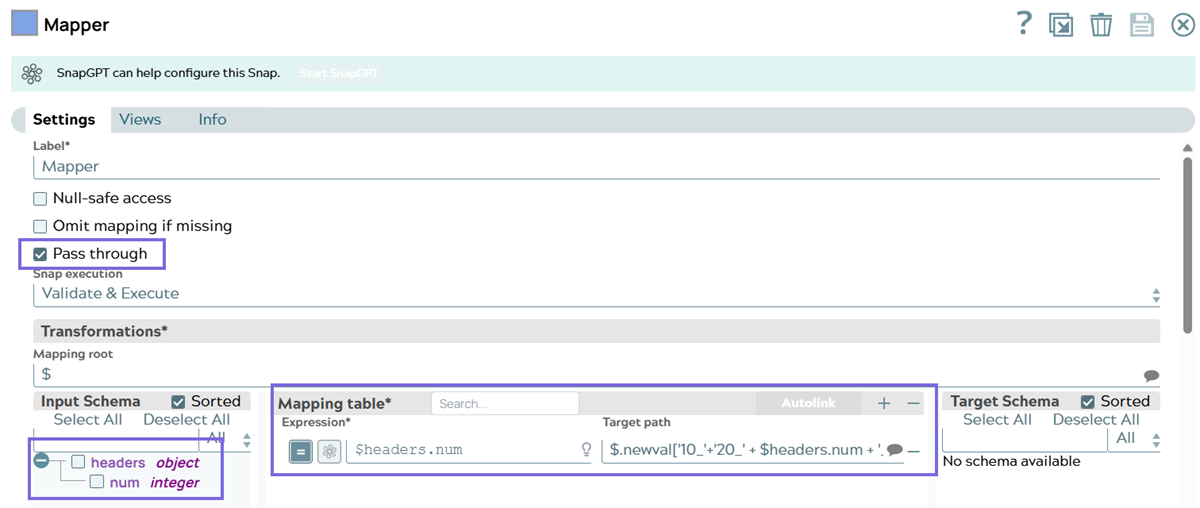
-
Input data:
{"headers": {"num": 100}} -
Expression:
$headers.num—this reads thenumfield nested inside theheadersobject from the incoming document (based on your JSON Generator, this value is100). -
Target path:
$.newval['10_'+'20_'+$headers.num+'_30']—this is a dynamic target path — instead of mapping to a fixed field name, it builds the field name itself -
Output:
[{"headers":{"num":100},"newval":{"10_20_100_30":100}}]—the output preview looks as shown below: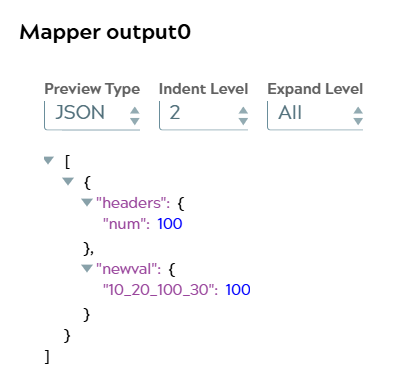
headers.num field is passed through along with the newly
created newval object in the output. This expression
dynamically generates a nested key name under newval by
stitching together static text and the runtime value of num,
then assigns the original num value to that dynamically named
key.How Target path field works?
The Target path field is designed to represent a static (or JSONPath-style)
field location—not a general-purpose JavaScript expression. While it can accept
dynamic bracket-notation like $.newval[someExpression], that
someExpression portion is expected to resolve as a key
reference (example, a field value or JSONPath), not an arbitrary
string-concatenation expression chained with + operators.
So in this mapping:
Target path: $.newval['10_'+'20_' + $headers.num + '_30']The '10_'+'20_' + $headers.num + '_30' part is not evaluated as a
JavaScript concatenation the same way it would be in the Expression column.
The Expression column fully supports JavaScript syntax (string concatenation and
other functions) because it's designed for that purpose. However, the Target
path column has limited expression support. It's primarily meant for
path/key resolution, not multi-part string building.
Recommended approach
If you want to build a dynamic key name using concatenation, we recommend you to build the key in the Expression column first, then reference that computed value in the Target path. However, since Target path itself needs the key name, not the value, here's the typical workaround:
Precompute the key via an intermediate mapping:
-
First mapping: compute the dynamic key string into a temporary field, for example:
-
Expression:
'10_20_' + $headers.num + '_30' -
Target path:
$.tempKey
-
-
Second mapping: use that computed value to build the dynamic target:
-
Expression:
$headers.num -
Target path:
$.newval[$tempKey]
-
-
Clean up
tempKeyafterward if it shouldn't appear in the final output (example, with a Mapper Snap that removes it, or by nesting logic in a Script and Mapper combination).