


ServiceNow Statistics
Overview
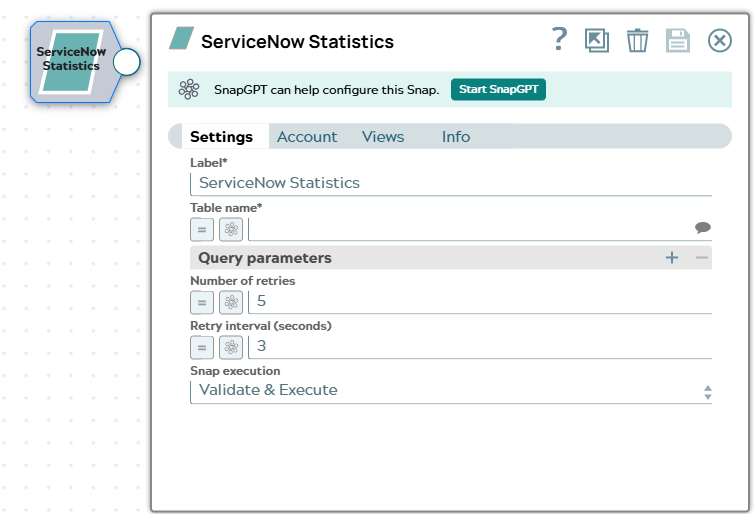
The ServiceNow Statistics Snap computes aggregate statistics—count,
sum, average, minimum, and maximum—over a ServiceNow table using the Stats API
(/api/now/stats/{table_name}), without fetching individual
records.
- This is a Read-type Snap.
 Works in Ultra Tasks
Supported Accounts
Prerequisites
- A valid ServiceNow account configured in SnapLogic.
- The ServiceNow instance must support the Aggregate (Stats) API, which requires the Paris release or later.
- At least one aggregate parameter must be provided in Query
parameters:
sysparm_count,sysparm_avg_fields,sysparm_sum_fields,sysparm_min_fields, orsysparm_max_fields. ServiceNow rejects a request without at least one of these parameters with a400error.
Limitations
- The Table name field does not support expressions.
- At least one aggregate parameter (
sysparm_count,sysparm_avg_fields,sysparm_sum_fields,sysparm_min_fields, orsysparm_max_fields) is required. A request without one results in a400error from ServiceNow. - The
sysparm_havingvalue must follow the ServiceNow aggregate formataggregate^field^operator^value, for exampleCOUNT^state^>^10.
Snap views
| Type | Description | Examples of upstream and downstream Snaps |
|---|---|---|
| Input |
This Snap has at most one document input view. When an input document is present, expression-enabled fields in Query parameters can reference values from the upstream document. |
|
| Output |
This Snap has exactly one document output view and produces one document per input document containing the Stats API result as-is.
When an input document is present, the original input is included under the
|
|
| Error |
Common errors include an invalid table name ( |
|
| Learn more about Error handling. | ||
Snap settings
| Field/Field set | Description |
|---|---|
Label* String |
Specify a unique name for the Snap. Modify this to be more appropriate, especially if more than one of the same Snaps is in the pipeline. Default value: ServiceNow Statistics Example: Incident Count |
Table name*
String/Suggestion |
Specify the name of the ServiceNow table to query. Suggestions load from the connected instance. Note: Only accounts that have the Personalize dictionary role
can see the field labels associated with each table in the ServiceNow data
dictionary. Therefore, accounts used with Snaps in this Snap Pack must have the
Personalize dictionary permission if you want to view the
Table name suggestions.
Default value: None. Example: |
| Query parameters |
A key-value table of query parameters to send to the Stats API. Add one row per
parameter. Rows with a blank Parameter name are skipped. A
blank Parameter value is still sent, which supports
presence-only options such as |
Parameter name
String/Suggestion |
Specify the name of the query parameter. Suggestions list the common
Default value: None. Example: |
Parameter value
String/Expression |
Specify the value of the query parameter. This field supports expressions, so the
value can be driven per input document. Reserved characters in values
( Default value: None. Example: |
Number of retries
Integer/Expression |
Specify the maximum number of attempts the Snap makes to reconnect to the ServiceNow instance if the initial connection attempt fails, before it stops execution and displays an error. Default value: 5 Example: |
Retry interval (seconds)
Integer/Expression |
Specify the number of seconds the Snap waits between each retry attempt. Default value: 3 Example: |
|
Snap execution Dropdown list
|
Choose one of the three modes in
which the Snap executes. Available options are:
Default value: Validate & Execute Example: Validate & Execute |
Examples
Count the records in a table
Set Table name to incident and configure
Query parameters as follows:
| Parameter name | Parameter value |
|---|---|
sysparm_count |
true |
The Snap writes the following output document:
{
  "stats": {
    "count": "42"
  }
}
Compute multiple aggregations in one request
Set Table name to incident and configure
Query parameters as follows:
| Parameter name | Parameter value |
|---|---|
sysparm_count |
true |
sysparm_avg_fields |
reassignment_count |
sysparm_sum_fields |
reassignment_count |
sysparm_min_fields |
reassignment_count |
sysparm_max_fields |
reassignment_count |
The Snap writes the following output document:
{
  "stats": {
    "count": "42",
    "avg": {"reassignment_count": "2.35"},
    "sum": {"reassignment_count": "99"},
    "min": {"reassignment_count": "0"},
    "max": {"reassignment_count": "8"}
  }
}