


Tc Create And Update Item: Simple create example
This example shows the input document that creates a part and sets attributes on both its item and its revision in one call.
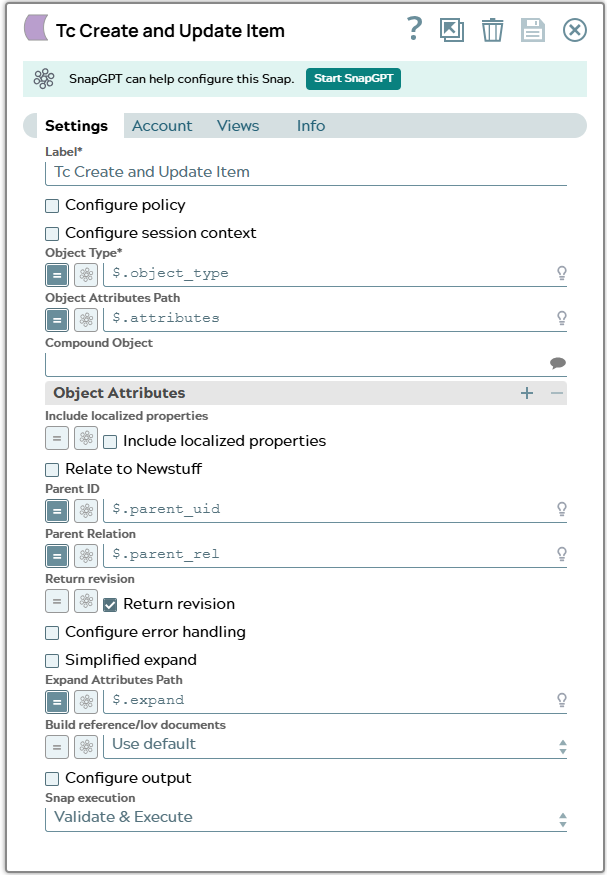
In the snap configuration following values has to fed into fields
- $object_type to Object Type
- $attributes to Object Attributes Path
- $expand to Expand Attributes Path
UIDs in Teamcenter are as the name says UNIQUE. The UIDs in the example only exist in our Teamcenter system as expected for our example. Same is valid for Adapter ID "_id" since its base is the UID. UID in following JSON is in property “parent_uid”.
[
  {
    "object_type": "Part",
    "parent_uid": "wFPAgE3G7hAnmD", //existing Folder; this uid is unique so you need an own one or don't relate to parent
    "parent_rel": "contents",
    "attributes": {
        "object_desc": "Test Create with Snap",
        "object_name": "Simple_Test"
    },
    "expand": [
        "object_type",
        "object_name",
        "object_string",
        "item_id",
        "item_revision_id",
        "uom_tag",
        "creation_date",
        "fnd0IcsClassNames",
        "is_modifiable",
        "ics_classified",
        "owning_user",
        "fnd0CurrentLocationCode",
        "checked_out"
    ]
  }
]
Snap configuration | Snap output |
|---|---|
 | |