


Update or Insert Records Using Bulk Upsert
Overview
This example demonstrates how to use the Redshift Bulk Upsert Snap to update existing records or insert new records based on key columns. The Snap checks if entries exist in the table using the specified key columns and performs an update or insert accordingly.
Prerequisites
- Amazon Redshift cluster with appropriate access
- Target table with defined key columns for matching records
- S3 bucket configured in Redshift account for staging data
- Valid Redshift account configured in SnapLogic
Pipeline Overview
The pipeline uses a Mapper Snap to prepare and transform data before sending it to the Redshift Bulk Upsert Snap. The Bulk Upsert Snap:
- Stages data to S3
- Uses key columns to check if records already exist in the
Accountnbackuptable - Updates existing records or inserts new ones based on the key match
Pipeline

Snap Configuration
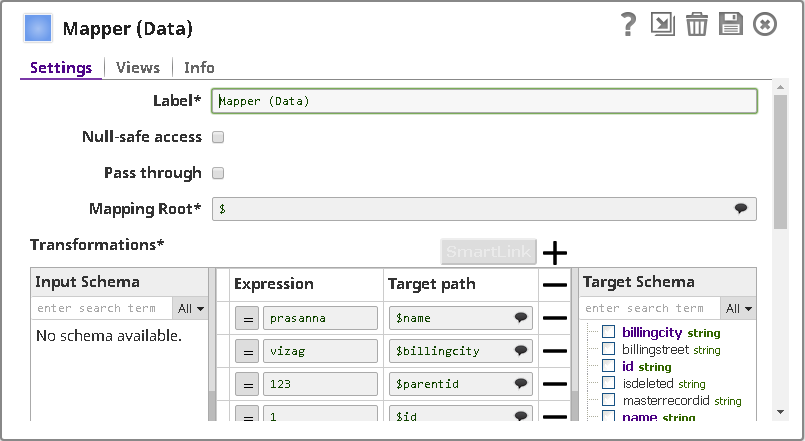
Mapper Snap:
The Mapper Snap transforms and prepares the input data for the upsert operation.
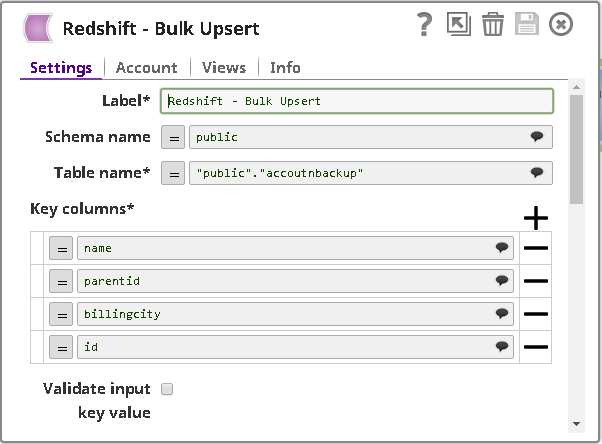
Redshift Bulk Upsert Snap - Settings:
- Table name: Accountnbackup
- Key columns: Configured to identify existing records
- Data Source: Input view
- The Snap automatically determines whether to update or insert based on key column matches
Pipeline Execution
When the pipeline executes:
- The Mapper Snap transforms input data into the required format
- The Redshift Bulk Upsert Snap stages the data to S3
- Key columns are checked against existing table records
- Matching records are updated; non-matching records are inserted
- The operation uses the COPY command for efficient bulk processing
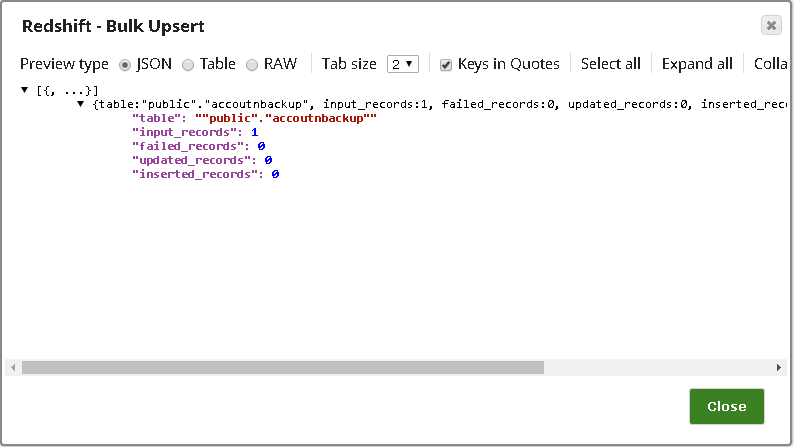
Output
The Snap outputs a document showing:
- Total number of records processed
- Count of records updated vs. inserted
- Operation status (success or failure)
Best Practices
- Choose key columns that uniquely identify records in your table
- Ensure key columns are indexed for optimal performance
- Use the bulk upsert operation for large datasets instead of individual insert/update operations
- Monitor S3 staging area to ensure sufficient storage space