


Typical Redshift Bulk Load Snap Configurations
Overview
This example demonstrates the key configuration approaches for the Redshift Bulk Load Snap. The configuration varies based on how values are passed to the Snap—either directly (without expressions) or dynamically (with expressions using pipeline parameters).
Configuration Approach 1: Without Expression
In this approach, values are passed directly to the Snap properties without using expressions or pipeline parameters.
Key Settings:
- Schema name: Entered directly (for example,
public) - Table name: Entered directly (for example,
employees) - All other properties are configured with static values
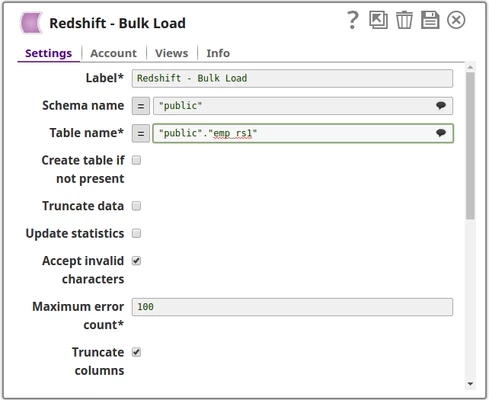
Use Case: This approach is suitable for pipelines where the target schema and table names remain constant across executions.
Configuration Approach 2: With Expression Using Pipeline Parameters
In this approach, the Table name and other properties are passed as pipeline parameters, making the pipeline more flexible and reusable.
Step 1: Define Pipeline parameters
Create pipeline parameters to hold dynamic values:
- Parameter Name:
tableName - Parameter Value: Set at runtime or through parent pipeline
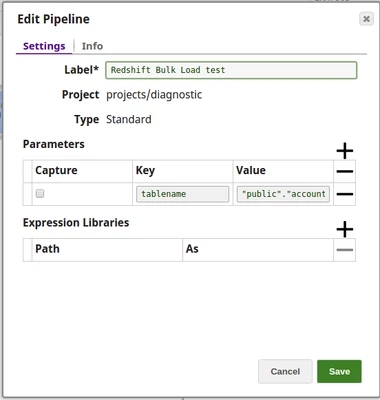
Step 2: Configure Snap with Expression
Reference the pipeline parameter in the Snap configuration:
- Table name:
_tableName(underscore prefix references pipeline parameter) - Enable the expression toggle (
 ) for the field
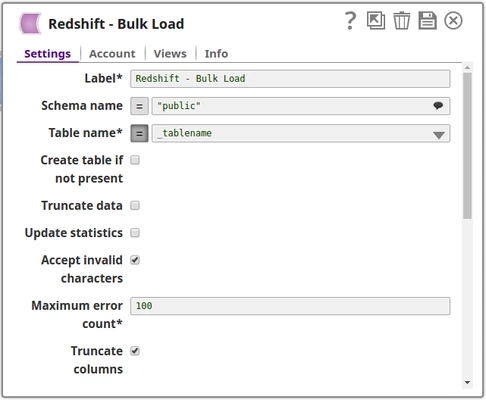
Use Case: This approach is ideal for:
- Reusable pipelines that load data into different tables
- Child pipelines called by a parent Pipeline Execute Snap
- Scenarios where table names are determined dynamically at runtime
Comparison
| Aspect | Without Expression | With Expression |
|---|---|---|
| Configuration Method | Direct value entry | Pipeline parameter reference |
| Flexibility | Fixed values only | Dynamic values at runtime |
| Reusability | Limited | High |
| Best For | Single-purpose pipelines | Multi-purpose, parameterized pipelines |
Best Practices
- Use pipeline parameters when the same pipeline needs to load data into different tables or schemas
- Document pipeline parameters clearly for maintainability
- Validate parameter values before pipeline execution to avoid runtime errors
- Use meaningful parameter names that reflect their purpose