


Customize Envelope
Clicking Customize Envelope will attempt to generate a SOAP envelope based on the information defined in the properties and the selected WSDL. The action will launch the XML Editor.
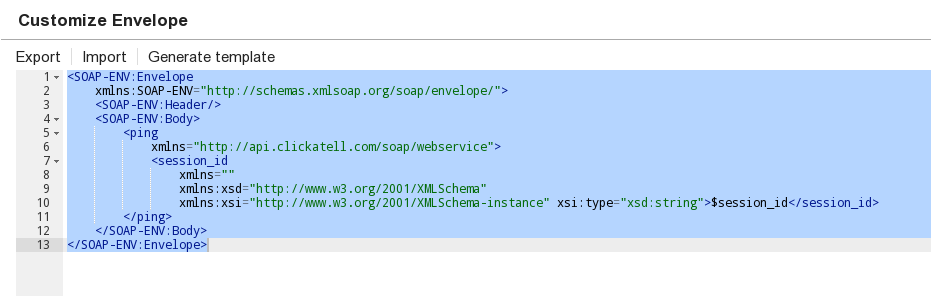
In general, you will most likely always use Customize Envelope.
All files referred to in WSDLs hosted in SLDB must be either explicit URLs or relative in the same project. For example, if the WSDL refers to an XSD "Projects/SomeSchema.xsd", this must be changed (in the WSDL) to refer to the file in the same project "SomeSchema.xsd", and the XSD should be put in that same folder.
The envelope will be stored in the Snap after clicking OK. Further, the envelope can be exported to SnapLogic's file system using the export action or be imported from there using the import action. The Generate template action will regenerate the template, but the content of the editor must be removed prior to that. The envelope can be customized to meet specific endpoint needs. The Snap is fully configured and executable once the envelope is finalized.
The generated envelope will have velocity references in it. These references (here, $session_id) will be exposed to the Target Schema column of the upstream Mapper or Structure Snap. However, any changes made by the user in the generated envelope won't be reflected to this Target Schema column. In this case, the user has to remember the references added/modified in the generated envelope to map them in the upstream Snap.
Template generation only works with document-style WSDLs. RPC-style WSDL template generation is currently not supported.
To execute a create request through an NTLM account in the SOAP Execute Snap, use the generic envelope similar to the following sample. This ensures the output is rendered as excepted. See the example for a demo on how this works.
Only a sample envelope
This sample is meant only for reference purposes and must not be replicated.
| Generic Customized Envelope |
|---|
|
In the upstream Mapper or Structure Snap, these references can be mapped to static values (such as 1234) or to the references exposed in the Input Schema column.

The SOAP Execute Execute Snap is a writing Snap. The Snap can be executed during preview to allow executing the defined request and to retrieve data and schema from the response. The SOAP Snap can be executed during the save operation by enabling the Snap Execution option.
If you receive the following error: "reach the innerElementCountThreshold:50000", perform one of the following tasks:
- Configure the Global Properties of the Groundplex in the global.properties file
("/opt/snaplogic/etc/global.properties" in Linux;
"c:\opt\snaplogic\etc\global.properties" in Windows) to increase the threshold
value:
jcc.jvm_options = -Dorg.apache.cxf.stax.maxChildElements=<value>
where 'value' is 1000000 or higher. OR - Add the same line as a global property in the node.