


S3 Delete
Overview
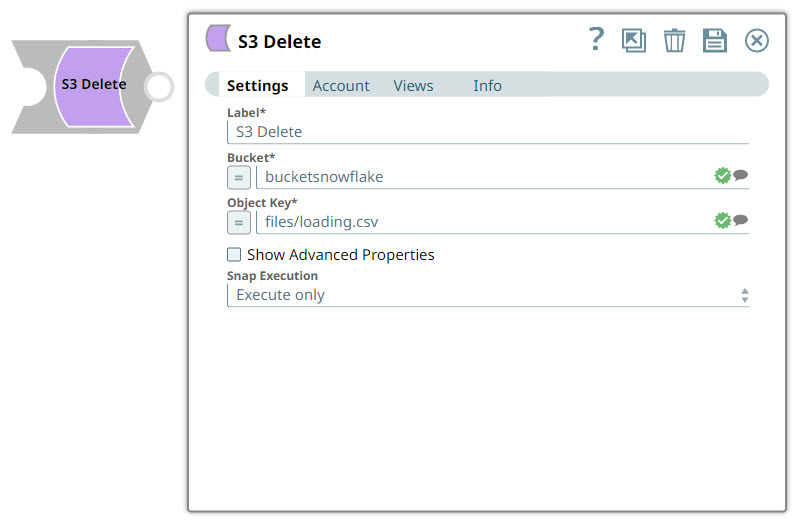
You can use this Snap to delete an S3 object specified in the Bucket and Object Key fields.
-
To delete multiple S3 objects, use the S3 Browser Snap as the upstream Snap with Bucket and Object Key fields expression-enabled.
-
When the specified object does not exist, the Snap displays the
'200
                OK'
status in the output document without any error.
- This is a Write-type Snap.
 Works in Ultra Tasks
Snap views
| Type | Description | Examples of upstream and downstream Snaps |
|---|---|---|
| Input | Receives document data containing file metadata and status information from the upstream Binary to Document transformation, providing the necessary context to identify the target file for deletion. | |
| Output | Produces document data containing the deletion operation status and metadata, confirming successful removal of the specified file from the S3 bucket. | |
| Learn more about Error handling. | ||
Snap settings
- Expression icon (
 ): Allows using
pipeline parameters to set field values dynamically (if enabled). SnapLogic Expressions
are not supported. If disabled, you can provide a static value.
): Allows using
pipeline parameters to set field values dynamically (if enabled). SnapLogic Expressions
are not supported. If disabled, you can provide a static value. - SnapGPT (
 ): Generates SnapLogic Expressions
based on natural language using SnapGPT. Learn
more.
): Generates SnapLogic Expressions
based on natural language using SnapGPT. Learn
more. - Suggestion icon (
 ): Populates a
list of values dynamically based on your Snap configuration. You can select only one
attribute at a time using the icon. Type into the field if it supports a comma-separated
list of values.
): Populates a
list of values dynamically based on your Snap configuration. You can select only one
attribute at a time using the icon. Type into the field if it supports a comma-separated
list of values. - Upload
 : Uploads files. Learn more.
| Field/Field set | Type | Description |
|---|---|---|
Label
|
String | Required. Specify a unique name for the Snap. Modify this to be more appropriate, especially if more than one of the same Snaps is in the pipeline. Default value: S3 Delete Example: Delete Demo Object |
| Bucket | String/Expression/ Suggestion | Required. Specify the S3 bucket name where the S3 object to be deleted is located. Warning: Do not add S3:/// before
bucket name, because the Snap can fail. Bucket names are unique globally and can be accessed without the region name in most cases. If you cannot access a bucket name without its region name, you can specify the region information with the following syntax:
Note:
If you enter an incorrect region name, but the bucket name is valid, the AWS S3 service might successfully access the bucket without errors.
Default value: None. Examples:
|
| Object Key | String/Expression/ Suggestion | Required. Specify the S3 object key name, which may include one or more forward-slash ('/') characters. Note: The forward-slash
character is part of the S3 object key name and there is no folder object defined
in AWS S3. The maximum length of the suggested list is 1,000. Default value: None. Examples:
|
| Show Advanced Properties | Checkbox | Select this checkbox to display the advanced properties. Deselect this checkbox to hide the properties. Default status: Deselected |
| Thread Pool Size | Integer/Expression |
Appears when you select Show Advanced Properties checkbox. Specify the maximum number of threads to be used to delete multiple S3 objects in parallel with Bucket and Object Key properties expression-enabled. Note: If the Thread Pool Size property is expression-enabled, it can be evaluated
with a Pipeline parameter, but not with an input document. Therefore, the value of
this property remains constant throughout the Pipeline execution.
Default value: 10 Example: 20 |
| Maximum Retries | Integer/Expression | Appears on selecting Show Advanced Properties checkbox. Specify the maximum number of retry attempts to perform in case of a temporary network loss. Default value: 3 Example: 2 |
| Pass Through | Checkbox |
Appears when you select the Show Advanced Properties checkbox. Select this checkbox to pass the input document to the output view as a value to
the ' Default status: Deselected |
| Snap execution
|
Dropdown list |
Choose one of the three modes in
which the Snap executes. Available options are:
Default value: Execute only Example: Validate & Execute |