


Salesforce Poller
Overview
The Salesforce Poller Snap polls the status of the batch job submitted to Salesforce by the preceding Salesforce Snaps (Create/Delete/Update/Upsert) in Bulk API mode.
This Snap uses the Salesforce Bulk API to check the batch job status and retrieve the result for each record. The Snap sends the successful record writes to the output view and the failed record writes to the error view.
- This is a Write-type Snap.
 Works in Ultra Tasks
Supported Accounts
Snap views
| Type | Description | Examples of upstream and downstream Snaps |
|---|---|---|
| Input |
This Snap has exactly one document input view. Each document contains a Map data for the job ID (key: "jobId"), batch ID (key: "batchId") and URL (key: "url"), and records of field-value pairs. |
|
| Output |
This Snap has exactly one document output view. Each document contains Map data that includes an object ID and records of the field-value pairs for the successful record write. |
|
| Error |
This Snap has one optional error view. Each document contains Map data that includes an object ID, records of the field-value pairs for the failed record write, and an error message. |
|
Snap settings
| Field/Field set | Description |
|---|---|
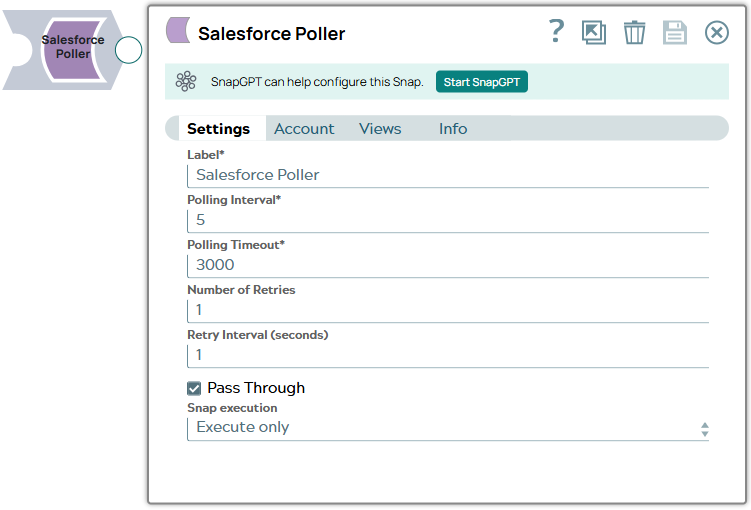
Label
String |
Required. Specify a unique name for the Snap. You can modify this to be more specific, especially if you have more than one of the same Snap in your pipeline.
Default value: Salesforce Poller Example: Salesforce Poller |
Polling interval
String |
Required. Specify the polling interval in seconds for the Bulk API batch job execution. At each polling interval, the Snap checks the status of the Bulk API batch processing.
Maximum value: 60 Default value: 5 Example: 5 |
Polling timeout
String |
Required. Specify the polling timeout in seconds for the Bulk API batch job execution. If the timeout occurs while waiting to complete the batch job execution, the Snap displays an exception.
Note: The polling timer starts at the beginning of the pipeline execution, and NOT when the first document passes into the Salesforce Poller snap. The Polling Timeout includes waiting for the first document to pass into the Salesforce Poller Snap.
Default value: 3000 Example: 300 |
Number Of Retries
String/Expression |
Specify the maximum number of retry attempts in case of connection failures.
Note:
This Snap retries all retryable HTTP status codes, including 401, 403, and 5XX, and connection-related errors. Minimum value: 0 Default value: 1 Example: 3 |
Retry Interval (seconds)
String/Expression |
Specify the minimum number of seconds for which the Snap must wait before
attempting recovery from a network failure. Minimum value: 0 Default value: 1 Example: 3 |
Pass through
Checkbox |
Select this checkbox to display input data fields as the top-level flatmap data merged with the response from SFDC in the output document.
If you deselect this checkbox, the output document contains only the SFDC response. Default value: Selected |
Snap execution
Dropdown list |
Choose one of the three modes in
which the Snap executes. Available options are:
|
Troubleshooting
None.