


Dropbox OAuth2 Account
Overview
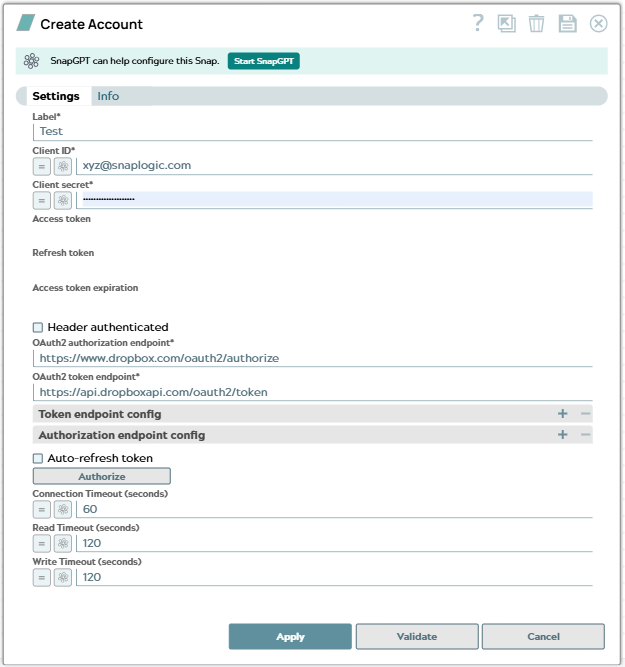
Use this account type to connect Dropbox Snaps with Dropbox data sources using OAuth 2.0 authentication. This account enables secure access to Dropbox resources through token-based authentication.
Prerequisites
- A Dropbox account with access to the Dropbox App Console
- A registered Dropbox application with OAuth 2.0 credentials (Client ID and Client Secret)
- Appropriate permissions configured for your Dropbox app
Account settings
| Field/Field set | Description | ||
|---|---|---|---|
| Label* String |
Specify a unique label for the account. Default value: N/A Example: Dropbox OAuth2 Account |
||
| Client ID* String/Expression |
Specify the client ID associated with your Dropbox application. You can create the client ID as advised by your application provider. Default value: N/A Example: abc123xyz456 |
||
| Client secret* String/Expression |
Specify the client secret associated with your account. You can create the client secret as advised by your application provider. The client secret will be securely stored in SnapLogic's cloud. Default value: N/A Example: Encrypted |
||
| Access token String |
Auto-generated after authorization. The access token associated with the Dropbox application is used to make API requests on behalf of the application associated with the client ID. Default value: N/A Example: <Value encrypted> |
||
| Refresh token String |
Auto-generated after authorization. The token used to refresh the access token. |
||
| Access token expiration String |
Auto-generated after authorization. The access token expiration value. Default value: N/A Example: 1656423824 |
||
| Header Authenticated Checkbox |
Select this checkbox if the endpoint uses the bearer header authentication. Default status: Deselected |
||
| OAuth2 authorization endpoint* String |
Specify the endpoint to authorize the application. Default value: https://www.dropbox.com/oauth2/authorize Example: N/A |
||
| OAuth2 token endpoint* String |
Specify the endpoint to get the access token. Default value: https://api.dropboxapi.com/oauth2/token Example: N/A |
||
| Token endpoint config | Use this field set to define custom properties for the OAuth2 token endpoint. | ||
| Token endpoint parameter String |
Specify the parameter for the token endpoint. Default value: N/A Example: redirect_uri |
||
| Token endpoint parameter value String |
Specify the value for the token endpoint parameter. Default value: N/A Example: https://elastic.snaplogic.com/api/1/rest/admin/oauth2callback/dropbox |
||
| Authorization endpoint config | Use this field set to define custom properties for the OAuth2 authorization endpoint. | ||
| Authorization endpoint parameter String |
Specify the parameter for the authorization endpoint. Default value: N/A Example: token_access_type |
||
| Authorization endpoint parameter value String |
Specify the value for the authorization endpoint parameter. Default value: N/A Example: offline |
||
| Auto-refresh Token Checkbox |
Select this checkbox to automatically refresh the access token when it expires using the refresh token. Default status: Deselected |
||
| Connection Timeout (seconds) Integer/Expression |
Specify the maximum time in seconds to wait for a connection to be established. Default value: 60 |
||
| Read Timeout (seconds) Integer/Expression |
Specify the maximum time in seconds to wait for data to be read from an established connection. Default value: 120 |
||
| Write Timeout (seconds) Integer/Expression |
Specify the maximum time in seconds to wait for data to be written to an established connection. Default value: 120 |
||
Troubleshooting
| Error | Reason | Resolution |
|---|---|---|
| Failed to validate account. | Invalid credentials or missing required fields | Verify that the Client ID, Client Secret, and tokens are correct. Ensure your Dropbox application has the necessary permissions. |
| Invalid access token. | The access token has expired or is invalid. | Regenerate the access token through the OAuth flow or enable Auto Refresh with a valid refresh token. |
| Insufficient permissions. | The OAuth scopes do not include required permissions. | Update the Scope field to include all necessary permissions for your use case and re-authorize the account. |