


Google Sheets Browser
Overview
The Google Sheets Browser Snap browses a given Google Drive folder and lists the spreadsheet names matching the provided name filter.
The Snap also displays the worksheets within each spreadsheet.
- This is a Read-type Snap.
 Works in Ultra Tasks
Limitations
- Inputs without any format restrictions are accepted when the expression toggle is enabled and a Pipeline parameter is provided for the following fields:
- Number of Retries
- Retry Interval
- Read timeout in seconds
- Connection timeout in seconds
- For an expression input, the value is evaluated and accepted if it meets the expression criteria; if not, the default value is used.
- The Snap fetches all worksheets in the output, regardless of whether they are hidden or protected.
Known issues
A long-standing bug in the Google Sheets endpoint does not allow the use of a colon (':') in the worksheet names; hence, these inputs are not supported.
Snap views
| Type | Description | Examples of upstream and downstream Snaps |
|---|---|---|
| Input |
This Snap has at most one document input view. Expected input: The name filter to select the desired spreadsheets. |
|
| Output |
This Snap has exactly one document output view. Expected output: List of spreadsheets available in the provided folder matching the provided name filter. Provides Sheet ID, Sheet name, and Worksheets within. |
|
| Learn more about Error handling. | ||
Snap settings
| Field/Field set | Description |
|---|---|
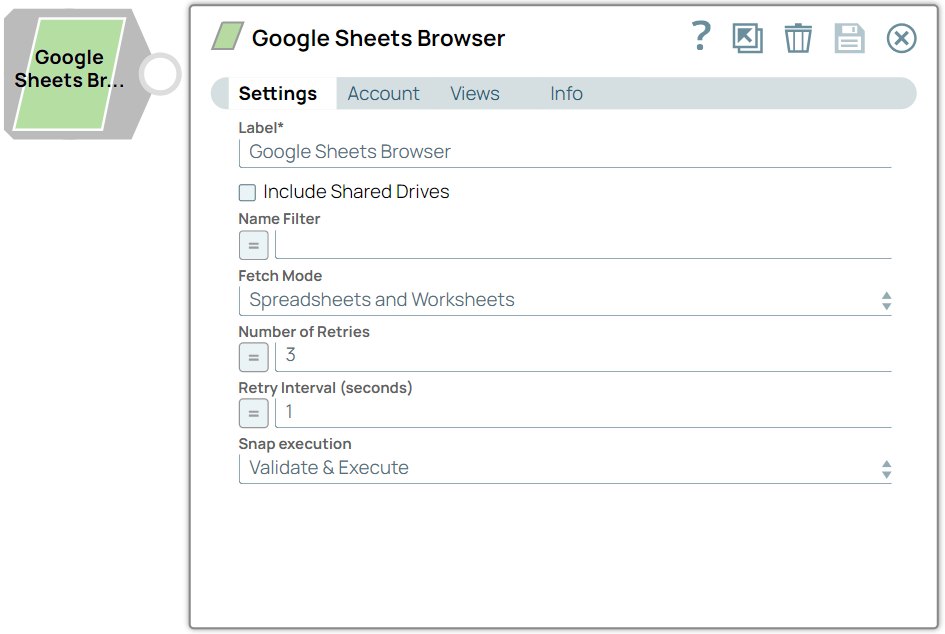
Label
String |
Specify a unique name for the Snap. Modify this to be more appropriate, especially if more than one of the same Snaps is in the pipeline. Default value: Google Sheets Browser Example: Google Sheets Browser |
Include Shared Drives
Checkbox |
Select this checkbox to include files from the shared drive.
Deselect this checkbox to exclude files from the shared drive. Default value: Deselected Example: Selected |
Name filter
String/Expression |
Specify the GLOB pattern to look for spreadsheets having name patterns.
Default value: N/A Example: Filter1 |
Fetch Mode
Dropdown list |
Choose an option to fetch the Spreadsheets. The available options are:
Default value: Spreadsheets and Worksheets Example: Spreadsheets |
Number of Retries
Integer/Expression |
Specify the maximum number of retry attempts that the Snap must make to read the worksheet.
Default value: 3 Example: 2 |
Retry Interval (seconds)
Integer/Expression |
Specify the time interval in seconds for each retry attempt.
Default value: 1 Example: 2 |
Snap execution
Dropdown list |
Choose one of the three modes in
which the Snap executes. Available options are:
|