


Power BI Read Groups
Overview
The Power BI Read Groups Snap reads data matching specified criteria from Power BI workspaces.
- This is a Read-type Snap.
 Works in Ultra Tasks
Snap views
| Type | Description | Examples of upstream and downstream Snaps |
|---|---|---|
| Input |
This Snap has at most one document input view. Expected input: A document containing filter data. |
|
| Output |
This Snap has exactly one document output view. Expected output: A document containing the API's success/failure response and details of the data resource. |
|
| Learn more about Error handling. | ||
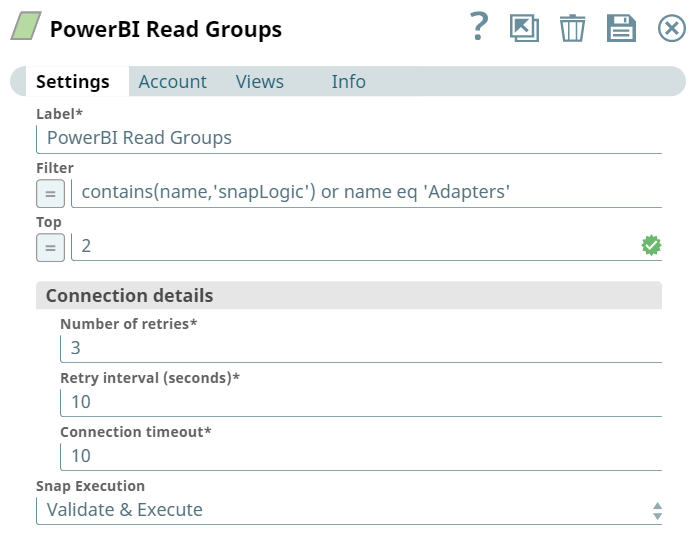
Snap settings
Note: Learn about
the common controls in the Snap settings dialog.
| Field/Field set | Description |
|---|---|
|
Label String
|
Specify a unique name for the Snap. Modify this to
be more appropriate, especially if there are more than one of the same Snap in the
pipeline.
Default value: Power BI Read Groups Example: Read Projects |
|
Filter String
|
Specify the filter expressions that yield a boolean condition for the results. You can also use conditional operators to separate multiple filter criteria.
Default value: N/A Example: contains(name,'marketing') |
|
Top Integer
|
Specify the number of top-most groups to read.
Default value: N/A Example: 3 |
| Connection details | Use this field set to configure the network connection parameters.
This field set contains the following fields:
|
|
Connection timeout Integer
|
Required. Specify the connection timeout duration in seconds.
Default value: 0 Example: 30 |
|
Number of retries Integer
|
Required. Specify the maximum number of re-connections if the connection fails or is timed-out.
Default value: 10 Example: 4 |
|
Retry interval (seconds) Integer
|
Required. Specify the interval in seconds between reconnections.
Default value: 10 Example: 30 |
|
Snap execution Dropdown list
|
Choose one of the three modes in
which the Snap executes. Available options are:
Default value: Execute only |
Troubleshooting
| Error | Cause | Resolution |
|---|---|---|
| HTTP Response Exception:400 | Invalid OAuth endpoint/token URL. | Verify the values of the OAuth2 endpoint or token URLs in the account settings. |
| HTTP Response Exception:401 | Invalid refresh token or access token. | Verify the values of the refresh or access tokens in the account settings. |
| HTTP Response Exception:409 | Conflict | Verify the network and Snap settings. |
| Property value is missing. | You have not configured the required fields. | Required fields cannot be blank. Verify whether you have configured all required fields correctly. |