


Vertica - Table List
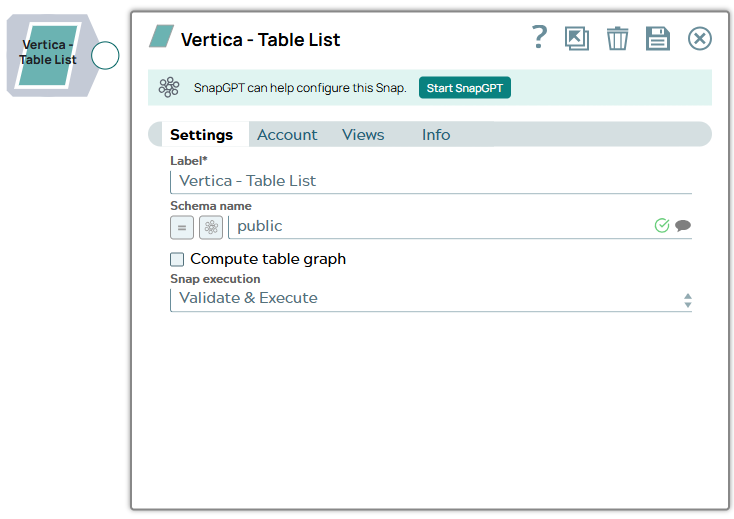
The Vertica - Table List Snap outputs a list of tables in a database.
Expected input: N/A
Expected output: Documents with the following fields:
- name - The fully-qualified name of the table. To use the table name in another Snap, like a Select or Insert, you can pass it through a ForEach Snap to another pipeline with the Select or Insert.
- type - The type of table. This value is currently fixed to the string "TABLE".
- This is a Write-type Snap.
 Works in Ultra Tasks
Replicating a Subset of Tables
The output of the Table List Snap can be directly used to replicate an entire database. However, if you are only interested in a subset of tables, you can use a Filter Snap to select the table names you are interested in as well as the tables that they reference. For example, given the following diamond-shaped table graph where A depends on B and C and they both depend on D:
       A
      / \
     B   C
      \ /
       D
The Table List will output the following documents:
name=D; dependents=[A, B, C, D]
name=C; dependents=[A, C]
name=B; dependents=[A, B]
name=A; dependents=[A]
So, if you wanted to copy just table 'A' and its dependencies, you can add a Filter Snap with the following expression:
$.dependents.indexOf('A') != -1The filter will then remove any extra tables that happen to be in the schema.
Prerequisites
None.
Supported Accounts
Snap views
| Type | Description | Examples of upstream and downstream Snaps |
|---|---|---|
| Input |
This Snap has exactly one document input view. |
|
| Output |
This Snap has at most one document output view. |
|
| Learn more about Error handling. | ||
Snap settings
- Expression icon (
 ): Allows using
pipeline parameters to set field values dynamically (if enabled). SnapLogic Expressions
are not supported. If disabled, you can provide a static value.
): Allows using
pipeline parameters to set field values dynamically (if enabled). SnapLogic Expressions
are not supported. If disabled, you can provide a static value. - SnapGPT (
 ): Generates SnapLogic Expressions
based on natural language using SnapGPT. Learn
more.
): Generates SnapLogic Expressions
based on natural language using SnapGPT. Learn
more. - Suggestion icon (
 ): Populates a
list of values dynamically based on your Snap configuration. You can select only one
attribute at a time using the icon. Type into the field if it supports a comma-separated
list of values.
): Populates a
list of values dynamically based on your Snap configuration. You can select only one
attribute at a time using the icon. Type into the field if it supports a comma-separated
list of values. - Upload
 : Uploads files. Learn more.
| Field/Field set | Description |
|---|---|
| Label
|
Specify a unique name for the Snap. Modify this to be more appropriate, especially if more than one of the same Snaps is in the pipeline. Default value: Vertica Table List Example: Vertica Table List |
| Schema name
|
Specify the database schema name. Selecting a
schema filters the Table name list to show only those tables within the
selected schema. The property is suggestible and retrieves available database
schemas during suggest values. Default value: N/A Example: public |
| Compute table graph
|
Select this checkbox to compute the dependents
among tables and return each table with a list of tables it has foreign key
references to. The ordering of outputted tables is from least dependent to
most-dependent. Note: Turning on this option will significantly slow down the Snap,
so it should be left unselected unless you need it. Default value: Not selected |
| Snap Execution
|
Choose one of the three modes in which the Snap executes. The available options are: Validate & Execute: Performs limited execution of the Snap and generates a data preview during pipeline validation. Subsequently, performs full execution of the Snap (unlimited records) during pipeline runtime. Execute only: Performs full execution of the Snap during pipeline execution without generating preview data. Disabled: Disables the Snap and all Snaps that are downstream from it. Default value: Execute only Example: Validate & Execute |