


Salesforce Update
Overview
The Salesforce Update Snap enables you to update object records in Salesforce in Bulk API 1.0 or REST API mode. The Salesforce Poller Snap checks the result of the batch job when in Bulk API mode. The Snap submits the batch job and writes the batch job information to the output view. In the REST API mode, the Snap updates records to the Salesforce object and returns results synchronously without the need for the Salesforce Poller Snap.
-
Note: The ID field is required. This Snap updates records only by record ID and not by its external ID.
-
Note: To use newer Salesforce objects, use the latest API versions where those objects are available.
- This is a Write-type Snap.
 Works in Ultra Tasks
Supported Accounts
Limitations
This Snap performs batch processing, that is, a batch of input documents are processed for each HTTP request sent to Salesforce. Values of all the expression-enabled fields must remain constant during the Snap execution or validation. Hence, all expression fields can support Pipeline parameters only when they are expression-enabled. The input data parameters are not supported for expression fields, for example, $serviceVersion.
Snap views
| Type | Description | Examples of upstream and downstream Snaps |
|---|---|---|
| Input |
This Snap has exactly one document input view. Each document contains Map data for an object ID and records of field and value pairs. |
|
| Output |
This Snap has exactly one document output view. Each document contains Map data that includes the Job ID, Batch ID, URL, and an array of records if it is in Bulk API mode. If it is executed in REST API mode, each document contains input data and a key-value pair of created: false for each successfully updated record. |
|
| Error |
This Snap produces documents in the view if the input data causes an error in REST API. Each document contains the record ID and an error message from Salesforce.com. If the Snap is in Bulk API, a similar set of data is available in the error view of the Salesforce Poller Snap connected to this Snap directly or indirectly. The error view contains error, reason, resolution, and stack trace. For more information, see Error handling. |
|
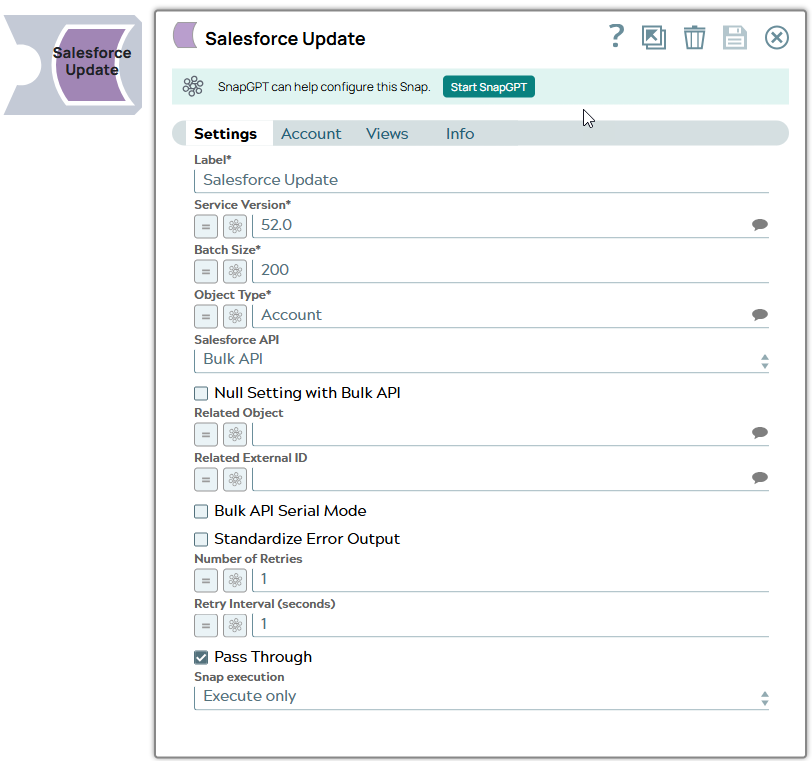
Snap settings
| Field/Field set | Description |
|---|---|
Label
String |
Required. The name for the Snap. You can modify this to be more specific, especially if you have more than one of the same Snap in your Pipeline. Default value: Salesforce Update Example: Salesforce Update |
Service Version
String/Expression/ Suggestion |
Required. Specify the version number associated with the Salesforce service that you want to connect to. Alternatively, click the Suggestion icon to fetch the list of versions and select the desired version. Default value: 52.0 Example: 41.0 |
Batch Size
Integer/Expression |
Required. Specify the number of records to be processed in a batch. Note:
In Bulk API, this value is allowed to be from 1 through 10,000. Each input document forms one Salesforce record to be updated. The Snap stores record in memory until the number of records reaches the batch size and sends the request to SFDC in a single batch. Increasing the batch size increases the amount of memory used during the data load. Decreasing the batch size increases the number of API calls against Salesforce. In REST API, the Snap can update only one record per each request regardless of the Batch Size. Default value: 200 Example: 10000 |
Object Type
String/Expression/ Suggestion |
Required. Specify the name of the Salesforce object or select one from the suggested list. Note: This Snap does not support Net Zero Cloud Salesforce objects.
Default value: Account Example: Account |
Salesforce API
Dropdown list |
Set the Salesforce API mode to Bulk API or REST API. The Snap in REST API mode creates one record at a time and returns the results at the output. REST API can be simpler and faster if the number of records to be created is small (a few). Default value: Bulk API Example: REST API |
Null Setting with Bulk API
Checkbox |
Select this checkbox to set the nullable fields to null in the Salesforce object if there are null values in the input document. This field works only if you select Bulk API mode in the Salesforce API field. Default value: Deselected |
Related Object
String/Expression/ Suggestion |
Enter or select a related parent object. This field does not affect the Snap operation on records in Salesforce. It is provided for the property suggest and the input schema suggests only. Default value: N/A Example: Account_r |
Apply active assignment rules
Checkbox |
Appears when you select REST API from the Salesforce API dropdown and when the Object Type is Account, Case, or Lead. Select this checkbox to apply the active assignment rules for the selected object type (Account, Case, or Lead). If you deselect this checkbox, active assignment rules are not applied for the selected object type (Account, Case, or Lead). Default value: Selected |
Related External ID
String/Expression/ Suggestion |
Enter or select an external ID of the selected related parent object. This property does not affect the Snap operation on records in Salesforce. It is provided for the property suggest and the input schema suggests only. Default value: N/A Example: AccountNumber__c |
Bulk API Serial mode
Checkbox |
Select this checkbox to allow the Bulk API to run in serial mode. Deselect this checkbox to allow the Bulk API to run in Batch mode. This is applicable only for Bulk API. Default value: Deselected |
Standardize Error Output
Checkbox |
Select this checkbox to enable the Snap to produce the error output with Reason, Original, Stack trace and Resolution. Deselect this checkbox to display the input document along with the error message in the output view. Default value: Deselected |
Number Of Retries
String/Expression |
Specify the maximum number of retry attempts in case of connection failures. Note:
This Snap retries all retryable HTTP status codes, including 401, 403, and 5XX, and connection-related errors. Minimum value: 0 Default value: 1 Example: 3 |
Retry Interval (seconds)
String/Expression |
Specify the minimum number of seconds for which the Snap must wait before attempting recovery from a network failure. Minimum value: 0 Default value: 1 Example: 3 |
Pass Through
Checkbox |
Select this checkbox to pass the input document to the output view under the key If you deselect this checkbox, the input document will not be passed and there is no Note: For Bulk APIs, if you select this checkbox and if the Batch size is equal to 1, the input document is passed to the output view under the key
original. If the Batch size is greater than 1, the list of input documents is displayed under Records and the input document is not included under the original key.Default value: Selected |
Snap execution
Dropdown list |
Choose one of the three modes in
which the Snap executes. Available options are:
|
Troubleshooting
None.