


SQL Server Table List
You can use this Snap to output a list of tables in a database. The Snap will connect to the database, read its metadata, and output a document for each table found in the database. The table names are output in a topological order so that tables with the fewest dependencies are output first. In other words, if table A has a foreign key reference to table B, then table B will be output before A. The ordering is intended to ease the process of replicating a group of tables from one database to another.
This Snap supports SQL Server 2008 or a higher version.
- name - The fully-qualified name of the table. To use the table name in another Snap, like a Select or Insert, you can pass it through a ForEach Snap to another pipeline with the Select or Insert.
- type - The type of table. This value is currently fixed to the string "TABLE".
- dependents - (If Compute table graph is selected) A list of table names that have references to this table, including this table.
Replicating a Subset of Tables
The output of the Table List Snap can be directly used to replicate an entire database. However, if you are only interested in a subset of tables, you can use a Filter Snap to select the table names you are interested in as well as the tables that they reference. For example, given the following diamond-shaped table graph where A depends on B and C and they both depend on D:
       A
      / \
     B   C
      \ /
       D
The Table List will output the following documents:
name=D; dependents=[A, B, C, D]
name=C; dependents=[A, C]
name=B; dependents=[A, B]
name=A; dependents=[A]
So, if you wanted to copy just table 'A' and its dependencies, you can add a Filter Snap with the following expression:
$.dependents.indexOf('A') != -1The filter will then remove any extra tables that happen to be in the schema.
Supported Accounts
- This is a Read-type Snap.
Snap Type
SQL Server - Table List Snap is a Read-type Snap that lists the tables in a database
Support for Ultra Pipelines
Works in Ultra pipelines.
Snap views
| Type | Description | Examples of upstream and downstream Snaps |
|---|---|---|
| Input |
This Snap has at most one input view.
|
|
| Output |
This Snap has at most one output view.
|
|
| Learn more about Error handling. | ||
Snap settings
| Field/Field set | Description |
|---|---|
|
Label String
|
Required.Specify a unique name for the Snap. Modify this to
be more appropriate, especially if there are more than one of the same Snap in the
pipeline.
Default value: SQL Server - Table List |
Schema Name
String/Expression |
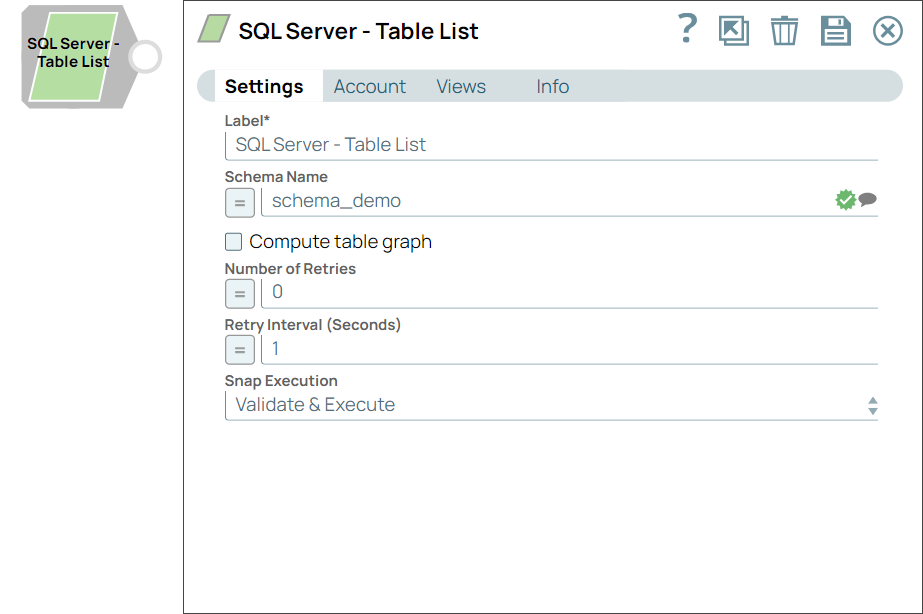
Specify the database schema name. Selecting a schema filters the Table name list to show only those tables within the selected schema. The property is suggestible and will retrieve available database schemas during suggest values. Default value: N/A Example: schema_demo |
Compute table graph
Checkbox |
Specify the dependents among tables and returns each table with a list of tables it has foreign key references to. The ordering of outputted tables is from least dependent to most-dependent. Note that as turning on this option will significantly slow down the Snap, it should be left as off unless you need it. Default status: Deselected |
Number of retries
Integer/Expression |
Specify the maximum number of attempts to be made to receive a response. The request is terminated if the attempts do not result in a response. Default value: 0 Example: 3 |
Retry interval (seconds)
Integer/Expression |
Specify the time interval between two successive retry requests. A retry happens only when the previous attempt resulted in an exception. Default value: 1 Example: 10 |
Snap Execution
Dropdown list |
Select one of the following three modes in which the Snap executes:
Default value: Validate & Execute Example: Execute only |