


Veeva Metadata Read
Overview
The Veeva Metadata Read Snap reads metadata for Veeva Vault objects and documents.
Use this Snap to retrieve schema information, field definitions, and object metadata from Veeva Vault.
Supported Accounts
- This is a Read-type Snap.
 Works in Ultra Tasks
Snap views
| Type | Description | Examples of upstream and downstream Snaps |
|---|---|---|
| Input |
This Snap has at most one document input view. The input document can specify the object name for which to retrieve metadata. If no input is provided, the Snap uses the configured object name. |
|
| Output |
This Snap has exactly one document output view. The output document contains the metadata information for the specified Veeva Vault object or document type. |
|
| Learn more about Error handling. | ||
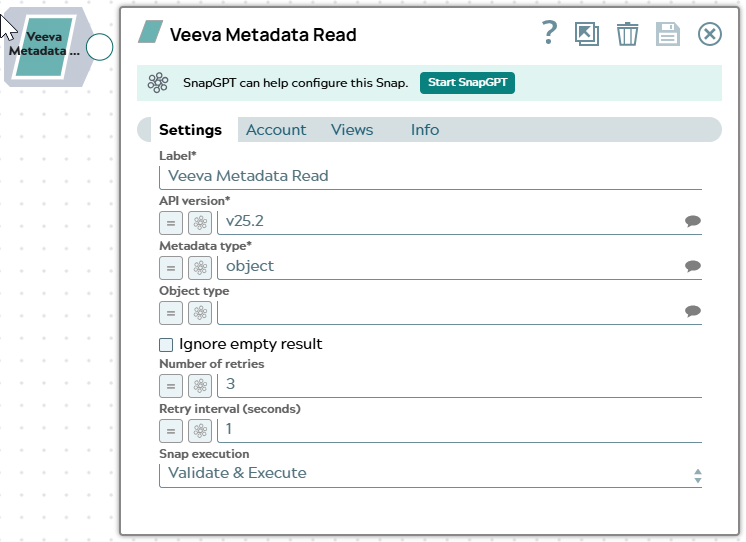
Snap settings
| Field/Field set | Description |
|---|---|
| Label*
|
Specify a unique name for the Snap. Modify this to be more appropriate, especially if more than one of the same Snaps is in the pipeline. Default value: Veeva Metadata Read |
| API version*
|
The Veeva Vault API version to use for this Snap. Default value: v25.2 Example: |
| Metadata type*
|
The type of metadata to retrieve. Options include object, field, picklist, etc. Default value: object Example: |
| Object type
|
The name of the Veeva Vault object to retrieve metadata for. Default value: N/A Example: |
| Ignore empty result
|
Select this checkbox to ignore empty results. When selected, the Snap does not write an output document if metadata cannot be found. Default value: Not selected |
| Number of retries
|
The number of retry attempts for failed API calls. The Snap retries the request if it receives a transient error from Veeva Vault. Default value: 3 Example: |
| Retry interval (seconds)
|
The time interval in seconds between retry attempts. Default value: 1 Example: |
|
Snap execution Dropdown list
|
Choose one of the three modes in
which the Snap executes. Available options are:
Default value: Validate & Execute |