


Marketo OAuth2 Account
Overview
Use this account type to connect Marketo Snaps with data sources
that use the Marketo OAuth2 Account.
Prerequisites
- A valid Munchkin ID. You can generate one from the Marketo app.
Account settings
Note: Learn about
the common controls in the Snap settings dialog.
| Field/Field set | Description |
|---|---|
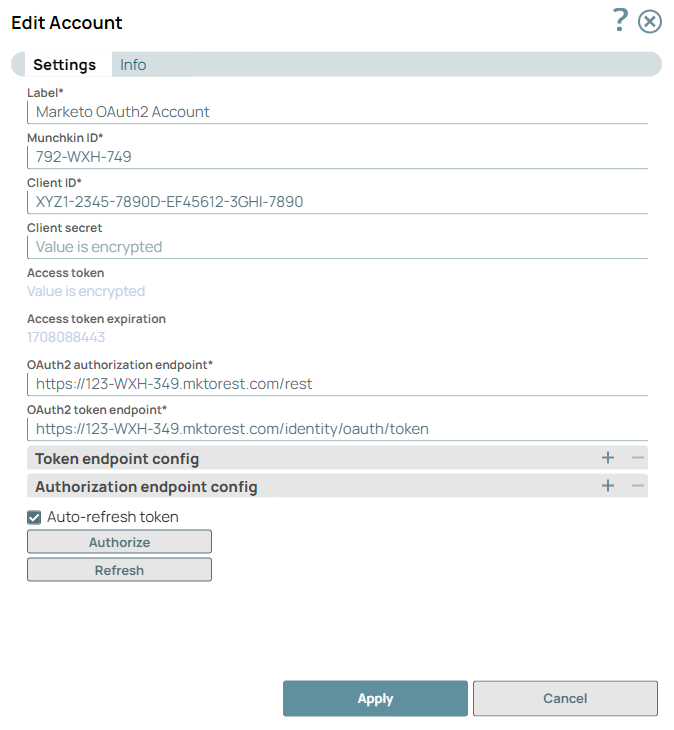
Label*
String
|
Specify a unique name for the account.
Default value: N/A Example: Marketo OAuth2 Account |
Munchkin ID*
String
|
Specify the Munchkin ID associated with your Marketo application.
Default value: N/A Example: 792-WXH-749 |
Client ID*
String
|
Specify the client ID associated with your Marketo application. You can create
the client ID as advised by your application provider.
Default value: N/A Example: XYZ1-2345-7890D-EF45612-3GHI-7890 |
Client Secret
String
|
Specify the client secret associated with your account. You can create the
client secret as advised by your application provider.
Default value: N/A Example: Value is encrypted |
Access Token
String
|
Auto-generated after authorization. The access token associated with the
Marketo portal application, used to make API requests on behalf of the user
associated with the client ID.
Default value: N/A Example: Value is encrypted |
Access Token Expiration
String
|
Auto-generated after authorization. The access token expiration value.
Default value: N/A Example: 1708088443 |
Header Authenticated
Checkbox
|
Select this checkbox if the endpoint uses bearer header authentication.
Default value: Deselected |
OAuth2 Authorization Endpoint*
String
|
Specify the authorization endpoint to authorize the application.
Default value: N/A Example: https://123-WXH-349.mktorest.com/rest |
OAuth2 Token Endpoint*
String
|
Specify the token endpoint to get the access token.
Default value: N/A Example: https://123-WXH-349.mktorest.com/identity/oauth/token |
| Token Endpoint Config | Use this fieldset to configure token endpoint parameters as necessary for the account. |
Token Endpoint Parameter
String
|
Specify the name for the token endpoint parameter.
Default value: N/A |
Token Endpoint Parameter Value
String
|
Specify the value for the parameter, typically the default scope or a redirect
URL.
Default value: N/A |
| Authorization Endpoint Config | Use this fieldset to assign scopes for the OAuth2 authentication endpoint for the account. Define at least one scope entry in this fieldset. |
Authentication Parameter
String
|
Specify the name for an authentication parameter.
Default value: N/A |
Authentication Parameter Value
String
|
Specify the value for the parameter, typically the default scope or a redirect
URL.
Default value: N/A |
Auto-Refresh Token
Checkbox
|
Select this checkbox to refresh the token automatically using the refresh
token when the token is due for expiry.
Default value: Deselected Example: Selected |
| Authorize | Click this button to acquire the required permissions for this account from the Marketo portal application. For existing accounts, click this button to re-acquire the permissions to ensure that the account works as expected. This action does not require or result in any changes to the Access Token that is already generated. |
Note: Click Validate
after entering the required details to ensure that all fields have been filled accurately.
Click Apply to save the settings.