


HubSpot Read
Overview
Use this Snap to retrieve data objects from HubSpot. Learn more about HubSpot APIs from
HubSpot Documentation.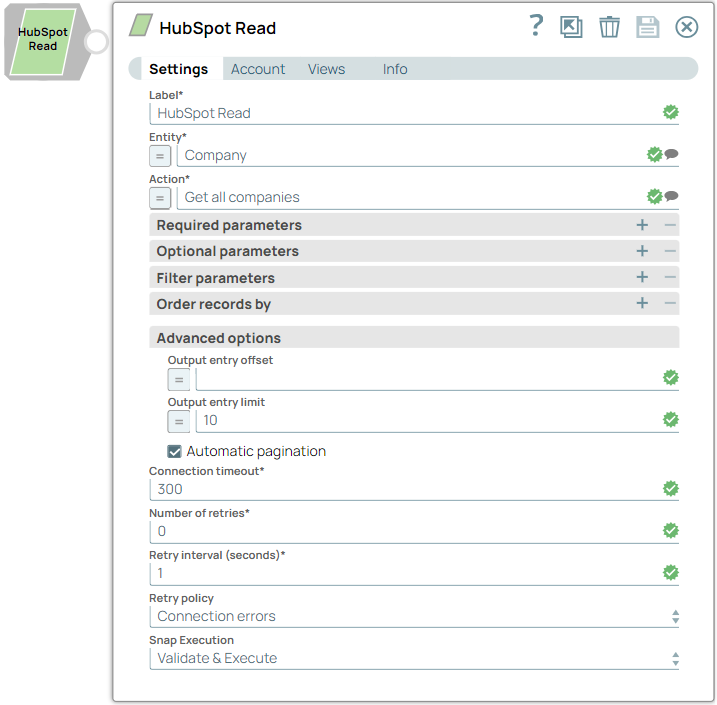
Supported Accounts
Examples
- This is a Read-type Snap.
 Works in Ultra Tasks
Prerequisites
A valid HubSpot Account with the required permissions.
Snap views
| Type | Description | Examples of upstream and downstream Snaps |
|---|---|---|
| Input |
A document containing details with which to identify the data object to retrieve from HubSpot. |
|
| Output |
A document containing details of the data object retrieved from HubSpot. |
|
| Learn more about Error handling. | ||
Snap settings
| Field/Field set | Description |
|---|---|
Label
String |
Specify a unique name for the Snap. Modify this to be more appropriate, especially if more than one of the same Snaps is in the pipeline. Default value: HubSpot Read Example: Read Employee Details |
Entity*String |
Select the data object to read. Default value: N/A Example: Company |
Action*String |
Select the read-action to perform on the entity selected above. Click to see the list of supported actions. Default value: N/A Example: Get all companies |
| Parameter |
Specify the names of the required parameters. Click to see the list of supported parameters. |
Value*String |
Specify the values of the parameters. The data type of this field depends on the specified parameter. Default value: N/A Example: company.id |
| Parameter |
Specify the system parameter $filter fields to be included in the output. |
OperatorString |
Specify the comparison operator for the system parameter $filter. Default value: Like Example: contains |
ValueString |
Enter the values of the specified input $filter fields. The data type of this field depends on the specified parameter. Default value: N/A Example: @example.com |
| Parameter |
Enter the parameter for which to specify the order. |
ValueString |
Select one of the following orders in which to sort the specified parameter:ASCENDINGDESCENDING Default value: ASCENDING Example: DESCENDING |
Output entry offsetInteger |
Specify the number of records to skip during the read operation. Leave it empty so as not to skip any records. Default value: 0 Example: 1 |
Output entry limitInteger |
Select the number of records to fetch in the read operation. Leave it empty to retrieve the default number of records, Default value: 100 Example: 30 |
Automatic paginationCheckbox |
Select this checkbox to enable the Snap to return all the records in the output. By default, the HubSpot Read Snap returns the maximum number of records per page from HubSpot based on the entity. The remaining records, if any, display in the subsequent pages.If you deselect the Automatic pagination checkbox, the Snap returns only the records of the first page in the output. Learn more about Usage of Automatic pagination. Default value: Selected |
Connection timeout*Integer |
Enter the connection timeout duration of seconds. Default value: 30 Example: 30 |
Number of retries*Integer |
Enter the maximum number of re-connection attempts in case of a failure or timeout. Default value: 3 Example: 3 |
Retry interval (seconds)*Integer |
Enter the interval in seconds between reconnection attempts. Default value: N/A Example: 3 |
Retry policyDropdown list |
Choose the retry policy for connection and error responses. The available options are:Connection errors: Select this option when the client fails to establish a secure connection to the server.Connection and API limit exceeded errors (429): Select this option when the 10-second or daily limit is exceeded. Default value: Connection errors Example: Connection and API limit exceeded errors (429) |
Snap executionDropdown list |
Choose one of the three modes in
which the Snap executes. Available options are:
|
Troubleshooting
| Error | Reason | Resolution |
|---|---|---|
| Missing required parameters. | There is a required parameter that was not provided. | Verify whether all required parameters are configured. |
| You have reached your ten-second rolling limit. | There are too many requests to REST endpoint. | Select Connection and API limit exceeded errors (429) in the Retry policy field and adjust the values for Number of retries and Retry interval. |
| You have reached your daily limit. | There are too many requests to REST endpoint. | The maximum number of daily requests has been reached, and no further requests can be made until it resets. For more information, refer to HubSpot Documentation. |
Additional Information
The response for auto pagination is an array of response batches where each batch contains the default number of records returned by the HubSpot API for the specific entity. By default, the HubSpot Read Snap returns the maximum number of records per page in the response from HubSpot based on the entity. The remaining records, if any, display in the subsequent pages.
- If you select the Automatic pagination checkbox, this Snap returns all the records in
the output. For example, if there are 100 records for a certain object, and:
- if the Output entry limit is 5, and the Output entry offset is 0, then the Snap returns 20 batches in the response, with each batch containing 5 records.
- if the Output entry limit is set as 5. and the Output entry offset is 10, then the Snap returns 18 batches in the response, each batch containing 5 records. The response starts from the 11th record and skips the initial 10 records.
-
If you deselect the Automatic pagination checkbox, the Snap returns only the records of the first page in the output. The Snap decodes the JSON-formatted API response to split all records into single output documents, which are displayed in the output view of the Snap. You can use the Output entry limit and Output entry offset fields. to control the number of records.
General Behavior
The following behaviors of HubSpot are useful to know in order to easily use the read Snap:
- There are two different date input:
- Milliseconds: Example: Date 1420772453000. This value represents the date Fri Jan 09 2015 04:00:53 GMT+0100
- Dates: Example: Date 20150109. This value represents the date Fri Jan 09 2015 00:00:00
- The maximum of records returned is entity-specific.
- Some entities of HubSpot have required parameters to be used. Without which, a 404 exception is thrown by HubSpot. This exception indicates the mandatory fields required.