


Bulk Extract
Overview
You can use this Snap to perform bulk extract (export) for the selected entity. When using date-based filters, specify all dates in UTC format.
- This is a Read-type Snap.
- Ultra: Works in Ultra Pipelines only when the Snap is in the non-lineage path.
Prerequisites
A valid account with the required permissions.
Limitations
- Works in Ultra Pipelines only when the Snap is in the non-lineage path.
- If you enable expressions for the Marketo Entity field, it's possible that other fields that are not relevant might be displayed in the UI (because of a UI limitation). If you think a field is not relevant, leave it blank.
- The Marketo Bulk Extract Snap supports only one filter at a time for bulk export with Leads or Custom Objects as the Entity type. So, if you select multiple filters for these Entity types, Snap displays an error.
Known issues
- This Snap fails with a lineage error when used in the lineage path.
- Marketo Snaps do not support some special characters (for example, (𝖖𝖗𝖘𝖬𝖭𝖮𝗕𝗖𝘧𝘨𝘩𝛀𝛁𝛂𝛃𝛄𝛅𝛆𝛇,𝖗𝖘𝖬𝛌𝛗𝛘𝛙𝛴).
Snap views
| Type | Description | Examples of upstream and downstream Snaps |
|---|---|---|
| Input | This Snap has at most one document input view. Requires the Export format with filter data to retrieve the respective entity from Marketo. | Mapper |
| Output | This Snap has at most two document output views. The extracted data relating to the specific entity. | |
| Learn more about Error handling. | ||
Snap settings
| Field/Field set | Description |
|---|---|
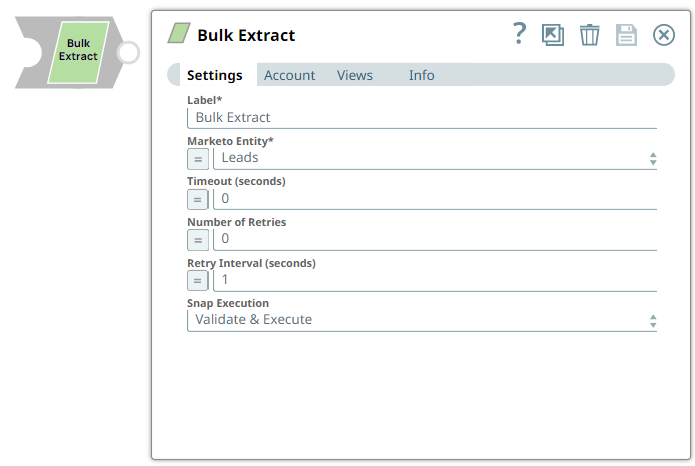
Label*
String |
Specify a unique name for the Snap. Supports expressions.
Default value: Marketo Bulk Extract |
Marketo Entity
String/Expression/ Suggestion |
Select one of the following entities for which you need to perform the bulk extract:
Default value: Leads |
API Name*
String/Expression |
Appears when you select Custom Objects for Marketo Entity. Specify the Custom Object API name for which you must extract data. Default value: N/A |
Include export ID
Checkbox |
Select this checkbox to display the export ID in the output. Default value: Deselected |
Include record count
Checkbox |
When you select this checkbox, the number of records processed by the export job is included in the output document. The Default value: Deselected |
Timeout (seconds)
String/Expression |
Specify the time in seconds to wait for the bulk extract to complete before it times out. A value of zero disables the timeout. Default value: 0 Example: 1000 |
Number of Retries
String/Expression |
Specify the number of attempts the Snap must make in case of connection failure or timeout. Default value: 0 Example: 3 |
Retry Interval (seconds)
String/Expression |
Specify the minimum number of seconds the Snap must wait before each retry attempt. Default value: 1 Example: 4 |
Snap execution
Dropdown list |
Choose one of the three modes in
which the Snap executes. Available options are:
Default value: Validate and Execute |