


Understand OAuth2 Accounts
OAuth2 Accounts for authentication to OAuth2-based endpoints.
SnapLogic offers multiple OAuth2 account types that provide secure authentication and connection to various external data sources, APIs, and services.
Account types
SnapLogic Platform includes the following OAuth2 accounts:
- OAuth2 Account
- Supports Authorization Code (default), Client Credentials, and Password grant types.
- Features auto-refresh tokens and bearer header authentication.
- In Memory OAuth2 Account
- Designed for short-lived access tokens (less than 30 minutes).
- Supports only the Client Credentials grant type.
- Stores the access tokens in cache.
- SSL OAuth2 Account
- OAuth2 authentication with SSL certificate support.
- Supports multiple grant types, including Authorization Code, Client Credentials, and Password.
- Includes KeyStore and TrustStore support.
- Dynamic OAuth2 Account or Dynamic Access Token Account
- Authentication to OAuth2-based endpoints.
- Provides simple access token-based authentication.
- Includes expression-enabled fields for dynamic values.
Key Components
- Client ID & Secret: Application credentials from the service provider.
- Authorization Endpoint: URL for user authorization.
- Token Endpoint: URL for token retrieval and refresh.
- Access Token: Short-lived token for API requests.
- Refresh Token: Long-lived token for obtaining new access tokens.
OAuth2 Workflow in SnapLogic
The following infographic displays the step-by-step workflow of OAuth2 in SnapLogic:
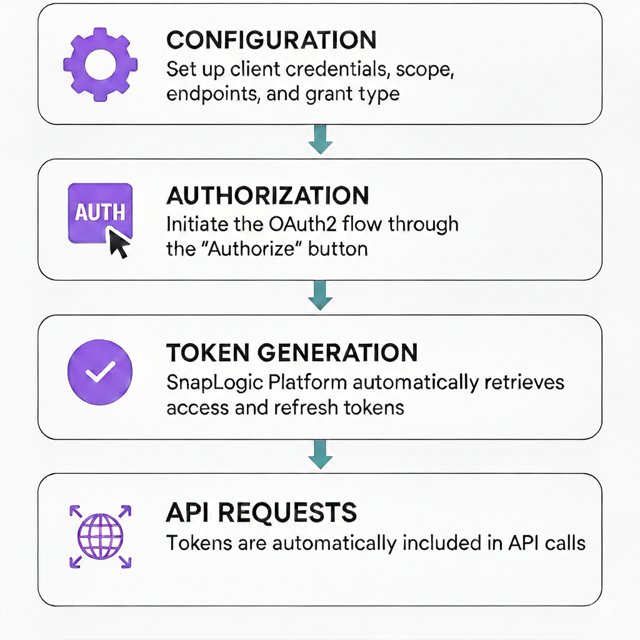
| Step | Description |
|---|---|
| Configuration |
Set up Client credentials, Redirect URI, Scope, Endpoints, and Grant type.
|
| Authorization |
Initiate the OAuth2 flow through the Authorize button (trigger the actual approval process).
|
| Token generation and management |
Once the user consents, the SnapLogic Platform automatically retrieves access and refresh tokens.
Automatic refresh before expiration (if enabled).
|
| API requests |
With the tokens generated and managed, your integration is ready for production.
|
Best Practices for Using OAuth2 Accounts in SnapLogic
- Security
- Use pipeline parameters (
account.access_token) instead of hardcoded tokens. - Enable auto-refresh to prevent token expiration issues.
- Integrate with enterprise Secrets Management systems.
- Use pipeline parameters (
- Configuration
- Set appropriate redirect URLs in your application settings in the
following format:
where thehttps://<control-plane-name>.snaplogic.com/api/1/rest/admin/oauth2callback/<snap-pack-name><control-plane-name>corresponds to the domain part of your SnapLogic URL—elastic(global control plane) oremea(EMEA control plane). For example:https://emea.snaplogic.com/api/1/rest/admin/oauth2callback/azureactivedirectory https://elastic.snaplogic.com/api/1/rest/admin/oauth2callback/azureactivedirectory - Configure custom properties for (OAuth2 token and Auth endpoint) specific API requirements, such as Scope.
- Set appropriate redirect URLs in your application settings in the
following format:
- Token Management
- Enable auto-refresh for long-running pipelines.
- Use In Memory OAuth2 accounts for frequently changing short-lived tokens.
OAuth2 Accounts supported in SnapLogic
| Snap Pack / Category | OAuth2 Accounts |
|---|---|
| Anaplan | Anaplan OAuth2 Account |
| Coupa | |
| Google Analytics and Google Directory | |
| Google BigQuery | |
| Google Sheets | Spreadsheet OAuth2 Account |
| Eloqua | Eloqua OAuth2 Account |
| Exchange Online | |
| Hadoop | Azure Data Lake Gen 2 OAuth2 Account |
| Dropbox | Dropbox OAuth2 Account |
| Dynamics 365 | Dynamics 365 OAuth2 Account for Online |
| Eloqua | Eloqua OAuth2 Account |
| Finance and SCM | Finance and SCM OAuth2 Account |
| HubSpot | HubSpot OAuth Account |
| In Memory | In Memory OAuth2 Account |
| JIRA | JIRA OAuth2 Account |
| Marketo | Marketo OAuth2 Account |
| Microsoft Dynamics 365 Business Central | Business Central OAuth2 Account |
| Microsoft Entra ID | Microsoft Entra ID OAuth2 Account |
| Microsoft OneDrive | |
| NetSuite REST | NetSuite REST M2M OAuth2 Account |
| HTTP Client | OAuth2 Account |
| Teams | |
| REST | |
| Salesforce |
|
| ServiceNow | ServiceNow OAuth2 Account |
| Shopify | |
| Slack | |
| Snowflake | |
| SuccessFactors | SuccessFactors OAuth2 Account |
| OpenAPI | |
| Workday Rest | Workday OAuth2 Account |
| Zendesk | Zendesk OAuth2 Account |
| Zuora |