


Compare APIM 3.0 with Classic APIM
APIM 3.0 builds on Classic APIM by adding capabilities required for modern, growing API programs. Use this page to understand key differences before deciding whether to migrate.
Key differences
The primary difference between Classic APIM and APIM 3.0 is not the API implementation model, but how APIs and governance are modeled, reused, and operated.
Classic APIM:
- Supports two API implementation approaches:
- Proxies that front third-party or external endpoints.
- Native SnapLogic APIs, implemented and executed within SnapLogic.
- APIs are managed individually, regardless of implementation type, and cannot be combined.
- Governance is supported, but is typically:
- Defined per API or API version.
- Copied and customized rather than reused.
- Configuration grows linearly with the number of APIs.
- User interface reflects earlier design patterns and workflows.
APIM 3.0:
- Like Classic APIM, APIM 3.0 supports proxies and native SnapLogic APIs. However, they are modeled as Services designed for reuse and multiple endpoints can be combined in one Service.
- Governance is implemented through reusable Policies composed of individual rules.
- Common patterns are defined once and applied consistently.
- Designed explicitly for composability and domain-driven services.
- Includes a modernized user interface optimized for scale and usability.
Feature mapping
The following table summarizes how specific features compare between the two products.
| Feature | Classic APIM | APIM 3.0 |
|---|---|---|
| API support | Proxies to third-party/external endpoints and native SnapLogic APIs | Proxies to third-party/external endpoints and native SnapLogic APIs modeled as Services that can support multiple endpoints |
| Governance support | Through individual Policies | Through Policies composed of individual rules. Rules are the equivalent of Classic APIM Policies. |
| Governance reuse | Limited / manual | First-class reusable assets |
| Reusability model | Per-API configuration; no shared assets | Core design principle |
| Composability | Limited | Explicitly supported |
| User interface | Earlier design patterns and workflows | Redesigned for scale and usability |
| Scalability model | Configuration per API | Shared, reusable building blocks |
Similarities
Classic APIM and APIM 3.0 have a common foundation. The intentional continuity enables you to evolve API management without changing the underlying implementation models. Both Classic APIM and APIM 3.0 support:
- Third-party or external endpoints.
- Native SnapLogic task APIs that execute pipelines on the SnapLogic infrastructure.
- Governance controls such as authentication, authorization, rate limiting, and traffic management.
- A developer portal to publish APIs for consumption.
Both products also use the same policy hierarchy:
| Classic APIM | APIM 3.0 |
|---|---|
| Environment (Org) level — Applies to all API/Proxy versions unless overridden at a version or endpoint level |
Catalog Policy — can contain multiple rules. Each rule has an Always use Catalog rule checkbox that determines whether the Catalog rule overrides the same type of rule set at the Service or endpoint level. |
| API or Proxy version — Applies unless overridden at the endpoint level | Service version — Applies unless overridden at the endpoint level |
| Endpoint — Overrides other policies | Endpoint — Overrides other policies |
Interface mapping
APIM 3.0 includes a redesigned interface. The image below shows the API Manager in Classic APIM on the left and the Services Catalog in APIM 3.0 on the right.
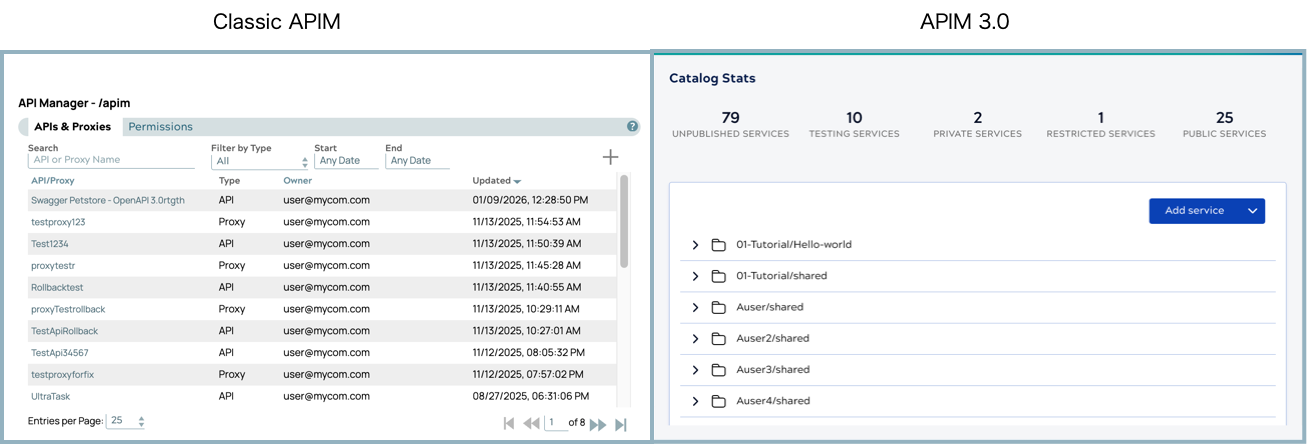
The following table maps the Classic APIM interface to APIM 3.0 interface components:
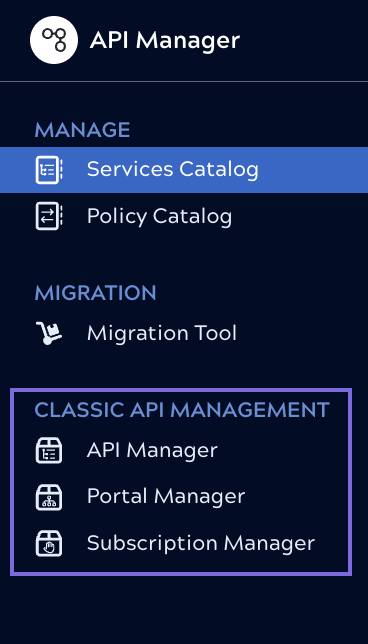
| Classic APIM | APIM 3.0 | Supported tasks |
|---|---|---|
| API Manager |
Services Catalog Policy Catalog |
|
| Portal Manager | Admin Manager API Management 3.0 settings | Configure the Developer Portal, add a logo |
| Subscription Manager | Admin Manager |
|
Migrating Classic APIM assets to APIM 3.0
The Migration Tool creates a new Service version in APIM 3.0 from a selected API Version or Proxy without modifying the original. After migration, both the original asset and the new Service exist simultaneously. Once you publish the new Service, APIM 3.0 forwards calls from the original URL to the new Service. For the full migration process, including what happens to the source asset after publishing, see Move from Classic APIM to APIM 3.0.