


Secured Headers Account
Overview
You can use this account if you want the Authorization Header or other headers to be stored securely.
Account settings
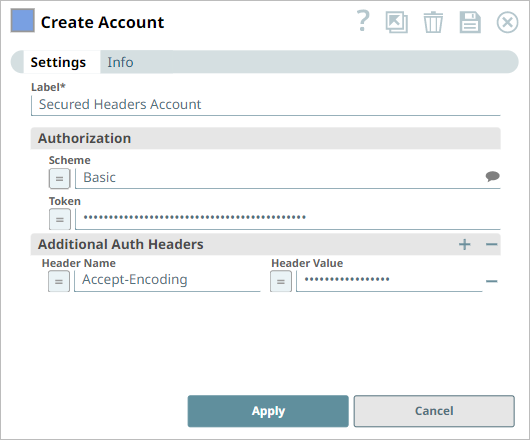
Legend:
- Expression icon (
 ): Allows using
JavaScript syntax to access SnapLogic Expressions to set field values dynamically (if
enabled). If disabled, you can provide a static value. Learn more.
): Allows using
JavaScript syntax to access SnapLogic Expressions to set field values dynamically (if
enabled). If disabled, you can provide a static value. Learn more. - SnapGPT (
 ): Generates SnapLogic Expressions
based on natural language using SnapGPT. Learn
more.
): Generates SnapLogic Expressions
based on natural language using SnapGPT. Learn
more. - Suggestion icon (
 ): Populates a
list of values dynamically based on your Snap configuration. You can select only one
attribute at a time using the icon. Type into the field if it supports a comma-separated
list of values.
): Populates a
list of values dynamically based on your Snap configuration. You can select only one
attribute at a time using the icon. Type into the field if it supports a comma-separated
list of values. - Upload
 : Uploads files. Learn more.
| Field/Field set | Type | Description |
|---|---|---|
| Label String |
Required.Specify a unique label for the account. Default value: None. Example: Secured Headers Account |
|
| Authorization | Represents the settings for the authorization header. | |
| Scheme String/Expression/ Suggestion |
Specify or select the scheme for the authorization
header. The available options are:
Default value: None. Example: Basic |
|
| Token String/Expression |
Specify the token of the authorization header. Default value: N/A Example: a9Dvb5MhbGFAc23hcGxvZ7ljLmNvbTpZDk5QEBAQA8== |
|
| Additional Auth Headers | Use this field set to apply additional authentication-related headers. | |
| Header Name String/Expression |
Specify the name of the HTTP header. Default value: N/A Example: Accept-Encoding |
|
| Header Value String/Expression |
Specify the value that you want to assign to the
HTTP header. Default value: N/A Example: gzip, deflate, br |
|