


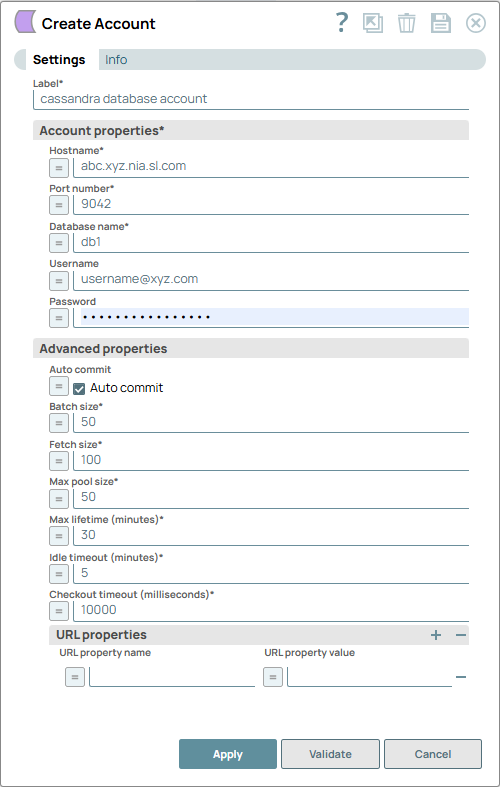
Cassandra Database Account
Account settings
- Expression icon (
 ): Allows using
JavaScript syntax to access SnapLogic Expressions to set field values dynamically (if
enabled). If disabled, you can provide a static value. Learn more.
): Allows using
JavaScript syntax to access SnapLogic Expressions to set field values dynamically (if
enabled). If disabled, you can provide a static value. Learn more. - SnapGPT (
 ): Generates SnapLogic Expressions
based on natural language using SnapGPT. Learn
more.
): Generates SnapLogic Expressions
based on natural language using SnapGPT. Learn
more. - Suggestion icon (
 ): Populates a
list of values dynamically based on your Snap configuration. You can select only one
attribute at a time using the icon. Type into the field if it supports a comma-separated
list of values.
): Populates a
list of values dynamically based on your Snap configuration. You can select only one
attribute at a time using the icon. Type into the field if it supports a comma-separated
list of values. - Upload
 : Uploads files. Learn more.
| Field/Field set | Type | Description |
|---|---|---|
| Label*
|
String |
Specify a unique label for the account. Default value: N/A Example: Cassandra Database Account |
| Account properties | Required. Enter in the information to create a connection to the database. | |
| Hostname | String/Expression | Required. The server's address to connect to. You may want to provide multiple hostnames when using a Cassandra cluster. To do so, separate each hostname with two uninterrupted hyphens; for example, host1--host2--host3. Warning:
The multiple hostnames support is not applicable for IP addresses. Default value: None. |
| Port Number | String/Expression | Required. The database server's port to connect
to. Default value: 9042 |
| Database name | String/Expression | Required. The database name to connect to. Default value: None. |
| Username | String/Expression | Username that is allowed to connect to the database. Username will be used as
the default username when retrieving connections. The username must be valid in
order to set up the data source. Default value: None. |
| Password | String/Expression | Password used to connect to the data source. Password will be used as the
default password when retrieving connections. The password must be valid in order to
set up the data source. Default value: None. |
| Local Datacenter | String/Expression |
Required.Required when connecting to Cassandra using the 4.x driver. Specifies the local datacenter name of the Cassandra cluster for this account. This value is used by the Cassandra driver to:
Default value: None. Example: Cassandra Database AccountImportant:
For existing accounts:
|
| Advanced properties | ||
| Auto commit | Checkbox/Expression |
When selected, each of the batches is committed immediately after it is executed. If the Snap fails, only the batch being executed at that moment is rolled back. When deselected, the Snap execution output is committed only after all the batches are executed. If the Snap fails, the entire transaction is rolled back, unless the Snap finds invalid input data before it sends the insert request to the server, and routes the error documents to the Error view. Default status: Selected |
| Batch size | Integer/Expression | Required. Number of statements to execute at a
time. Warning: Select queries are not batched. Warning: Using a large batch size could use up the JDBC placeholder
limit of 2100.
Default value: 50 |
| Fetch size | Integer/Expression | Required. Number of rows to fetch at a time when
executing a query. Warning: Large values could cause the server to run
out of memory. Default value: 100 |
| Min pool size | Integer/Expression | Required. Minimum number of connections a pool will
maintain at a time. Default value: 3 |
| Max pool size | Integer/Expression | Required. Maximum number of connections a pool will
maintain at a time. Default value: 50 |
| Max life time (minutes) | Integer/Expression | Required. Maximum lifetime of a connection in the pool.
Ensure that the value you enter is a few seconds shorter than any database or
infrastructure-imposed connection time limit. A value of 0 indicates an infinite
lifetime, subject to the Idle Timeout value. An in-use connection is never retired.
Connections are removed only after they are closed. Default value: 30 |
| Idle timeout (minutes) | Integer/Expression | Required. The maximum amount of time a connection is
allowed to sit idle in the pool. A value of 0 indicates that idle connections are
never removed from the pool. Default value: 5 |
| Checkout timeout (milliseconds) | Integer/Expression | Required. Number of milliseconds to wait for a
connection to be available when the pool is exhausted. Note: If you specify
0, the Snap waits infinitely until the connection is available. Therefore,
we recommend you not to specify 0 for Checkout Timeout. Default value: 10000 |
| URL Properties | ||
| URL property name | String/Expression | URL property name. Default value: None. |
| URL property value | String/Expression | URL property value. Default value: None. |
Error/exception message changes after driver upgrade
After upgrading the Cassandra driver from 3.x to 4.x:
Exception package names and messages may change, for example:
- Previous (3.x driver):
com.datastax.driver.core.exceptions.NoHostAvailableException -
New (4.x driver):
com.datastax.oss.driver.api.core.servererrors.NoNodeAvailableExceptionor other types under
com.datastax.oss.driver.api.core.servererrors.*
Metadata differences: column order and column size
With the upgraded Cassandra driver:
Table output schema metadata may differ:
- Column order in the output schema can change compared to previous Snap Pack versions.
- Column size and related metadata values may be reported differently.
Recommendation
Do not rely on column position; use column names whenever possible.
If column-size metadata is used for validation or UI display, allow minor differences when moving between driver versions.
TIME data type – milliseconds not preserved
When working with Cassandra columns of type TIME:
Observed behavior:
Milliseconds (or finer‑grained precision) may be missing or truncated in Snap outputs in some scenarios.
Reason:
This is due to limitations in the Cassandra JDBC wrapper used by the Snap Pack, as tracked here:
Troubleshooting
1. java.lang.NoSuchMethodError involving io.netty.util.concurrent.SingleThreadEventExecutor
Symptoms
When validating a Cassandra Database Account or Cassandra SSL/TLS Database Account, or when running a pipeline that uses Cassandra Snaps, you see errors similar to:
java.lang.NoSuchMethodError: 'void io.netty.util.concurrent.SingleThreadEventExecutor.<init>(
    io.netty.util.concurrent.EventExecutorGroup,
    java.util.concurrent.Executor,
    boolean,
    java.util.Queue,
    io.netty.util.concurrent.RejectedExecutionHandler
)'
Cause
This error is caused by a runtime dependency conflict between multiple Netty versions on the classpath:
The Cassandra Snap Pack previously:
- Used the Cassandra JDBC driver based on DataStax 3.x, which depends on Netty 4.0.x/4.1.x.
- Bundled Netty JARs explicitly (for example, netty-all:4.1.17.Final).
Other Snap Pack dependencies (Hadoop/Zookeeper, Azure SDK, AWS SDK, test dependencies, and the Cassandra driver itself) brought in their own different Netty versions (4.1.63.Final, 4.1.77–4.1.118.Final, and others).
At runtime, the JVM loaded a Netty class where the expected constructor signature did not exist in the actual Netty version on the classpath, resulting in NoSuchMethodError during driver initialization.
This failure happens before any SSL/TLS handshake or database I/O. It is not caused by account credentials, key stores, or network connectivity.
Resolution / What changed
The Cassandra Snap Pack now:
- Consolidates to a single Netty version required by the Cassandra driver, and
- Excludes conflicting Netty transitive dependencies brought in by other libraries.
As a result:
- The NoSuchMethodError no longer occurs.
- Cassandra Database Account and Cassandra SSL/TLS Database Account connections can be established successfully.