


Dropbox Read
Supported Accounts
- This is a Read-type Snap.
 Works in Ultra Tasks
Prerequisites
None.
Limitations and known issues
None.
Snap views
| Type | Description | Examples of upstream and downstream Snaps |
|---|---|---|
| Input |
This Snap has at most one document input view. If an input view is defined, the Snap reads the file path from the incoming document. If no input view is connected, the file path must be specified in the Snap settings. |
|
| Output |
This Snap has exactly one binary output view. The Snap outputs the file content as binary data along with metadata about the file. |
|
| Learn more about Error handling. | ||
Snap settings
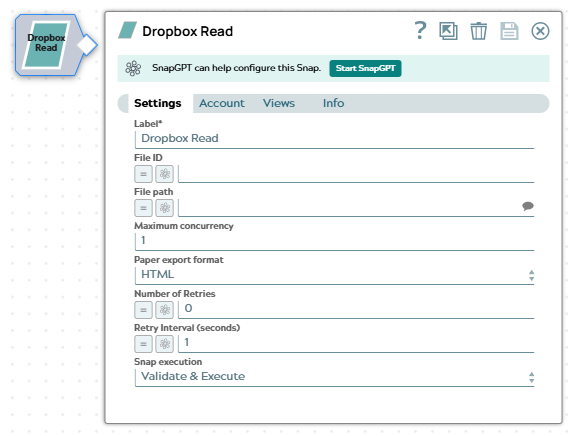
| Field/Field set | Description |
|---|---|
|
Label
|
Specify a unique name for the Snap. Modify this to
be more appropriate, especially if there are more than one of the same Snap in the
pipeline.
Default value: Dropbox Read |
| File ID
|
Specify the Dropbox file ID of the file to read. Use this field as an alternative to File path when you want to read a file by its immutable identifier, which does not change when the file is moved or renamed. If you specify both fields, the Snap uses the File ID.
Example: Default value: None |
| File path
|
The path to the file in Dropbox to read. The path should start with a forward slash (/). This field is required unless you specify a File ID.
Example: Default value: None |
| Maximum concurrency
|
Specify the maximum number of files that the Snap reads in parallel. Increase this value to improve throughput when reading many files, keeping in mind the Dropbox API rate limits for your account.
Example: Default value: 1 |
| Paper export format
|
Select the format in which the Snap exports Dropbox Paper documents. This field applies only when the file being read is a Dropbox Paper document. The available options are:
Default value: HTML |
| Number of retries
|
Specify the maximum number of retry attempts the Snap must make in case of a network failure.
Example: Default value: 0 |
| Retry interval (seconds)
|
Specify the time interval between two successive retry requests. A retry happens only when the previous attempt resulted in an exception.
Example: Default value: 1 |
| Snap execution
|
Choose one of the three modes in
which the Snap executes. Available options are:
Default value: Validate & Execute |