


Active Directory Search
Overview
The Active Directory Search Snap searches for items in Active Directory.
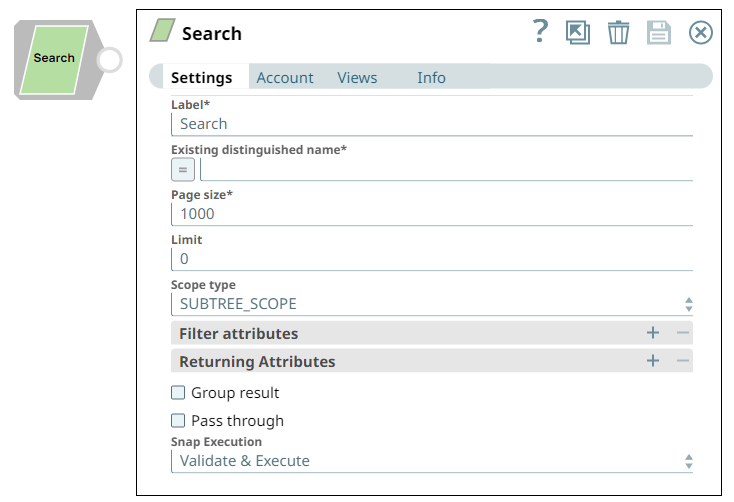
It provides options to select the scope and provide filter attributes to effectively return search results. The attributes of the table are populated in the suggestions list based on the existing distinguished name in Active Directory. The table consists of all the fields that can be used as filter attributes to perform search and effectively return the results.
- This is a Read-type Snap.
 Works in Ultra Tasks
Supported Accounts
Prerequisites
- A valid account with the required permissions.
- Existing distinguished name.
Behavior changes
- Previously the Page Size field worked similar to the Limit field, that is, it set the limit on fetching records instead of fetching all the records.
- The Active Directory Search Snap output now displays the number of records that you specify in the Limit field under Settings. If your Pipelines use the Snap with the Page Size field, they may fail to execute if the downstream Snap expects the same count. To retrieve all the records, configure the Snap with default settings, that is, Limit: 0 and Page Size: 1000.
Snap views
| Type | Description | Examples of upstream and downstream Snaps |
|---|---|---|
| Input |
This Snap has at most one document input view. Expected input: Existing distinguished name, Filter attributes (Filter keys, Filter values). |
|
| Output |
This Snap has exactly one document output view. Expected output: The output data and the searched entries based on the specified existing distinguished name. |
|
| Learn more about Error handling. | ||
Snap settings
| Field/Field set | Description |
|---|---|
Label
String |
Required. Specify a unique name for the Snap. Modify this to be more appropriate, especially if more than one of the same Snaps is in the pipeline. Default value: Search Example: Active Directory Search |
Existing distinguished name
String/Expression |
Required. Specify the LDAP API references an LDAP object by its distinguished name (DN). A DN is a sequence of relative distinguished names (RDN) connected by commas. An RDN is an attribute with an associated value in the form attribute=value, normally expressed in a UTF-8 string format. The typical RDN attribute types include: DC = domainComponent, CN = commonName, OU = organizationalUnitName, O = organizationName, STREET = streetAddress, L = localityName, ST = stateOrProvinceName, C = countryName, UID = userid. A distinguished name for an LDAP entry can be represented as:
Note: This field is applicable only to existing users. If the user does not exist,
create an entry using the Active Directory Create Entry Snap first.
You can also use special characters in the distinguished name. See using special characters in Distinguished Name. Default value: None Example:
|
Page size
Integer |
Required. Specify the size of the page to receive search results. The maximum value accepted by Active Directory is 1000. Refer to Microsoft MSDN documentation for more information. Note: A new field Limit is introduced in a 4.23 dot release
(423patches8210). Your Pipelines created prior to this release, which use
Page Size for limiting records may fail to execute.
Hence, modify your Pipelines using the Limit field
below.
Default value: 1000 Example: 500 |
Limit
Integer |
Specify the number of search records to be fetched from the Active Directory.
Default value: 0 Example: 5 |
Scope type
Dropdown list |
Specify the scope type to search against. The options available include:
Default value: SUBTREE_SCOPE |
Filter Attributes
Fieldset |
Specify the key-value pairs to filter the search
results. The filter keys generated by suggesting can be modified, that is:
|
Filter keys
String/Expression/ Suggestion |
The suggested filter attributes based on the provided Existing distinguished name property. |
Filter values
String/Expression |
The corresponding values of the suggested filter key to perform an effective search. |
Returning Attributes
Fieldset |
Use this field set to define the attributes that should return in the search results. |
Attribute Keys
String/Expression/ Suggestion |
Specify the attribute keys that should return in the search results. When using this Snap to search by a distinguished name, the Snap only returns up to 1500 members if the total member in the group is greater than 1500.
Default value: N/A Example:
|
Group results
Checkbox |
Select to group the output result in a single array. When Group result is checked, the documents will be grouped inside an array instead of individual documents. Default value: Deselected |
Pass through
Checkbox |
Select to include the entire input data in the Snap's output. The Snap includes
this data within the In certain scenarios, the Snap may be unable to process the entire input due to limitations imposed by the endpoint's API. In such cases, we recommend that you select the Pass through checkbox to ensure that the unprocessed input is not lost. You can process the remaining input data using more of the same Snaps in the Pipeline. Alternatively, you can also write the original data into a separate file using a combination of the Mapper Snap and the File Writer Snap. Default value: Deselected |
Snap execution
Dropdown list |
Choose one of the three modes in
which the Snap executes. Available options are:
|
Additional information
The following table indicates the output the Search Snap returns for a given Distinguished name.
| Distinguished name value | Returns |
|---|---|
CN=groupname,CN=Users,DC=server,DC=company,DC=com |
Details about that group. |
CN=Users,DC=server,DC=company,DC=com |
Details about all items in Users under that domain. |
DC=server,DC=company,DC=com |
Details about all objects on that server domain. |
Using Special Characters in Distinguished Name
You can include special characters in the Distinguished name and Existing distinguished name fields. You do not have to prefix the following special characters with an escape character:
- Forward slash (/)
- Backward slash (\)
- Plus (+)
- Double quote (")
- Less than symbol (<)
- Greater than symbol (>)
- Semicolon (;)
If an escape character is prefixed, the Snap reads it, else, it prefixes it to the special character to correctly process the data.
Comma (,) and Equals (=) have a special meaning in the distinguished name, as comma (,) is
used to separate RDNs and equals (=) is used for designating key value pairs (key=value).
Therefore, these must still be prefixed with an escape character to be passed as special
characters. For example, \, or \=.
For instance, you need to specify a distinguished name, such as
CN=man/eesh,CN=Users,DC=ad1,DC=clouddev,DC=snaplogic,DC=com, where the
common name man/eesh contains a special character. This Snap supports both
scenarios:
- If the special character is prefixed with an escape character. For example,
CN=man\/eesh. - If no escape character is used. For example,
CN=man/eesh.
In both cases, the Snap generates the same output during Pipeline validation. This ensures existing Pipelines do not break in either case.