


Box Account
Overview
You can use this account type to connect Box Snaps with data sources that use the Box Account.
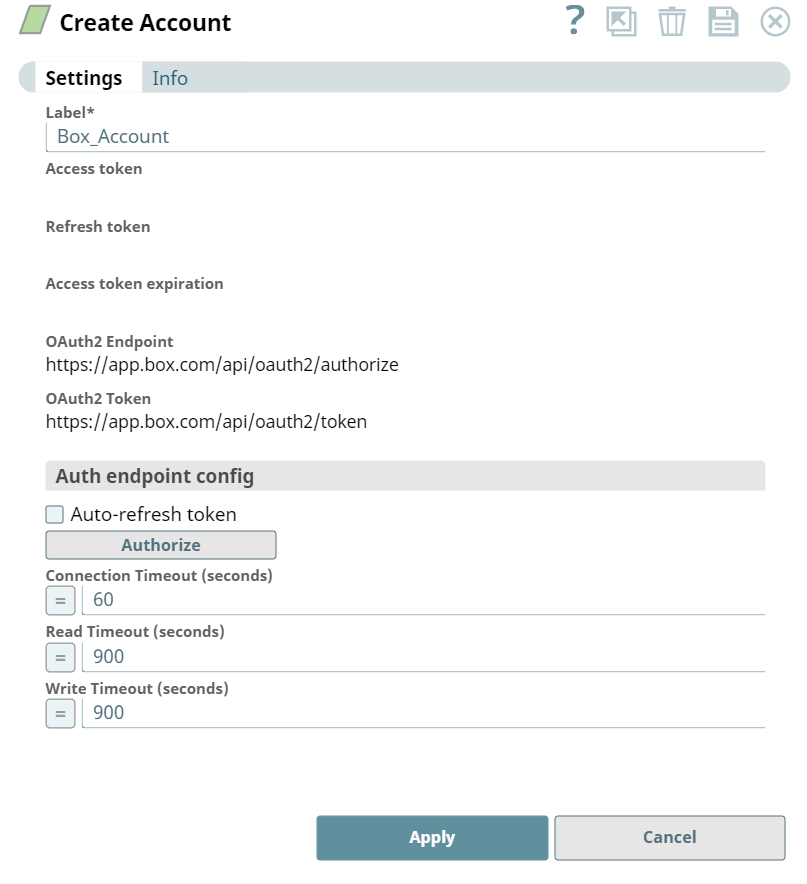
Account settings
- Expression icon (
 ): Allows using
JavaScript syntax to access SnapLogic Expressions to set field values dynamically (if
enabled). If disabled, you can provide a static value. Learn more.
): Allows using
JavaScript syntax to access SnapLogic Expressions to set field values dynamically (if
enabled). If disabled, you can provide a static value. Learn more. - SnapGPT (
 ): Generates SnapLogic Expressions
based on natural language using SnapGPT. Learn
more.
): Generates SnapLogic Expressions
based on natural language using SnapGPT. Learn
more. - Suggestion icon (
 ): Populates a
list of values dynamically based on your Snap configuration. You can select only one
attribute at a time using the icon. Type into the field if it supports a comma-separated
list of values.
): Populates a
list of values dynamically based on your Snap configuration. You can select only one
attribute at a time using the icon. Type into the field if it supports a comma-separated
list of values. - Upload
 : Uploads files. Learn more.
| Field/Field set | Description |
|---|---|
|
LabelRequired. String
|
Specify a unique name for the account instance. |
|
Access token String
|
The access token for the application. The retrieval of the access token is done when setting up the account for the endpoint. There, the OAuth2 flow will be executed and the resulting access token will be stored in this property. The access token might be refreshable, in that case an optional refresh token can be stored. The user must get a new access token if the access token has expired and no refresh token was defined or both the access and the refresh token have expired. |
|
Refresh token String
|
The refresh token for the application. The retrieval of the refresh token is done when setting up the account for the endpoint. There, the OAuth2 flow will be executed and the resulting refresh token can be stored in this property. If the refresh token is stored, then the access token can be refreshed automatically before it expires. |
|
Access token expiration String
|
The access token expiration value. Note: Per Box, access token must expire under 60 minutes.
|
|
OAuth2 EndpointRequired. String
|
Authorization endpoint to authorize the application. Default value: https://app.box.com/api/oauth2/authorize Recommended value as per Box: https://account.box.com/api/oauth2/authorize |
|
OAuth2 TokenRequired. String
|
Token endpoint to get the access token. Default value: https://app.box.com/api/oauth2/token Recommended value as per Box: https://api.box.com/oauth2/token |
|
Auth endpoint config String
|
Provides custom properties for the OAuth2 auth endpoint. |
|
Refresh String
|
Refresh access token. Available after the account has been saved. |
|
Auto-refresh token Checkbox
|
Refreshes the token automatically using the refresh token if the property is enabled. Otherwise the token might expire and will not be automatically refreshed. |
|
Authorize |
Starts the OAuth authorization flow. Account will be saved before authorize. Note: You must grant access to the OAuth2.0 application owned by SnapLogic
after you click the Authorize button.
(Or) You can use the Box Service Account, where you must provide the Client ID and Client Secret of your OAuth 2.0 instance in the Box application. |
|
Connection Timeout (seconds) Integer
|
Specify connection timeout in seconds. A value of 0 indicates infinite timeout. Default value: 60 Example: 50 |
|
Read Timeout (seconds) Integer
|
Specify read timeout in seconds. A value of 0 indicates infinite timeout. Default value: 900 Example: 600 |
|
Write Timeout (seconds) Integer
|
Set write timeout in seconds. A value of 0 indicates infinite timeout. Default value: 900 Example: 600 |