


SAP S/4HANA Cloud SSL Auth Account
Overview
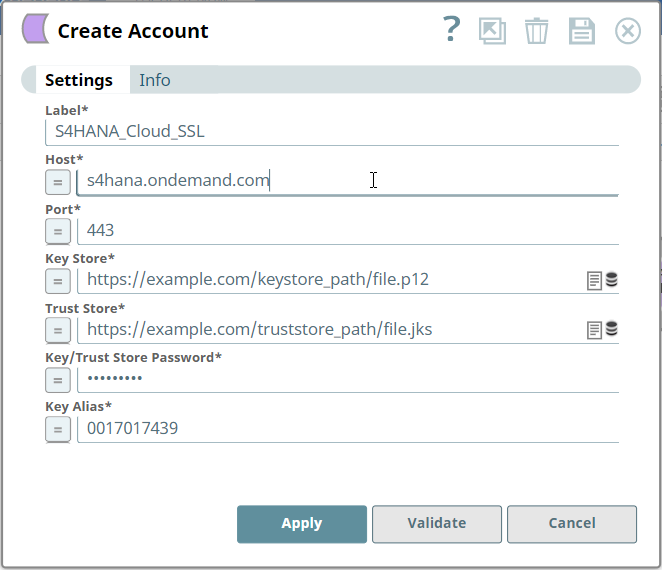
You can use this account type to connect the SAP S/4HANA Cloud Snaps to SAP S/4HANA Cloud instance using SSL-based authentication.
Prerequisites
- Valid Communication Arrangement which includes Catalog Service at S/4HANA Cloud instance.
- Valid certificates (Key store, Trust store, Key/Trust store password, and Key alias).
Account settings
| Field/Field set | Description |
|---|---|
| Label*
|
Specify a unique name for the account. Default value: N/A Example: S4HANA_Cloud_SSL |
| Host*
|
Specify the host server name of SAP S/4HANA Cloud instance. Default value: N/A Example: s4hana.ondemand.com |
| Port*
|
Specify the port of SAP S/4HANA Cloud instance. Default value: N/A Example: 443 |
| Key Store*
|
Specify the location of the key store file. It can be in the SLDB or any other
unauthenticated endpoint such as https://... Default value: N/A Example: https://example.com/keystore_path/file.p12 |
| Trust Store*
|
Specify the location of the trust store file. It can be in the SLDB or any
other unauthenticated endpoint such as https://... Default value: N/A Example: https://example.com/truststore_path/file.jks |
| Key/Trust Store Password*
|
Specify the password for key/trust store. It is used for both Key store
and Trust store, if both are defined. Default value: N/A Example: Encrypted |
| Key Alias*
|
Specify the alias of the private key in the key store. Default value: N/A Example: 0017017439 |
Troubleshooting
| Error | Cause | Resolution |
|---|---|---|
| IO/Error Cause: File not found on elastic.snaplogic.com at <path>. | The file path entered is incorrect. | Ensure that the file path is correct. |
| IO/Error Failed to decrypt safe contents entry: javax.crypto.BadPaddingException: Given final block not properly padded. | Key store password is incorrect. Such issues can arise if an incorrect key is used during decryption. |
|
| PKIX path building failed: sun.security.provider.certpath.SunCertPathBuilderException: unable to find valid certification path to requested target. | Valid certification path to requested target is not found. |
|
| IO/Error Cause: toDerInputStream rejects tag type <type number>. | toDerInputStream rejects tag type, the input file is rejected. |
|
| Detect premature EOF. | The file is empty. |
|
SSL Connection
SAP S/4HANA Cloud allows you to access the APIs using X509 certificate authentication. To implement this certificate-based authentication (SSL), you need to upload the key/trust store files on your SnapLogic tenant and configure this account accordingly. Learn more about the SAP security, Communication Arrangements, and SAP SSL certificate settings: How to create a Communication Arrangement