


GitHub Repository List
Overview
The GitHub Repository List Snap lists repositories accessible to the authenticated account, outputting one document per repository.
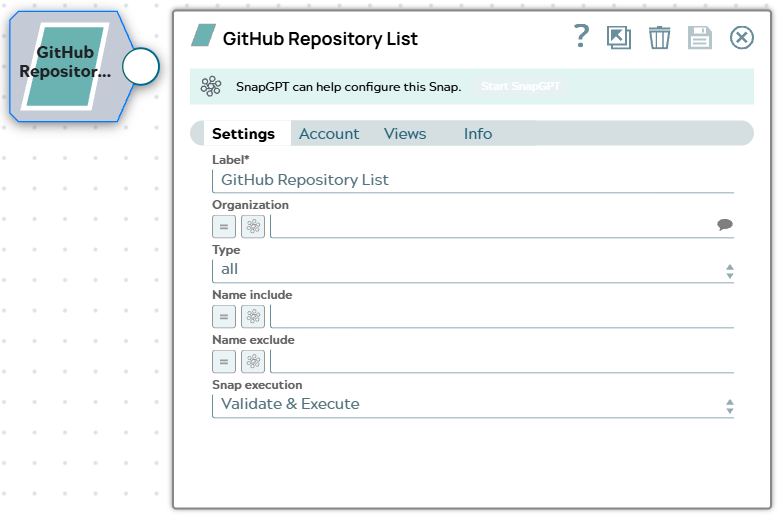
Use the Organization field to scope results to a specific organization, or leave it blank to return all repositories accessible to the account. Use Name include and Name exclude to filter results by regular expression patterns applied to the repository name.
- This is a Read-type Snap.
 Works in Ultra Tasks
Supported Accounts
Prerequisites
None.
Snap views
| Type | Description | Examples of upstream and downstream Snaps |
|---|---|---|
| Input |
This Snap has at most one document input view. When connected, field values from the incoming document can be referenced
in expression-enabled fields using the |
|
| Output |
This Snap has one document output view. Each accessible repository is emitted as a separate document containing
fields such as |
|
| Learn more about Error handling. | ||
Snap settings
| Field/Field set | Description |
|---|---|
Label*
String |
Specify a unique name for the Snap. Modify this to be more appropriate, especially if more than one of the same Snaps is in the pipeline. Default value: GitHub Repository List |
Organization
String/Expression |
Enter the name of the GitHub organization whose repositories you want to list. Leave blank to return all repositories accessible to the authenticated account, including personal and organization repositories. Default value: None Example: |
Type
Dropdown list |
Select the repository scope to apply when listing repositories.
Default value: all Example: public |
Name include
String/Expression |
Enter a regular expression to retain only repositories whose names match the pattern. The match is case-insensitive. Leave blank to include all repositories. Default value: None Example: |
Name exclude
String/Expression |
Enter a regular expression to exclude repositories whose names match the pattern. The match is case-insensitive. Applied after Name include. Leave blank to exclude nothing. Default value: None Example: |
|
Snap execution Dropdown list
|
Choose one of the three modes in
which the Snap executes. Available options are:
Default value: Validate & execute |
Troubleshooting
| Error | Reason | Resolution |
|---|---|---|
| Invalid regular expression: <pattern> | The value entered in Name include or Name exclude is not a valid regular expression. | Correct the regular expression syntax and run the pipeline again. For
example, use snap.* to match names starting with
"snap". |
| Invalid organization: <value> | The Organization field contains a slash or other invalid character. | Enter a simple organization name without slashes, for example
SnapLogic. |