


Read Tickets
Overview
The Read Tickets Snap retrieves ticket records from your Zendesk instance, filtered by ticket ID, user, organization, or recent activity, or exported incrementally since a given time.
Each ticket record is emitted as a separate document on the output view. Use the Filter mode field to choose which tickets to retrieve, and the Max results field to limit the number of documents emitted. Use the Incremental Export filter mode to retrieve only tickets that changed since a specific time, which is useful for synchronization pipelines.
- This is a Read-type Snap.
 Works in Ultra Tasks
Supported Accounts
Prerequisites
None.
Snap views
| Type | Description | Examples of upstream and downstream Snaps |
|---|---|---|
| Input |
This Snap has at most one document input view. When connected, field values from the incoming document can be referenced
in expression-enabled fields using the |
|
| Output |
This Snap has one document output view. Each Zendesk ticket record is emitted as a separate document. |
|
| Learn more about Error handling. | ||
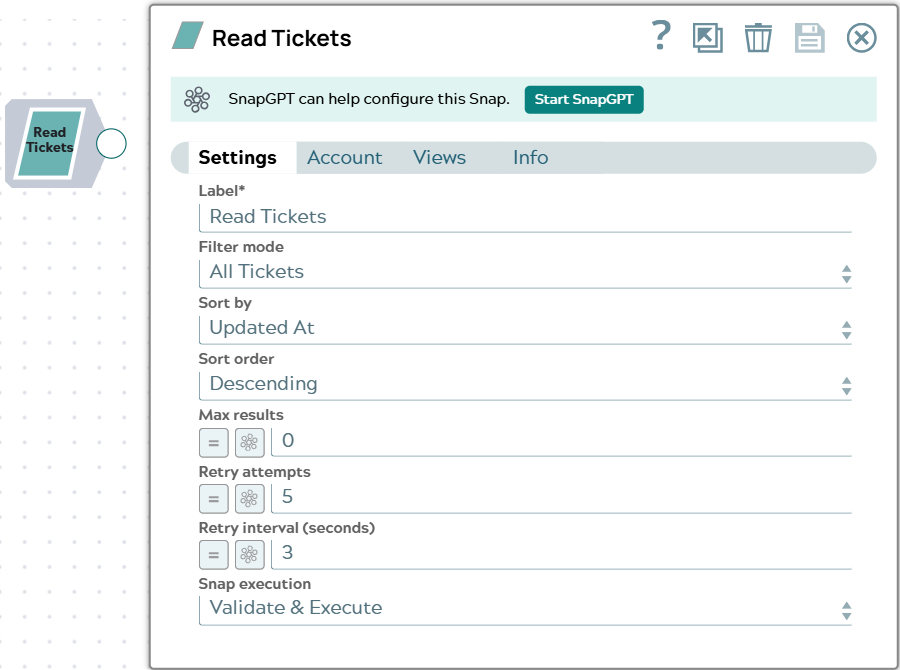
Snap settings
| Field/Field set | Description |
|---|---|
Label* String |
Specify a unique name for the Snap. Modify this to be more appropriate, especially if more than one of the same Snaps is in the pipeline. Default value: Read Tickets Example: Read open tickets |
Filter mode
Dropdown list |
Select the strategy for selecting the tickets to retrieve.
Default value: All Tickets Example: Assigned |
Ticket ID*
Integer/Expression |
Appears when Filter mode is By ID. Enter the numeric Zendesk ID of the ticket to retrieve. Default value: None Example: 35436 |
User ID*
Integer/Expression |
Appears when Filter mode is Requested, Followed, CC’d, or Assigned. Enter the numeric Zendesk ID of the user whose tickets to retrieve. Default value: None Example: 123456789 |
Organization ID*
Integer/Expression |
Appears when Filter mode is By Organization. Enter the numeric Zendesk ID of the organization whose tickets to retrieve. Default value: None Example: 112233445 |
Since date*
String/Expression |
Appears when Filter mode is Incremental Export. Enter the earliest update time to export from, as an ISO 8601 timestamp that includes the time, such as 2024-01-01T00:00:00Z. A date without a time is rejected. Default value: None Example: 2024-01-01T00:00:00Z |
Sort by
Dropdown list |
Appears when Filter mode is not By ID, Incremental Export, or By Recent. Select the field to sort the retrieved tickets by.
Default value: Updated At Example: Status |
Sort order
Dropdown list |
Appears when Filter mode is not By ID, Incremental Export, or By Recent. Select the direction in which to sort the retrieved tickets.
Default value: Descending Example: Ascending |
Max results
Integer/Expression |
Enter the maximum number of ticket records to emit per execution. Enter 0 or leave empty to emit all matching results. Default value: 0 Example: 100 |
Retry attempts
Integer/Expression |
Enter the number of times the Snap should retry the API call on connection
errors or 5xx responses. On a 429 response, the Snap automatically retries
after the interval specified in the server's Default value: 5 Example: 3 |
Retry interval (seconds)
Integer/Expression |
Enter the number of seconds to wait between retry attempts. Default value: 3 Example: 5 |
|
Snap execution Dropdown list
|
Choose one of the three modes in
which the Snap executes. Available options are:
Default value: Validate & execute Example: Execute only |
Troubleshooting
| Error | Reason | Resolution |
|---|---|---|
| Unable to connect to Zendesk: <details> | The Snap could not connect to your Zendesk instance with the selected account, because of an authentication or network problem. | Verify the subdomain and credentials in the account, and that the Snaplex can reach your Zendesk instance. Then run the pipeline again. |
| Authentication failed. | Zendesk rejected the account credentials with HTTP 401 (Unauthorized). | Verify the credentials in the account, then run the pipeline again. |
| Invalid request. | Zendesk rejected the request with HTTP 400 (Bad Request) or HTTP 422
(Unprocessable Entity). The reason field in the error document
shows which. |
Review the Snap settings and the values in the input document, correct any value that Zendesk does not accept, and run the pipeline again. |
| Access denied. | Zendesk returned HTTP 403 (Forbidden). The Zendesk user behind the account does not have permission for the requested resource. | Use an account whose Zendesk user has at least the Agent role, or the permissions the operation requires. |
| Resource not found. | Zendesk returned HTTP 404 (Not Found). The ID in the Snap settings or input document does not exist in your Zendesk instance, or the record was deleted. | Verify the ID, and make sure the record still exists in Zendesk. |
| Rate limit exceeded. | Zendesk returned HTTP 429 (Too Many Requests), and the rate limit was still exceeded after the Snap's automatic retries. | Reduce the volume of requests, for example by retrieving fewer records per run, or schedule the pipeline outside peak hours. |
| Zendesk server error. | Zendesk returned HTTP 500, 502, 503, or 504, and the error persisted after the configured retries. | Wait a few minutes and run the pipeline again. If the error recurs, increase Retry attempts or Retry interval (seconds). |
| Network error while calling Zendesk. | The Snap could not reach Zendesk, for example because of a connection timeout or a DNS failure. | Verify that the Snaplex can reach your Zendesk instance, then run the pipeline again. |
| The <field> provided is not valid | An ID field, such as User ID or Ticket ID, received a value that is not a whole number. Zendesk ID fields accept integer values only. | Enter the numeric Zendesk ID, or fix the expression so that it evaluates to one. |
| Ticket ID is required when filter mode is 'By ID' | Ticket ID is empty, or evaluates to 0. | Enter the ID of the ticket to retrieve. |
| User ID is required when filter mode is '<filter mode>' | Filter mode is Requested, Followed, CC’d, or Assigned, and User ID is empty or evaluates to 0. | Enter the ID of the user whose tickets to retrieve. |
| Organization ID is required when filter mode is 'By Organization' | Organization ID is empty, or evaluates to 0. | Enter the ID of the organization whose tickets to retrieve. |
| Since date is required for incremental export | Filter mode is Incremental Export and Since date is empty. | Enter the time to export from, such as 2024-01-01T00:00:00Z. |
| Invalid start time format: <value> | Since date is not an ISO 8601 timestamp, for example because it has no time part. | Enter a full ISO 8601 timestamp, such as 2024-01-01T00:00:00Z. |