


GitLab Access Token Account
Overview
Use this account type to connect GitLab Snaps to GitLab.com or to a GitLab Self-Managed
instance using a personal, project, or group access token. The Snaps send the token in the
PRIVATE-TOKEN header of every request.
Expression-enabled fields support Secrets Management, a SnapLogic add-on that allows you to store endpoint credentials in a third-party secrets manager such as AWS Secrets Manager, Azure Key Vault, or HashiCorp Vault. Expression-enabled fields also accept pipeline parameters, so one account can target a different GitLab instance per environment.
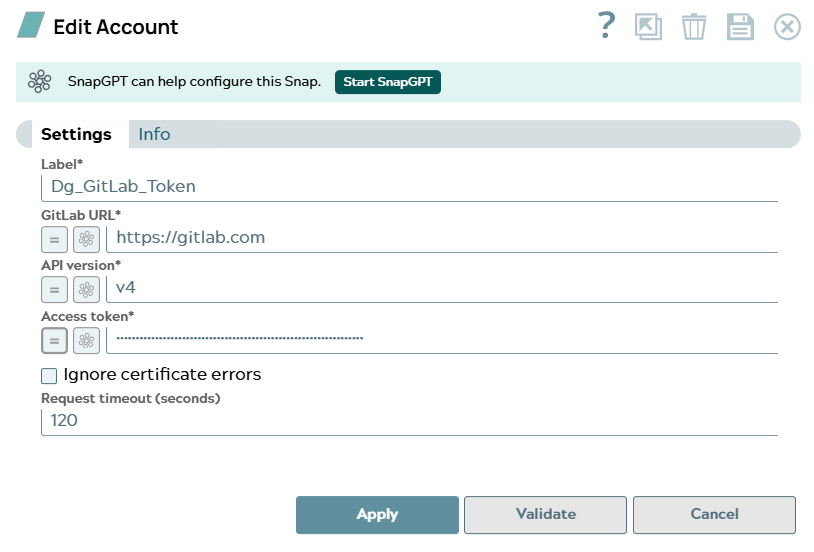
Prerequisites
- An access token with at least the
read_apiscope, created in GitLab as one of the following:- A personal access token, which acts with the permissions of your user.
- A project access token, which is limited to one project.
- A group access token, which covers a group and its subgroups and projects.
- Access, through the token, to the projects and groups that you intend to read.
Account settings
| Field/Field set | Description |
|---|---|
| Label*
|
Specify a unique label for the account. Default value: None Example: GitLab Production |
GitLab URL*
String/Expression |
Enter the URL or host name of the GitLab instance. A host name without a scheme,
such as
You can use a pipeline parameter, such as Default value: https://gitlab.com Example: https://git.example.com |
API version*
String/Expression |
Enter the version of the GitLab REST API that the Snaps call. The version forms
the Default value: v4 Example: v4 |
Access token*
String/Expression |
Enter the personal, project, or group access token. The token must have at least
the Default value: None Example: glpat-xxxxxxxxxxxxxxxxxxxx |
Ignore certificate errors
Checkbox |
Select this checkbox to skip the validation of the TLS certificate of the GitLab instance. Use it only for a Self-Managed instance with a self-signed certificate in a test environment. For production, import the CA certificate into the trust store of the Snaplex instead. Default value: Deselected Example: Selected |
Request timeout (seconds)
Integer |
Enter, in seconds, the connection and read timeout applied to every request that the Snaps send to GitLab, including the TLS handshake. Raise this value if large repository files, archives, or job artifacts time out. The minimum value is 1. Default value: 60 Example: 300 |
Validation calls the GitLab /user endpoint with the token. A successful
validation confirms the URL, the API version, and the token, but not the token's access to
a specific project or group.
Troubleshooting
| Error | Reason | Resolution |
|---|---|---|
| GitLab.com and GitLab Self-Managed | ||
| Invalid GitLab URL. | The GitLab URL is not an HTTP or HTTPS URL or host name, or it contains a query string or fragment. | Enter the base URL of the instance, for example
https://gitlab.com, without ? or #
parts. If the field is empty, the account uses
https://gitlab.com. |
| Invalid GitLab API version. | The API version is not of the form
v<number>. |
Enter the REST API version that GitLab exposes, for example v4. |
| Invalid GitLab credentials. | The Access token is empty, for example because a pipeline parameter or secret resolves to an empty value. | Enter the access token or fix the expression that supplies it. |
| Failed to validate the GitLab account against
https://gitlab.com.
Reason: HTTP 401: 401 Unauthorized |
The token is incorrect, expired, or revoked. | Create a token on the same instance as the GitLab URL, check its expiry date in GitLab, and enter it again. |
| Failed to validate the GitLab account against
https://gitlab.com.
Reason: HTTP 403: insufficient_scope |
The token does not have the read_api scope. |
Create a token with at least the read_api scope and enter it
again. |
| Failed to validate the GitLab account against
https://git.example.com.
Reason: HTTP 500: ... or HTTP 503: ... |
GitLab reports a server-side error, for example during maintenance or an upgrade. | Retry later. If the error persists on a Self-Managed instance, contact your GitLab administrator. |
| GitLab.com | ||
| Failed to validate the GitLab account against
https://gitlab.com.
Reason: No response from GitLab: ... |
The Snaplex cannot reach GitLab.com: a firewall or proxy blocks the outbound request, or the request times out. | Check the Snaplex proxy settings and allow outbound HTTPS to GitLab.com. Raise Request timeout (seconds) for timeouts. |
| GitLab Self-Managed | ||
| Failed to validate the GitLab account against
https://git.example.com.
Reason: HTTP 401: 401 Unauthorized |
The token was created on another instance, for example on GitLab.com instead of your instance. | Create the token on the instance that the GitLab URL points at, and enter it again. |
| Failed to validate the GitLab account against
https://git.example.com.
Reason: HTTP 404: ... |
The GitLab URL points at a project or group page, or misses the relative URL path of the instance, or the instance does not expose the API version. | Enter the root address of the instance, such as
https://example.com/gitlab, not a project URL. Keep the
API version at v4. |
| Failed to validate the GitLab account against
http://git.example.com.
Reason: HTTP 301: ... or HTTP 302: ... |
The instance redirects the request, for example from HTTP to HTTPS or from an alias host to its canonical host. The Snaps do not follow redirects, so that the token is never sent to another host. | Enter the final address of the instance, including the scheme and any path
prefix, for example https://git.example.com. |
| Failed to validate the GitLab account against
https://git.example.com.
Reason: No response from GitLab: ... |
The Snaplex cannot reach the instance: the host name does not resolve, the instance is on a private network, a firewall or proxy blocks the request, or the TLS certificate is not trusted (for example, PKIX path building failed). | Use a Groundplex that can reach the instance, or allow the Snaplex egress IP addresses. Check the Snaplex proxy settings. For an internal or self-signed certificate, import the CA certificate into the Snaplex trust store, or select Ignore certificate errors for testing. Raise Request timeout (seconds) for timeouts. |