


Sequence Parser
The Sequence Parser Snap parses Hadoop sequence file data and converts them into documents that can be processed by downstream Snaps.
Overview
- This is a Parse-type Snap.
 Works in Ultra Tasks
Snap views
| Input/Output | Type of View | Examples of Upstream and Downstream Snaps |
|---|---|---|
| Input | Binary | This Snap has exactly one binary input view. |
| Output | Document | This Snap has exactly one document output view. |
| Error | This Snap has at most one document error view and produces zero or more documents in the view. | |
Supported Accounts
Accounts are not required to use this Snap.
Snap settings
| Field Name | Description |
|---|---|
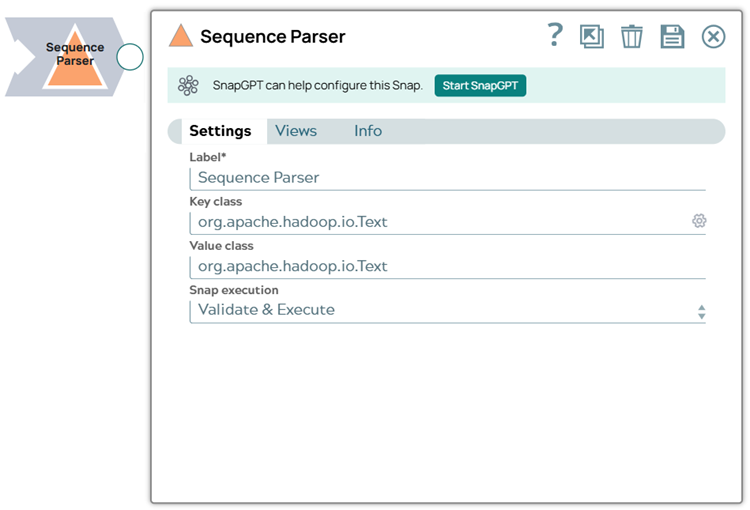
| Label*
|
Specify a unique name for the Snap. Modify this to be more appropriate, especially if more than one of the same Snaps is in the pipeline. Default value: Sequence Parser Example: Sequence Parser |
| Key class String/Expression |
Key class used in the sequence file. Default value: [None] |
| Value
class String/Expression |
Value class used in the sequence file. Default value: [None] |
| Snap Execution
|
Choose one of the three modes in
which the Snap executes. Available options are:
Default value: Execute only Example: Validate & Execute |
Troubleshooting
Writing to S3 files with HDFS version CDH 5.8 or later
When running HDFS version later than CDH 5.8, the Hadoop Snap Pack may fail to write to S3 files. To overcome this, make the following changes in the Cloudera manager:
- Go to HDFS configuration.
- In Cluster-wide Advanced Configuration Snippet (Safety Valve) for
core-site.xml, add an entry with the following details:
- Name: fs.s3a.threads.max
- Value: 15
- Click Save.
- Restart all the nodes.
- Under Restart Stale Services, select Re-deploy client configuration.
- Click Restart Now.