


IBM MQ Consumer
Overview
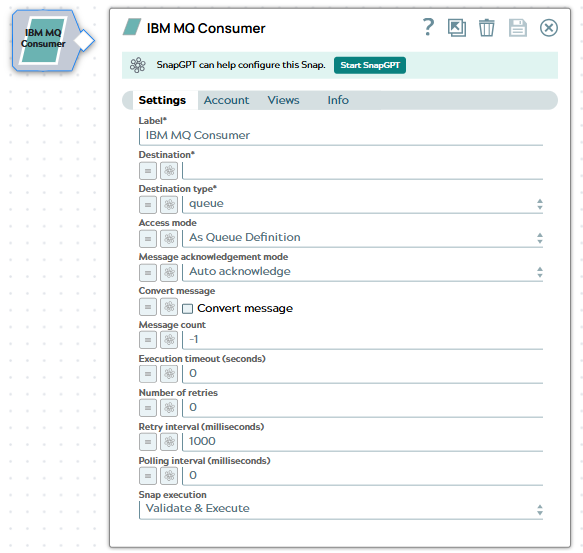
The IBM MQ Consumer Snap retrieves messages from IBM MQ queues or topics. This Snap enables integration with IBM MQ messaging systems, supporting both point-to-point (queue) and publish-subscribe (topic) messaging patterns.
Supported Accounts
- This is a Read-type Snap.
 Works in Ultra Tasks
Prerequisites
- An IBM MQ Account with valid credentials and access permissions
- Access to the target IBM MQ queue manager
- Network connectivity between the Snaplex and the IBM MQ server
- For transactional message processing (Syncpoint mode), the IBM MQ Acknowledge Snap must be used downstream
Snap views
| Type | Description | Examples of upstream and downstream Snaps |
|---|---|---|
| Input |
This Snap does not accept input documents. |
N/A |
| Output |
Each consumed message is output as a separate document containing the message payload, properties, and metadata. |
|
| Learn more about Error handling. | ||
Snap settings
| Field/Field set | Type | Description |
|---|---|---|
| Label*
|
String |
Specify a unique name for the Snap. Modify this to be more appropriate, especially if more than one of the same Snaps is in the pipeline. Default value: IBM MQ Consumer |
| Destination | String/Expression |
Required. Specify the destination name to retrieve the message. Example: |
| Destination type | Dropdown list |
Specify the type of destination from which to retrieve messages:
Default value: Queue |
| Access mode | Dropdown list |
Choose the queue access mode:
Default value: As Queue Definition |
| Message acknowledgment mode | Dropdown list |
A message acknowledgment mode for non-transacted sessions. Valid options are:
|
| Convert message | Checkbox |
When enabled, it automatically converts the message character set and encoding to the specified target values. Use this option when consuming messages that require character set or encoding transformation. Default value: Not selected |
| Encoding | Integer/Expression |
Specify the target encoding value for message conversion. This field is used when Convert message is enabled. Example: |
| Character set | Integer/Expression |
Specify the target character set identifier (CCSID) for message conversion. This field is used when the Convert message is enabled. Example: |
| Message count | Integer/Expression |
Specify the maximum number of messages to retrieve per execution:
Default value: -1 Example: |
| Execution timeout (seconds) | Integer/Expression |
The maximum time, in seconds, the Snap waits for execution to complete. If the time exceeds, the Snap stops processing and completes execution. The default value 0 indicates no timeout. If the Execution timeout is greater than 0, the Snap stops consuming after the specified timeout is reached, even if the Message count threshold is not met. Default value: 0 Example: |
| Number of retries | Integer |
Specify the number of retry attempts for connection or network errors. When set to 0, the Snap does not retry on failure. Default value: 0 |
| Retry interval (milliseconds) | Integer |
Specify the wait time in milliseconds between retry attempts. Default value: 1000 Example: |
| Polling interval | Integer/Expression |
Specify the time in milliseconds to wait between polling attempts when no messages are available in the queue or topic. Default value: 0 Example: |
| Snap execution | Dropdown list | Choose one of the three modes in which the Snap executes. Available options
are:
|
Troubleshooting
| Error | Resolution |
|---|---|
| MQRC_NOT_AUTHORIZED (2035) | Verify that the IBM MQ Account has appropriate permissions to access the queue or topic. Check the queue manager's authority records. |
| MQRC_UNKNOWN_OBJECT_NAME (2085) | Confirm that the queue or topic name is correct and exists on the queue manager. |
| MQRC_CONNECTION_BROKEN (2009) | Check network connectivity between the Snaplex and IBM MQ server. Verify firewall rules allow traffic on the specified port. |
| MQRC_Q_FULL (2053) | The queue is full. Remove messages from the queue or increase the queue's maximum depth. |
| Connection timeout | Increase the Execution Timeout setting or verify that the IBM MQ server is accessible from the Snaplex. |