


Exchange Online OAuth2 Application Account
Overview
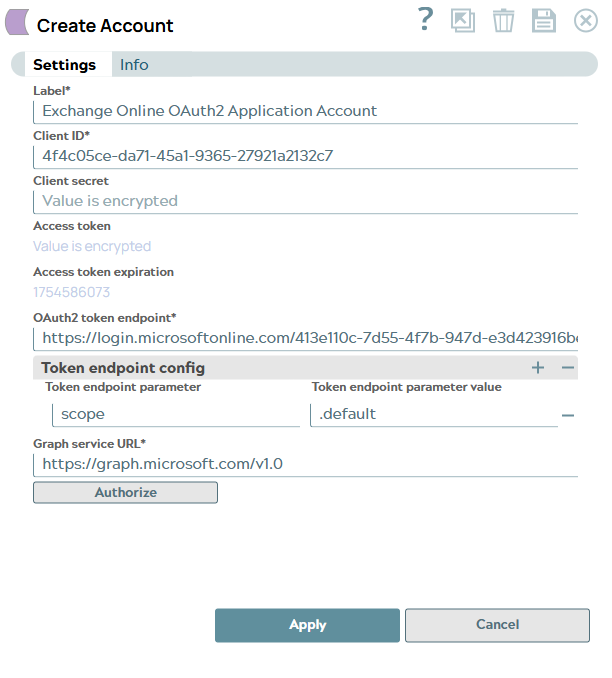
You can configure your accounts in SnapLogic using the Designer or Manager. You can use this account type to connect Exchange Online Snaps with data sources that use Exchange Online OAuth2 Application accounts. The Application account is typically used when you want to grant a third-party application or service access to Exchange Online data with default permissions. Refer to Send Email to know when to use the Exchange Online OAuth2 Application Account.
Prerequisites
- Valid OAuth2 application in the Azure portal with the required API permissions.
Account settings
| Field/Field set | Description |
|---|---|
Label*
String |
Specify a unique label for the account. |
Client ID*
String |
Specify the client ID associated with your OAuth2 application. You can create the client ID as advised by your application provider. Refer to Application Configuration in Azure Portal for OAuth2 Account to use in Exchange. Default value: N/A Example: 456efd-5464g-jdhnd-55dg |
Client secret
String |
Specify the client secret associated with your account. You can create the client secret as advised by your application provider. Refer to Application Configuration in Azure Portal for OAuth2 Account to use in Exchange. Default value: N/A Example: <Encrypted> |
Access token
String |
Auto-generated after authorization. The access token associated with the OAuth2 application is used to make API requests on behalf of the user associated with the client ID. Default value: N/A Example: <Encrypted> |
Access token expiration
Integer |
Auto-generated after authorization. The access token expiration value. Default value: N/A Example: 1664538038 |
OAuth2 Token*
String |
Specify the token endpoint to obtain the access token. Replace the tenant ID placeholder with the tenant ID generated while creating OAuth2 application. Default value:
Example: https://login.microsoftonline.com/413e110c-7d55-4f7b-947d-e3d423916beb/oauth2/v2.0/token |
| Token endpoint config |
Use this fieldset to provide custom properties for the OAuth2 token endpoint. Note: You must specify the scope and value in the Token endpoint
parameter and Token endpoint parameter value
fields to perform the read/write operations successfully.
|
Token endpoint parameter
String |
Specify an optional token endpoint parameter value. Default value: N/A Example: scope |
Token endpoint parameter value
String |
Specify the value associated with the optional endpoint parameter. Default value: N/A Example: .default |
Graph service URL
String |
Specify the Graph service URL. To connect to a Microsoft cloud other than the global cloud (such as the Government or China), you must configure the corresponding Token Endpoint and Authorization Endpoint to match the environment. The following table lists the Graph API Root URLs for different environments:
Default value:
Example: https://dod-graph.microsoft.us |
Troubleshooting
| Type | Description | Examples of upstream and downstream Snaps |
|---|---|---|
| Authentication failed. | You have entered an incorrect Client ID or Client secret. | Check and ensure that you have provided the correct and valid Client ID and Client secret for the account and allowed the required access privileges to the application. |
| Error in Authorization: Something went wrong when authorizing this app. Invalid client_id parameter. | You have entered an incorrect Client ID. | Check and correct the Client ID entered for the account and try authorizing the app again. |