


MongoDB Execute
This Snap executes all Data Manipulation Language (DML) and Data Definition Language (DDL) commands on the MongoDB database.
Overview
You can use this Snap to execute all Data Manipulation Language (DML) and Data Definition Language (DDL) commands on the MongoDB database. It supports CRUD operations, index search, and aggregate functions.
Supported Accounts
- This is a Write-type Snap.
Supported versions
The MongoDB Execute Snap is tested against v4.2.24.
Prerequisites
None.
Limitations
- The MongoDB driver has limited support for inline or multiline comments in a command.
- This Snap supports only the JSON format and specific date-type formats because it uses a Mongo template. A few of the supported date-type formats are:
{ "$date": "2020-09-01T00:00:00Z" }ISODate("2020-01-15T00:00:00Z")
Known issues
None.
Behavior changes
Previously, when you used the Write command in the MongoDB Execute Snap, the Snap was executed at the Primary node by default, regardless of the Read preference configuration. With the main31019 Snap Pack version, when you use the Write command in the MongoDB Execute Snap, it does not execute the command and displays an error depending on the Read preference set in the account. When the Read preference is:
- Secondary: It always displays an error.
- Secondary preferred: It most likely displays an error.
- Nearest: It might error out depending on the network latency between the client and the MongoDB server.
- Primary preferred and Primary: Has lower chances of error.
Snap views
| Type | Description | Examples of upstream and downstream Snaps |
|---|---|---|
| Input | Optional. This Snap has at most one document input view. Requires the command to be executed on the specified database. | |
| Output | Optional. This Snap has at most one document output view. The original document that was used to create the statement will be output with the status of the statement executed. | |
| Learn more about Error handling. | ||
Snap settings
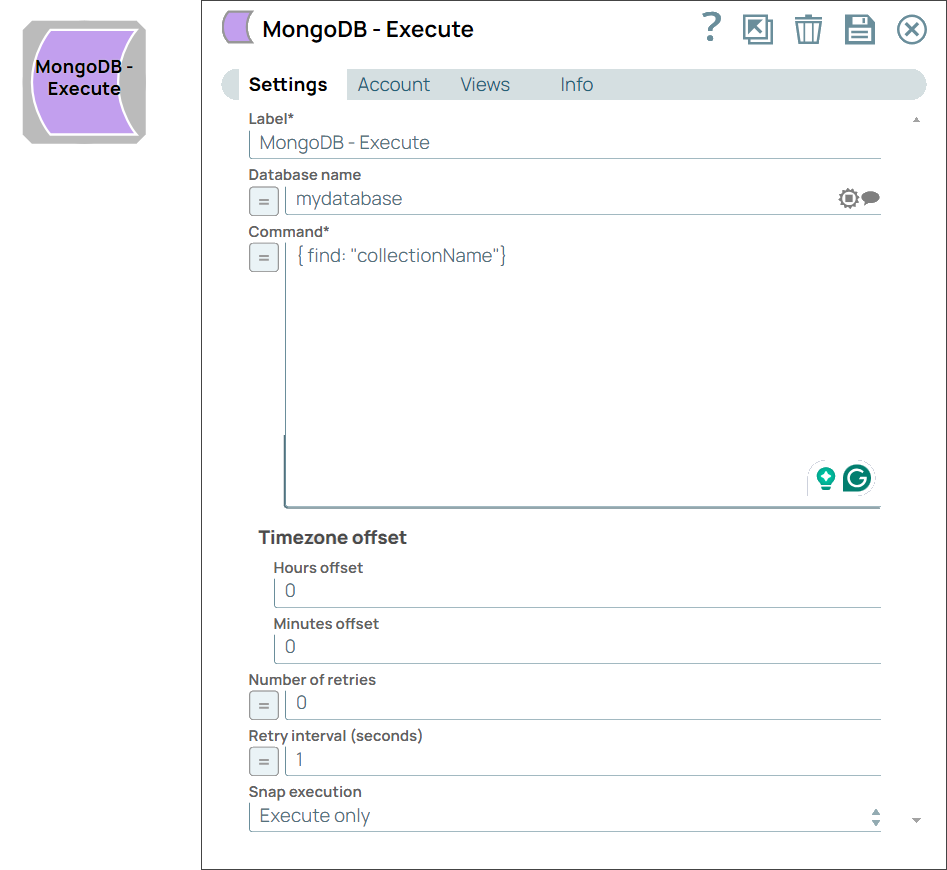
| Field/Field set | Description |
|---|---|
Label String |
Required.Specify a unique name for the Snap. Modify this to
be more appropriate, especially if there are more than one of the same Snap in the
pipeline.
Default value: MongoDB - Execute Example: Execute Lookup for Customers |
Database name String/Suggestion |
The database name where the query is executed. Note:
Default value: N/A Example: mydatabase |
Command String/Expression |
Required. The MongoDB command to execute on the MongoDB instance using the Note:
The
Default value: N/A Example:
|
Timezone Offset
Fieldset |
Use the field set to configure the timezone to apply to date fields. The default value is to read the date in UTC (00:00 offset). A value of -2 for hours and 30 for minutes produces the offset -2:30. |
Hours Offset Integer |
The hours to offset for the timezone. MongoDB returns dates in the UTC timezone. If another timezone is desired, an hour's offset can be used. If a negative value is used for the hours, then the timezone offset will be in the format -7:00. Default value: 0 Example: -7 |
Minutes Offset Integer |
The minutes to use for the time zone offset in the date returned by MongoDB. Default value: 0 Example: 1 |
Number of retries Integer |
Specify the maximum number of retry attempts the Snap must make in case of network failure. When you set the Number of retries to more than 0, the Snap generates duplicate records when the connection is not established. To prevent duplicate records, we recommend that you follow one of the following:
Default value: 0 Example: 4 |
Retry interval (seconds) Integer |
Specify the time interval between two retry requests. Default value: 1 Example: 5 |
|
Snap execution Dropdown list
|
Choose one of the three modes in
which the Snap executes. Available options are:
Default value: Execute only Example: Validate & Execute |
Usage of runCommand()
You can use the runCommand() to perform the following:
- Administrative tasks: Check server status, do database profiling, replication-related operations, user management, and more.
- Access internal commands: Access and execute the internal commands.
- Diagnostic Commands: Execute diagnostic commands to gather information about the database, collections, indexes, or the server status.
Examples:
- Checking server status:
db.runCommand({ serverStatus: 1 }) - Listing databases:
db.runCommand({ listDatabases: 1 }) - Checking the current operation in progress:
db.runCommand({ currentOp: 1 }) - Document insertion into a collection:
db.runCommand( { insert: "Test1", documents: [ { _id: 7, title: "Mary test", body: "Execute snap for MongoDB snappack" } ] } ) - Document updation into a collection:
db.runCommand({ update: "Test1", updates: [ { q: { title: "abc123" }, u: { $set: { body: "Toy Story" }, $inc: { points: 1 } } } ], ordered: false, writeConcern: { w: "majority", wtimeout: 5000 } }) - Document deletion from collection:
db.runCommand({ delete: "Test1", deletes: [ { q: { title: "Mary test" }, limit: 1 } ], ordered: false, writeConcern: { w: "majority", wtimeout: 5000 } }) - Creating indexes for a collection:
db.runCommand(
   {
     createIndexes: "collectionName",
     indexes: [
         {
             key: {
                 field1: 1,
                 field2: -1
             },
             name: "indexName",
             unique: true
         },
         { ... },
         { ... }
     ],
     writeConcern: { w: "majority" },
     commitQuorum: 1,
     comment: "Optional comment"
   }
 )
Troubleshooting
| Error | Reason | Resolution |
|---|---|---|
Failed to execute the command. Command failed with error 10107. |
Unable to execute the Write command. |
Set the Read preference to a writable node, such as Primary or Primary preferred, in your account settings. |