


SAP HANA Account
Overview
You can use this account type to connect SAP HANA Snaps with data sources that use an SAP HANA account.
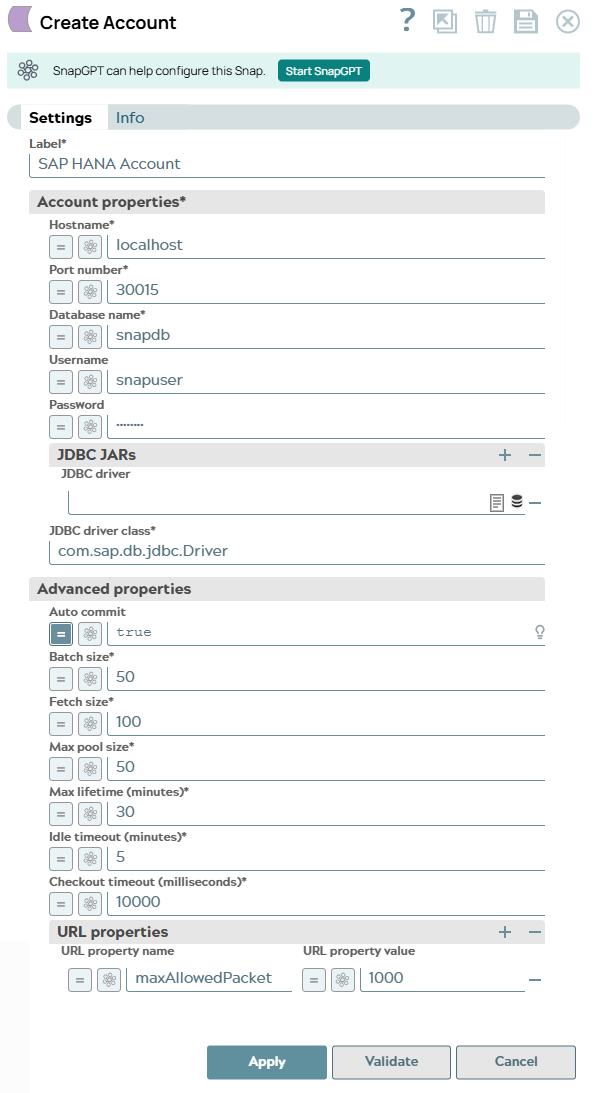
Account Settings
| Field/Field set | Description |
|---|---|
| Label
|
Required. Specify a unique name for the account
instance. Default value: None. Example: SAP HANA Account |
| Account properties | Specify the following account properties for the Snaps that use this account. |
| Hostname
|
Required. Specify the database server hostname. Default value: [None] Example: localhost |
| Port number
|
Required. Specify the database server's port number.
Default value: 30015 Example: 30015 |
| Database name
|
Required. Specify the name of the database to connect.
Default value: [None] Example: sample Note:
When configuring a SAP account to connect to SAP DWC, enter the Database name in the following format: Database name: <Space Schema Name> For the account to work as expected, you must do the following:
|
| Username
|
Specify the database username to use in the following format: Username: <Database User Name> Default value: [None] Example: Snapuser |
| Password
|
Specify the password to use the database. Default value: [None] Example: Snapuser |
| JDBC JARs | The JDBC JAR files to be loaded. |
| JDBC driver
|
Select the JDBC driver to use. The default driver is included in the Snap. If
the user wants to override it then upload the jar here. Default value: [None] |
| JDBC driver class
|
Specify the JDBC Driver class name to use. Default value: [None] Example: com.sap.db.jdbc.Driver |
| Advanced Properties | Specify the following advanced properties for the Snaps that use this account. |
| Auto commit
|
Select this checkbox to commit the individual batches immediately after
execution. If the Snap fails, only the batch being executed at that moment is rolled
back. When deselected, the Snap execution output is committed only after all the batches are executed. If the Snap fails, the entire transaction is rolled back, unless the Snap detects invalid input data before sending the insert request to the server and routes the error documents to the Error view. Default status: Selected |
| Fetch size
|
Required. Specify the number of records to retrieve from
the DB per request. Default value: 100 Example: 100 |
| Batch size
|
Required. Specify the number of statements to execute at
a time. Note: Database Write Snaps output all records of the batch to the error view
if the write fails during batch processing.
Default value: 1000 Example: 1000 |
| Min pool size
|
Required. Specify the minimum connection pooling size to
use. Default value: 1 Example: 1 |
| Max pool size
|
Required. Specify the maximum connection pooling size to
use. Default value: 10 Example: 10 |
| Max lifetime (minutes)
|
Required. Specify the maximum lifetime of a connection
in the pool. Ensure that the value you enter is a few seconds shorter than any
database or infrastructure-imposed connection time limit. A value of 0 indicates an
infinite lifetime, subject to the Idle Timeout value. An in-use connection is never
retired. Connections are removed only after they are closed. Default value: 30 |
| Idle timeout (minutes)
|
Required. Specify the maximum time a connection is
allowed to remain idle in the pool. A value of 0 indicates that idle connections are
never removed from the pool. Default value: 5 |
| Checkout timeout (milliseconds)
|
Specify the maximum time, in milliseconds, the system should wait for a
connection to become available when the pool is exhausted.
Note:
If you provide 0, the Snap waits infinitely until the connection is available. Therefore, we recommend that you do not set the Checkout timeout to 0. For any value other than 0, the Snap displays an exception after the wait time has expired. Default value: 10000 Example: 9000 Minimum value: 0 Maximum value No limit |
| URL properties | Specify the properties to use. |
| URL property name
|
Specify the URL property name. Default value: N/A Example: maxAllowedPacket |
| URL property value
|
Specify the value for the URL property. Default value: N/A Example: 1000 |
Auto Commit with Execute Snaps
For a DB Execute Snap, assume that a stream of documents enters the input view of the Snap and the SQL statement property has JSON paths in the WHERE clause. If the number of documents are large, the Snap executes in more than one batches rather than executing one per each document. Each batch would contain a certain number of WHERE clause values. If Auto commit is turned on, a failure would only roll back the records in the current batch. If Auto commit is turned off, the entire operation would be rolled back. For a single execute statement (with no input view), the setting has no practical effect.
Enabling SSL in the SAP HANA Account
Prerequisites
- The keystore is present in the SAP HANA instance.
- You have the keystore's location and password.
Configure URL properties
To enable SSL, configure the following URL properties:
- encrypt: Set to true to enable SSL encryption.
- validateCertificate: Set to true to validate the server certificate.
- keyStore: Enter the location of the keystore.
- keyStorePassword: Enter the keystore's password.
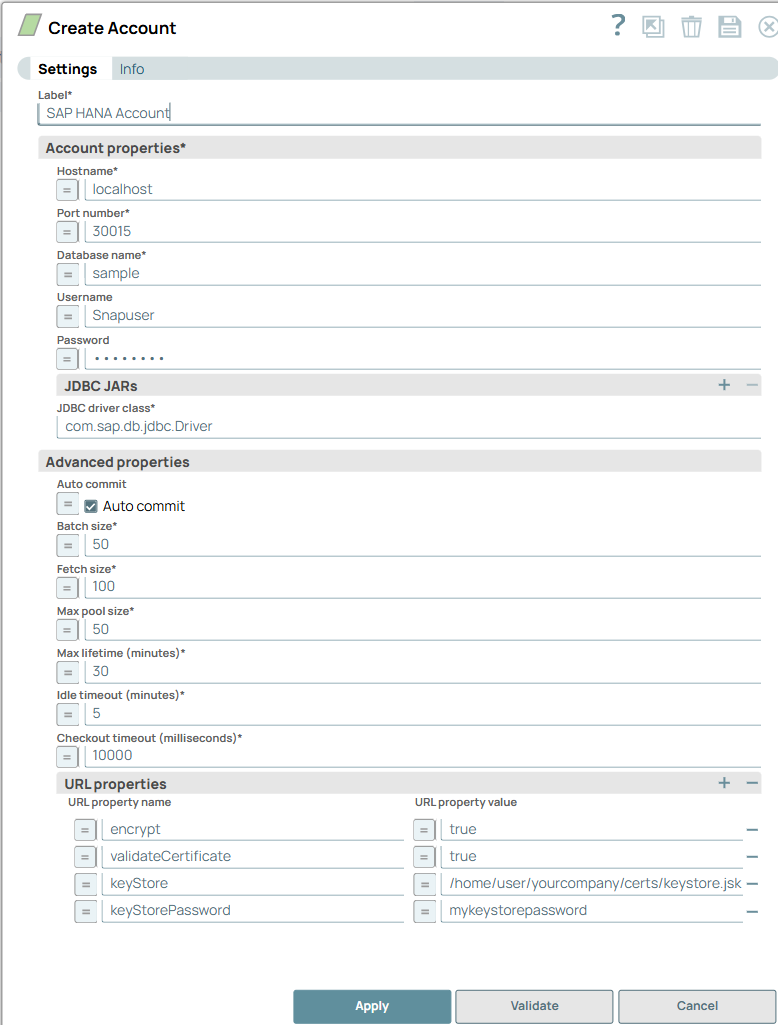
See Client-Side TLS/SSL Configuration Properties (JDBC) for details on other permitted URL properties.