


MySQL Insert
Overview
The MySQL - Insert Snap enables you to insert rows into a MySQL database table. This Snap reads data from input documents and inserts them as new records, providing efficient single-row or batch insertion capabilities.
You can use this Snap to load data from various sources into MySQL tables, automatically mapping input document fields to table columns and handling data type conversions.
- This is a Write-type Snap.
 Works in Ultra Tasks
Prerequisites
A valid account with INSERT privileges on the target MySQL database table.
Limitations
When MySQL execute Snaps (MySQL Execute and MySQL Multi Execute) are followed by MySQL non-execute Snaps, such as MySQL Insert, MySQL Merge, and so on, the following error is displayed when executed:
Table definition has changed, please retry transaction.
This happens due to a known issue in the MySQL Connector. For more information about this issue, see MySQL Bug #65378.
Behavior Change
Previously, when you passed Date/DateTime value for the Year data type column, the MySQL Insert Snap inserted the value into Year data type.
With the 4.37 GA release, when you pass a Date/DateTime value for the Year data type column, the Insert Snap does not accept those values and fails with an error. We recommend that you pass only year values for the Year data type. This is the expected behavior of the Snap.
Snap views
| Type | Description | Examples of upstream and downstream Snaps |
|---|---|---|
| Input | Required.
Min: 1, Max: 1 This Snap has two input views but by default it has one input view. You can add a second view for metadata for the table as a document so that the table is created in MySQL with a similar schema as the source table. This schema is usually from the second output of a database Select Snap. If the schema is from a different database, the data types might not be properly handled. |
|
| Output | Optional.
Min: 1, Max: 2 This Snap has at most one document output view. If an output view is available, then the original document that was used to create the statement will be output with the status of the insert executed. |
|
| Error | Error handling is a generic way to handle errors without losing data or failing the Snap execution. You can handle the errors that the Snap might encounter when running the Pipeline by choosing one of the following options from the When errors occur list under the Views tab:
Database write Snaps output all records of a batch (as configured in your account settings) to the error view if the write fails during batch processing. |
Snap settings
- Expression icon (
 ): Allows using
pipeline parameters to set field values dynamically (if enabled). SnapLogic Expressions
are not supported. If disabled, you can provide a static value.
): Allows using
pipeline parameters to set field values dynamically (if enabled). SnapLogic Expressions
are not supported. If disabled, you can provide a static value. - SnapGPT (
 ): Generates SnapLogic Expressions
based on natural language using SnapGPT. Learn
more.
): Generates SnapLogic Expressions
based on natural language using SnapGPT. Learn
more. - Suggestion icon (
 ): Populates a
list of values dynamically based on your Snap configuration. You can select only one
attribute at a time using the icon. Type into the field if it supports a comma-separated
list of values.
): Populates a
list of values dynamically based on your Snap configuration. You can select only one
attribute at a time using the icon. Type into the field if it supports a comma-separated
list of values. - Upload
 : Uploads files. Learn more.
| Field/Field set | Description |
|---|---|
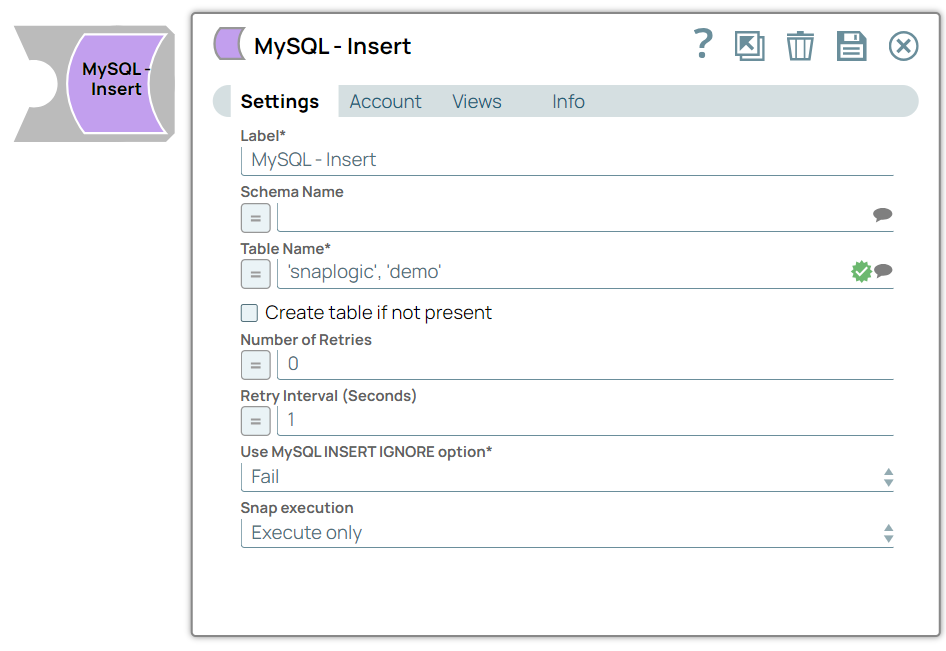
Label
String |
Required.Specify the name for the Snap. You can modify this to be more specific, especially if you have more than one of the same Snap in your pipeline.
Default value: MySQL - Insert Example: MySQL - Insert |
| Schema name
|
Specify the database schema name. In case it is not defined, then the suggestion for the Table Name will retrieve all tables names of all schemas. The property is suggestable and will retrieve available database schemas during suggest values.
The values can be passed using the pipeline parameters but not the upstream parameter. Default value: None Example: SYS |
| Table name
|
Required.Specify the name of table to execute insert on.
The values can be passed using the pipeline parameters but not the upstream parameter. Default value: None Example: people |
| Create table if not present
|
Select this checkbox to automatically create the target table if it does not exist.
If a second input view is configured for the Snap and it contains a document with schema (metadata) from the source table, the Snap creates the new (target) table using the same schema (metadata). However, if the schema comes from a different database, the Snap might fail with the Due to implementation details, a newly created table is not visible to subsequent database Snaps during runtime validation. If you want to immediately use the newly updated data you must use a child Pipeline that is invoked through a Pipeline Execute Snap. Default value: Deselected |
| Number of retries
|
Specify the maximum number of attempts to make to receive a response. The request is terminated if the attempts do not result in a response.
Default value: 0 Example: 3 |
| Retry interval (seconds)
|
Specify the time interval between two successive retry requests. A retry happens only when the previous attempt resulted in an exception.
Default value: 1 Example: 10 |
| Use MySQL INSERT IGNORE option
|
Choose an option to instruct the Snap to ignore the SQL errors encountered during execution.
If the target table contains no primary key constraint, and the 'Use MySQL INSERT IGNORE option' is set to ignore, then the Snap inserts null values into MySQL when you attempt to insert invalid data. To ensure that all data truncation / validation errors are caught in the error view, set the 'Use Mysql INSERT IGNORE option' to Fail. Default value: Fail Example: Ignore |
Snap execution
Dropdown list |
Choose one of the three modes in
which the Snap executes. Available options are:
|
Troubleshooting
| Error Scenario | Resolution |
|---|---|
If the MySQL Insert batch fails due to a duplicate primary key, the error message from MySQL contains a reference to the first row failed, for example, "Duplicate entry '10000' for key 'PRIMARY'". Those rows before the first failed row in the batch get successfully inserted and the ones after the failed row are not processed, but MySQL returns with a mark of all rows failed. You will see the same error message with the reference to the first failed row in all rows in the error view. |
If you want to see accurate referencing to the failed row in the error message, you can change the Batch size to 1 in the account and execute or preview the pipeline. You will see successful rows passed to the output view and failed rows to the error view with accurate reference.
There are differences in the MySQL DB version when reporting errors, for example, v5.5xx will return the expected error documents when the insert fails with a duplicate key, whereas a lower version, such as v5.0xx, does not. |
| In a scenario where the Auto commit on the account is set to true, and the downstream Snap does depends on the data processed on an Upstream Database Bulk Load Snap, use the Script Snap to add delay for the data to be available. | For example, when performing a create, insert and a delete function sequentially on a pipeline, using a Script Snap helps in creating a delay between the insert and delete function or otherwise it may turn out that the delete function is triggered even before inserting the records on the table. |