


SQL Server Bulk Load
You can use this Snap to execute an SQL Server bulk load. This Snap uses the bcp utility program internally to perform the bulk load action. The input data is first written to a temporary data file, and then the bcp utility program loads the data from the data file into the target table.
Supported Accounts
- This is a Write-type Snap.
Snap Type
The SQL Server - Bulk Load Snap is a Write-type Snap that inserts bulk data in one request.
Prerequisites
- Install the BCP utility on the Groundplex nodes where you want to execute this Snap.
- Starting from 4.42 August GA (
main32088), BCP version 18.x is supported for SQL Server Snap Pack. - With version 18.x, the BCP utility enforces SSL certificate verification by default. If your SQL Server Bulk Load pipelines use v18.x of the BCP utility, the Snap fails with a certificate verification error. Versions lower than 18.x are not affected.
Workaround: In the SQL server Account, configure the URL property and value to
trustServerCertificate=trueto allow the Snap to work with BCP v18.x and above.
- Download and install the BCP Utility in your Windows or Linux environment.
- Verify that you can run the
bcpcommand. To verify BCP installation, enterbcpon the terminal or the command line console and press Enter./u01/sqlncli> bcpThe output should look similar to the following. These are the command-line options that can be used with the BCP utility. If you see this output, it indicates that the BCP utility is installed and ready for use.
[-a packet_size] [-b batch_size] [-c] [-C { ACP | OEM | RAW | code_page } ] [-d database_name] [-e err_file] [-E] [-f format_file] [-F first_row] [-G Azure Active Directory Authentication] [-h"hint [,...n]"] [-i input_file] [-k] [-K application_intent] [-l login_timeout] [-L last_row] [-m max_errors] [-n] [-N] [-o output_file] [-P password] [-q] [-r row_term] [-R] [-S [server_name[\instance_name]] [-t field_term] [-T] [-U login_id] [-v] [-V (80 | 90 | 100 | 110 | 120 | 130 ) ] [-w] [-x] - Ensure the path to the
bcpcommand is correctly provided in the Snap.
Support for Ultra Pipelines
- Does not support Ultra Tasks.
Behavior Change
- Before the
4.33patches21119release, empty strings and null values were treated as null when loaded into the SQL server. However, starting from the433patches21119release, data in the format of an empty string inserted into a string-based column is stored as an empty string in the SQL server. Similarly, inserting null data into a string-based column is stored as null in the SQL server.To ensure consistent handling of both empty strings and null values, we recommend you to update the data to match how you would like it to be represented in the database before performing a bulk load operation.
Known Issues
The SQL Server - Bulk Load Snap returns 0 rows copied for tables containing spatial-type columns.
Snap views
| Type | Description | Examples of upstream and downstream Snaps |
|---|---|---|
| Input |
By default, this Snap has one document input view by default.
A second view can be added for metadata for the table as a document so that the target absent table can be created in the database with a similar schema as the source table. This schema is usually from the second output of a database Select Snap. If the schema is from a different database, there is no guarantee that all the data types would be properly handled. The target table's columns need to be mapped upstream using a Mapper Snap. The Mapper Snap will provide the target schema, which reflects the target table's schema. |
|
| Output |
Optional. This Snap has at most one output view.
A document that represents the result of the bulk load operation. |
|
| Learn more about Error handling. | ||
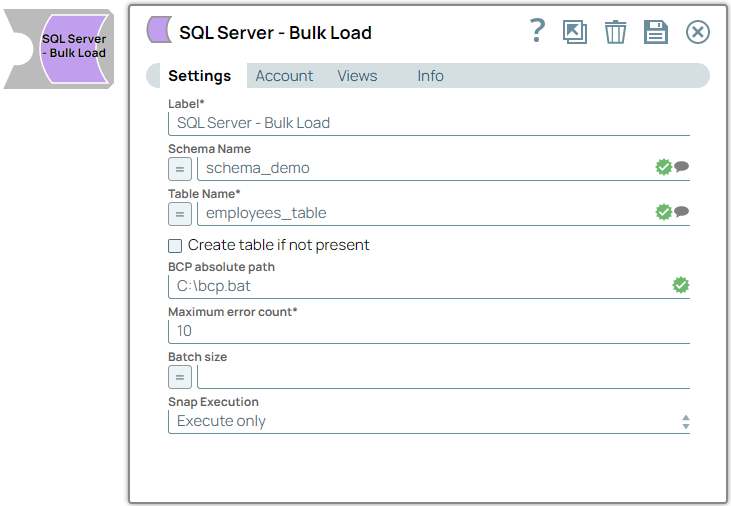
Snap settings
| Field/Field set | Description |
|---|---|
|
Label String
|
Required.Specify a unique name for the Snap. Modify this to
be more appropriate, especially if there are more than one of the same Snap in the
pipeline.
Default value: SQL Server - Bulk Load |
Schema Name
String/Expression/ Suggestion |
Optional. Specify the database schema name. The property is suggestible and will retrieve available database schemas during suggest values. Note: The values can be passed using the pipeline parameters but not the upstream parameter.
Default value: N/A Example: dbo |
Table Name
String/Expression/ Suggestion |
Required. Specify the table on which to execute the bulk load operation. Note:
Examples: Supported by BCP: "dbo"."sqldemo#^&$%" Not supported by BCP: "dbo"."sqldemo#^&%$" Default value: N/A Example: employees_table |
Create table if not present
Checkbox |
Optional. Select this checkbox to enable the Snap to automatically create a table if a table does not exist. Note: The data types for the columns in the new table depend on the data types from the upstream Snap. If a second input view exists, the Snap reads and uses the data types for the columns from this input view.
Default status: Deselected |
BCP absolute path
String |
Optional. Specify the absolute path of the bcp utility program in JCC's file system. If empty, the Snap looks for it in JCC's environment variable PATH. Note: bcp.bat should include the ".exe" extension to ensure the executable is actually referenced.
Handling Unrecognized Character sets in the Data set. As the Snaplex uses the OS's default character set, it cannot recognize characters in other languages. Due to this, unrecognized characters in the data set are replaced with junk values when performing bulk load operations. To mitigate this, create a bcp.bat file and include the following line: Use the path to this bcp.bat file in the BCP absolute path. Note: This is only applicable to Windows-based Snaplexes.
Default value: N/A Example: C:\bcp.bat |
Maximum error count
Integer |
Required. Specify the maximum number of rows which can fail before the bulk load operation is stopped. Default value: 10 Example: 12 |
Batch size
Integer/Expression |
Optional. Specify the number of records batched per request. If the input has 10,000 records and the batch size is set to 100, the total number of requests batched would be 100. Minimum Value: 1 Default value: N/A Example: 1000 |
|
Snap execution Dropdown list
|
Choose one of the three modes in
which the Snap executes. Available options are:
Default value: Execute only |
Table Creation
When attempting to load data, if the specified table does not exist and the Create table if not present checkbox is selected, the Snap creates the table along with the necessary columns and data types to accommodate the values in the first input document. If you want the table to have the same structure as a source table, you can connect the second output view of a Select Snap to the second input view of this Snap. The additional view in the Select and Bulk Load Snaps transmits metadata about the table, enabling the replication of a table from one database to another.
The metadata document, read by the second input view, contains a snapshot of the JDBC DatabaseMetaData class. By manipulating this document, you can modify the generated 'CREATE TABLE' statement. For instance, if you wish to rename the 'name' column to 'full_name,' you can utilize a Mapper (Data) Snap that sets the path '$.columns.Name.COLUMN_NAME' to 'full_name'. The document encompasses the following fields:
- columns - Contains the result of the getColumns() method with each column as a separate field in the object. Changing the COLUMN_NAME value will change the column's name in the created table. Note that you do not need to change the field name in the row input documents if you change a column name. The Snap automatically translates from the original name to the new name. For example, when changing from
nametofull_name, the name field in the input document will be put into the"full_name"column. You can also drop a column by setting the COLUMN_NAME value to null or the empty string. The other fields of interest in the column definition are:- TYPE_NAME - The type to use for the column. If this type is not known to the database, the DATA_TYPE field will be used as a fallback. If you want to explicitly set a type for a column, set the DATA_TYPE field.
- _SL_PRECISION - Contains the result of the getPrecision() method. This field is used along with the _SL_SCALE field for setting the precision and scale of a DECIMAL or NUMERIC field.
- _SL_SCALE - Contains the result of the getScale() method. This field is used along with the _SL_PRECISION field for setting the precision and scale of a DECIMAL or NUMERIC field.
- primaryKeyColumns - Contains the result of the getPrimaryKeys() method with each column as a separate field in the object.
- declaration - Contains the result of the getTables() method for this table. The values in this object are just informational at the moment. The target table name is taken from the Snap property.
- importedKeys - Contains the foreign key information from the getImportedKeys() method. The generated CREATE TABLE statement will include FOREIGN KEY constraints based on the contents of this object. Note that you will need to change the PKTABLE_NAME value if you changed the name of the referenced table when replicating it.
- indexInfo - Contains the result of the getIndexInfo() method for this table with each index as a separate field in the object. Any UNIQUE indexes in here will be included in the CREATE TABLE statement generated by this Snap.
The Snap will not automatically fix some errors encountered during table creation since they may require user intervention to resolve correctly. For example, if the source table contains a column with a type without direct mapping in the target database, the Snap fails to execute. You will then need to add a Mapper (Data) Snap to change the metadata document to explicitly set the values needed to produce a valid CREATE TABLE statement.
SQL Server BCP program only accepts date time values in format YYYY-MM-dd HH:mm: ss, thus SQL Server Bulk Load Snap only accepts two types of data as the input of a DATETIME column:
- A Joda DateTime object. For example, a Joda DateTime object can be created with expression Date.now() in Mapper Snap.
- A plain string in the format: YYYY-MM-dd HH: mm:ss. Example: 2016-10-22 11:11:11.
SQL Server Bulk Load Snap does not accept the results by the DateTime string from the expression Date.toLocaleDateTimeString().
Troubleshooting
| Error | Reason | Resolution |
|---|---|---|
| Some characters appear as junk values after bulk load. | Snaplex uses character sets defined in the OS on which it is installed. Therefore, Snaplex does not support any unrecognized character set. As a result, such characters in the data set are represented as junk values in the database after a bulk load operation. |
This problem can be resolved by editing the bcp.bat file to accept custom characters. And using the absolute path to this bcp file in the BCP absolute path property. The bcp.bat file must contain the following: Tip: This resolution is applicable only to Windows-based Snaplexes.
|