


Azure SQL Account
Overview
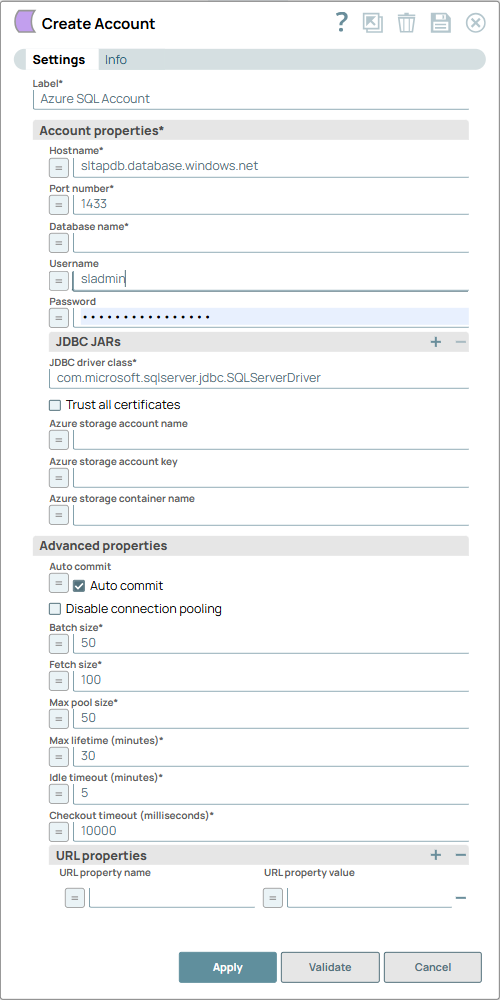
You can use this account type to connect Azure SQL Snaps with data sources that use Azure SQL account.
Prerequisites
- Valid database to connect
- Valid JDBC JAR file
Known issues
Supports only reading JSON files.
Account settings
| Field/Field set | Description |
|---|---|
Label
String |
Required. Unique name for the account. Default value: N/A |
Account properties
Fieldset |
Required. Enter the information to create a connection to the database. |
Hostname
String/Expression |
Required. Specify the server's address to which you must connect.
Default value: N/A Example: sltapdb.database.windows.net |
Port number
Integer/Expression |
Required. Specify the port number of the database server
to which you must connect. Default value: 1433 Example: 1433 |
Database name
String/Expression |
Required. Specify the name of the database to which you must connect.
Default value: N/A Example: DB1 |
Username
String/Expression |
Specify the username allowed to connect to the database. This username is used as the default username when retrieving connections and must be valid to set up the data source.
Default value: N/A Example: sladmin |
Password
String/Expression |
Specify the password used to connect to the data source. This password is used as the default password when retrieving connections and must be valid to set up the data source.
Default value: N/A Example: P#2,nxu0oiX2&? |
JDBC JARs
Fieldset |
Required. Use this field set to specify the JDBC JAR files to be loaded. Add each JAR file in a separate row.
Note: The Azure SQL Snap Pack uses the 11.2x driver by default. If you specify any specific driver, ensure that you provide a version higher than 9.1 that is compatible with the Microsoft Authentication Library for Java, because this Snap Pack uses the MSAL4J; otherwise, you may encounter errors.
|
JDBC driver class
String |
Specify the JDBC driver class name to use.
Default value: com.microsoft.sqlserver.jdbc.SQLServerDriver Example: com.microsoft.sqlserver.jdbc.SQLServerDriver |
Trust all certificates
Checkbox |
Select if all SSL certificates are to be accepted for connecting to the database.
Default value: Deselected |
Azure storage account name
String/Expression |
Specify the Azure Storage account name to use for authorization. The Bulk Load Snap automatically appends the .blob.core.windows.net domain to the value of this property.
Default value: N/A Example: johndoe |
Azure storage account key
String/Expression |
Specify the key generated by Azure for this account.
Default value: N/A Example: UvhVF65Bukk9hVF65BuUvhVF |
Azure storage container name
String/Expression |
Specify the name of an existing container.
Default value: N/A Example: johndoedcontainer |
| Advanced properties | Use this field set to specify the advanced properties. |
Auto commit
Checkbox |
Select this checkbox to commit each of the batches immediately after it is executed. If the Snap fails, only the batch being executed at that moment is rolled back.
Deselect this checkbox to commit the output only after all the batches are executed. If the Snap fails, the entire transaction is rolled back, unless the Snap finds invalid input data before it sends the insert request to the server, and routes the error documents to the Error view. Default value: Selected |
Disable connection pooling
Checkbox |
Select this checkbox to prevent the sharing of session state.
Note: Connection pooling keeps the connections active. When the Snap uses a connection and creates a table during execution, the table gets locked and is not released even after the Snap is executed and the connection is returned to the pool. If another Snap or the same Snap uses the same connection from the pool and reads the metadata of the same table, it displays an error that the resource is locked.
We recommend you select this checkbox for Snaps that use session state, for example, creating a temporary table. Default value: Deselected |
Batch size
Integer/Expression |
Required. Specify the number of statements to execute at a time.
Note:
Default value: 50 Example: 60 |
Fetch size
Integer/Expression |
Required. Specify the number of rows to fetch at a time when executing a query.
Note: Large values could cause the server to run out of memory.
Default value: 100 Example: 80 |
Max pool size
Integer/Expression |
Required. Specify the maximum number of connections a pool will maintain at a time.
Default value: 50 Example: 60 |
Max lifetime (minutes)
Integer/Expression |
Required. Specify the maximum lifetime (in minutes) of a connection in the pool.
Note: Ensure that the value you enter is a few seconds shorter than any database or infrastructure-imposed connection time limit. A value of 0 indicates an infinite lifetime, subject to the Idle Timeout value. An in-use connection is never retired. Connections are removed only after they are closed.
Default value: 30 Example: 50 |
Idle timeout (minutes)
Integer/Expression |
Required. Specify the maximum amount of time (in minutes) a connection is allowed to sit idle in the pool. A value of 0 indicates that idle connections are never removed from the pool.
Default value: 5 Example: 8 |
Checkout timeout (milliseconds)
Integer/Expression |
Required. Specify the timeout (in milliseconds) to wait for a connection to be available when the pool is exhausted.
Note: If you specify 0, the Snap waits infinitely until the connection is available. Therefore, we recommend you not specify 0 for Checkout Timeout.
Default value: 10000 Example: 100 |
URL properties
Fieldset |
Use this field set to define URL properties to use if any. |
URL property name
String/Expression |
Specify a name for the URL property if any.
Default value: N/A Example: MAX_CONCURRENCY_LEVEL |
URL property value
String/Expression |
Specify a value for the URL property name.
Default value: N/A Example: 3 |