


In-Memory Lookup
Overview
This Snap joins left and right input data streams. It uses the right input data as an in-memory lookup table.
- This is a Transform-type Snap.
-
 Works in Ultra Tasks when the Single document output field is
selected. Only one document is written to the output view for each input document, which
is a prerequisite for Ultra Pipelines.
Works in Ultra Tasks when the Single document output field is
selected. Only one document is written to the output view for each input document, which
is a prerequisite for Ultra Pipelines.
Prerequisites
- Enough free memory must be available to load all right input data to the in-memory lookup table.
Snap views
| Type | Description | Examples of upstream and downstream Snaps |
|---|---|---|
| Input | This Snap has exactly two document input views (left and right). Users may want to edit the right input view label in the Views section of the Snap, since the right input view label is used as a prefix during the JOIN operation if the same column name exists in the left input data. | |
| Output | This Snap has exactly one document output view. | |
| Learn more about Error handling. | ||
Examples
Snap settings
| Field/Field set | Description |
|---|---|
Label*
String |
Specify a unique name for the Snap. Modify this to be more appropriate, especially if more than one of the same Snaps is in the pipeline. Default value: In-Memory Lookup Example: InMemoryLookup_Join |
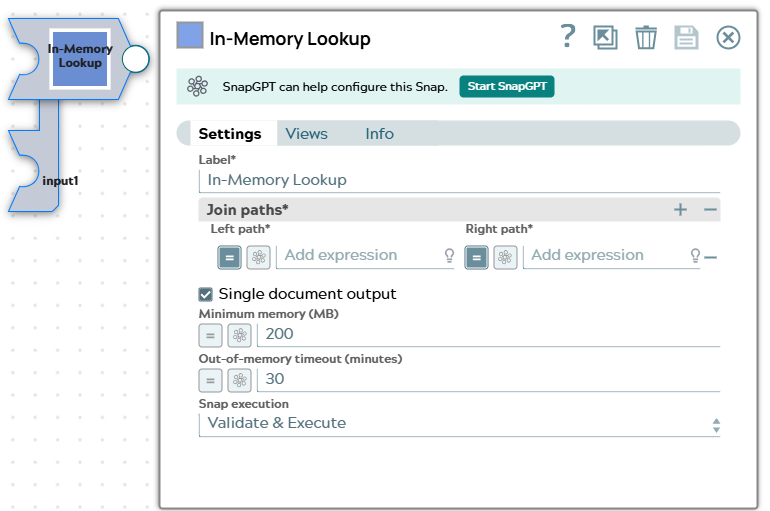
| Join paths* | Specify the field names to use for the left and right sides of the join. Each
row defines a relationship between a left field and a right field. The Snap supports
flat map data only for all input documents; a structured JSON path like
$customer.address is not supported. |
Left path*
String/Expression/ Suggestion |
Specify the field name in the left input data. You can select the field from the suggested list. Default value: None (expression toggle enabled) Example: customer_id, $customer_id, _leftFieldName (for a pipeline parameter with the expression toggle enabled) |
Right path*
String/Expression/ Suggestion |
Specify the field name in the right input data. You can select the field from the suggested list. Default value: None (expression toggle enabled) Example: customer_id, $customer_id, _rightFieldName (for a pipeline parameter with the expression toggle enabled) |
Single document output
Checkbox |
Select this checkbox to write only one document to the output view for each input document. If more than one row in the lookup table matches the left input data, the first match is joined. If there is no match, the left input data is written to the output view. Leave this checkbox selected for Ultra Tasks. If you deselect this checkbox, each matching row is joined with the left input data; the number of output documents may exceed the number of input documents. Default status: Selected |
Minimum memory (MB)
String/Expression |
Specify the minimum memory to maintain while building the in-memory lookup table
from the right input documents. If the available memory is less than this value,
the Snap pauses fetching the next right input document until more memory is
available. Set to This Snap loads all right input documents into memory before performing the JOIN. If the right input exceeds available memory, it may cause an out-of-memory failure. This field helps reduce that possibility. Default value: 200 Example: 500 |
Out-of-memory timeout (minutes)
String/Expression |
Specify the maximum time to wait for more memory to become available. If the Snap pauses longer than this value, it throws an exception to prevent the system from running out of memory. Default value: 30 minutes Example: 10 minutes |
|
Snap execution Dropdown list
|
Choose one of the three modes in
which the Snap executes. Available options are:
Default value: Validate & Execute Example: Execute only |