


Diff
Overview
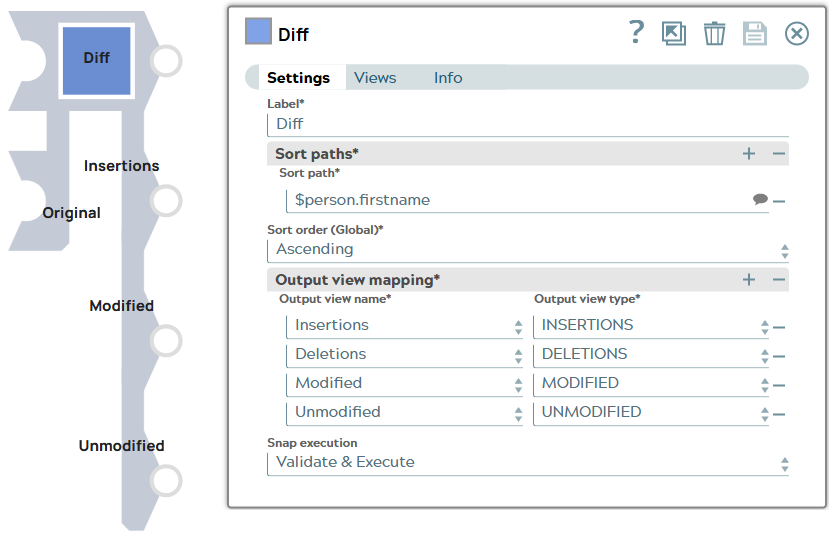
You can use this Snap to compare two sorted streams of documents (Original and New) and return four output streams: Deletions, Insertions, Modified, and Unmodified.
Ensure the first input is always New and the second input as Original in order for the Snap to display the output (insertions/deletions/modifications) in reference to the original document.
- This is a Transform-type Snap.
 Does not support Ultra Tasks
Snap views
| Type | Description | Examples of upstream and downstream Snaps |
|---|---|---|
| Input |
This Snap has exactly two document input views: New and Original. Ensure the first input is always New and the second input as Original in order for the Snap to display the output (insertions/deletions/modifications) in reference to the original document. |
|
| Output |
This Snap has four document output views:
|
|
| Learn more about Error handling. | ||
Snap settings
- Expression icon (
 ): Allows using
pipeline parameters to set field values dynamically (if enabled). SnapLogic Expressions
are not supported. If disabled, you can provide a static value.
): Allows using
pipeline parameters to set field values dynamically (if enabled). SnapLogic Expressions
are not supported. If disabled, you can provide a static value. - SnapGPT (
 ): Generates SnapLogic Expressions
based on natural language using SnapGPT. Learn
more.
): Generates SnapLogic Expressions
based on natural language using SnapGPT. Learn
more. - Suggestion icon (
 ): Populates a
list of values dynamically based on your Snap configuration. You can select only one
attribute at a time using the icon. Type into the field if it supports a comma-separated
list of values.
): Populates a
list of values dynamically based on your Snap configuration. You can select only one
attribute at a time using the icon. Type into the field if it supports a comma-separated
list of values. - Upload
 : Uploads files. Learn more.
| Field/Field set | Type | Description |
|---|---|---|
| Label*
|
String |
Specify a unique name for the Snap. Modify this
to be more appropriate, especially if more than one of the same Snaps is in the
pipeline. Default value: Diff Example: Diff_new |
| Sort paths* |
Use this field set to specify the list of paths to sort the two streams on. |
|
| Sort path* | String |
Specify the field/column name to sort the two streams on. Before comparing the two streams of data, they will be sorted by these paths, in the same order of the paths as specified in this field. For example, to sort a list of person objects by the field
Default value: None Example:
|
| Sort order (Global)* | Dropdown list |
Choose the order in which the two input streams have been sorted for the comparison. Allowed values are Ascending and Descending. Default value: Ascending Example: Descending |
| Output view mapping* |
Use this fieldset to map the output view name to the output view type if you removed and re-added output views. Tip: Though you can remove a mapping or change the order of the output views, we
recommend that you do not alter the default mappings of names with types.
|
|
| Output view name* | Dropdown list |
This is the name of the view in Views > Output Views. This value determines which result of the Diff operation is displayed in each of the four output views. Allowed values are Insertions, Deletions, Modified, and Unmodified. Default value: One allowed view name per output view. Example: Insertions |
| Output view type* | Dropdown list |
This is the type of output to be mapped with each output view in Views > Output Views. It is the result of the diff operation on each record between the two input streams. Allowed values are INSERTIONS, DELETIONS, MODIFIED, and UNMODIFIED. Default value: One allowed view type per output view. Example: DELETIONS |
| Snap execution
|
Dropdown list |
Choose one of the three modes in
which the Snap executes. Available options are:
Default value: Validate & Execute Example: Disabled |