


SAP S/4HANA Cloud Update
Overview
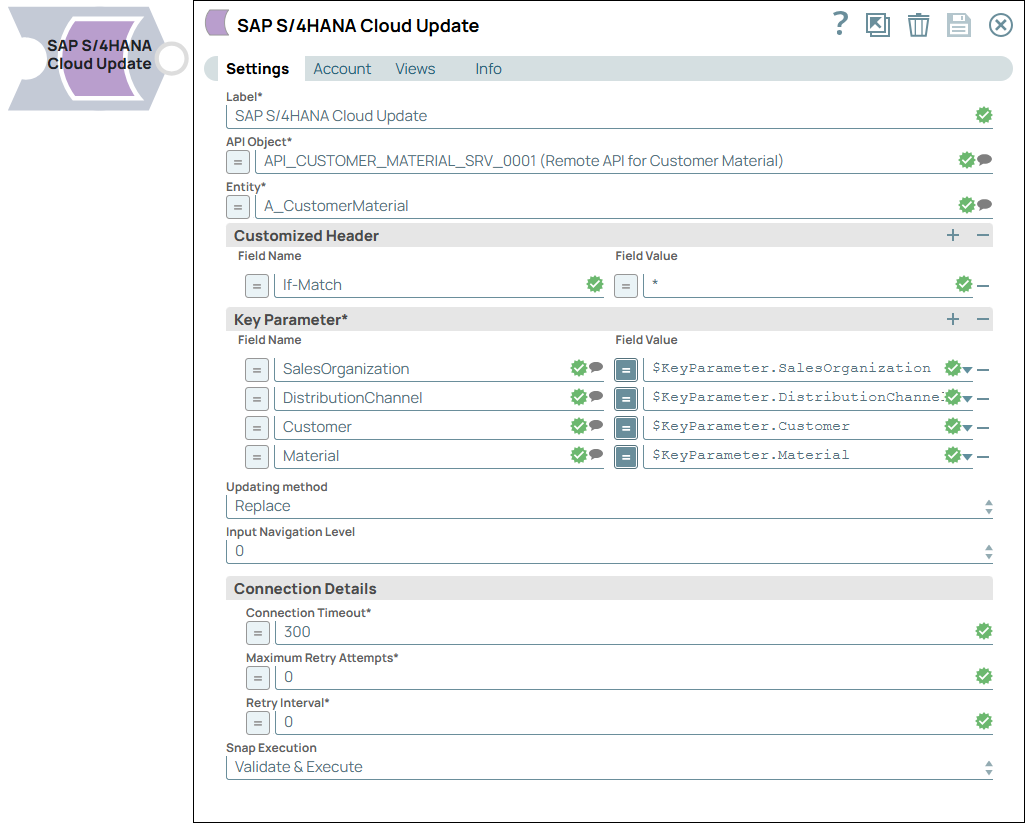
The SAP S/4HANA Cloud Update Snap updates data objects in the SAP S/4HANA Cloud instance.
Supported Accounts
- This is a Write-type Snap.
 Works in Ultra Tasks
Prerequisites
- A valid account that supports SAP S/4HANA Cloud instance, with the appropriate access permissions. See SAP S/4HANA Cloud Accounts.
Known issues
- The Snap does not support OData navigation link.
Snap views
| Type | Description | Examples of upstream and downstream Snaps |
|---|---|---|
| Input |
This Snap has exactly one document input view. Each input document contains data that must be updated and written into the SAP S/4HANA Cloud instance for the selected entity. |
|
| Output |
This Snap has at most one document output view. Each document contains the response of the update operation. |
|
| Learn more about Error handling. | ||
Snap settings
| Field/Field set | Description |
|---|---|
| Label*
|
Specify a unique name for the Snap. Modify this to be more appropriate, especially if more than one of the same Snaps is in the pipeline. Default value: SAP S/4Hana Cloud Update Example: SAP S/4HANA Cloud_Update |
| API Object*
|
Select the API that you want to access in SAP S/4HANA Cloud instance. This
dropdown list contains APIs available for the S/4HANA account configured in the
Snap, each with a short description. Default value: N/A Example: API_BUSINESS_PARTNER_0001 (Remote API for Business Partner) |
| Entity*
|
Select a business object (the Entity or Endpoint) for the API Object chosen
above. Default value: N/A Example: A_Supplier |
| Customized Header | Use this field set to add customized HTTP request headers for implementing specific HTTP requests other than the ones listed in the Additional Information - Usage of Customized header section of this page.
Note: The Snap provides the CustomizedHeader in the input schema to help you define the customized headers to the UI using the expression function. You can also manually enter the customized header names with values on the UI Customized header fieldset. If you provide only the customized header names or values using schema, but not link to the UI using the expression, the names or values you have entered will not be delivered to the API.
|
| Field Name
|
Specify the field name of the customized HTTP request header. Default value: N/A Example: If-Match |
| Field Value
|
Specify the field value for the above field of the customized HTTP request
header. Default value: N/A Example: '82F636DC08F14D22260CE67E505C231D0D2ACD95' |
| Key Parameter | Use this field set to specify the key parameters for a specific entity. Providing values for all key parameters in the dropdown list allows SAP S/4HANA to identify a unique record.
Note: Key parameters are NOT the same as filters which can return multiple records. To use a filter like normal select, use the parameters at the Filter records section instead.
Only one key parameter can be specified in each row. Click plus to add a new row in this table and define the values accordingly. |
| Field Name
|
Specify the reference parameter in this field. Default value: N/A Example: userId |
| Field Value
|
Specify the value for the reference parameter in this field. The data
type—String, Integer, Boolean, or any other—depends on the Field name you specified
for the parameter. Default value: N/A Example: TestUser |
| Updating method
|
Specify if the Replace or the Merge method should be implemented for updates.
Default value: Replace Example: Merge |
| Input Navigation Level
|
Select the navigation level of your input schema. Default value: 0 Example: 2 |
| Connection Details | Use this field set to specify the connectivity parameters. |
| Connection Timeout
|
Specify the duration in seconds for which the Snap must try to establish a
connection with SAP S/4HANA Cloud. If the connection cannot be established within
this duration, the Snap times out, writes the event to the log, and waits until the
specified Retry Interval before attempting to reconnect. Default value: 300 Example: 500 |
| Maximum Retry Attempts
|
Specify the maximum number of attempts the Snap should make to perform the
selected operation in case of connection failure or timeout. Default value: 0 Example: 3 |
| Retry Interval
|
Specify the time interval in seconds between the two successive retry requests.
A retry happens only when the previous attempt resulted in an exception. Default value: 0 Example: 2 |
| Snap execution
|
Choose one of the three modes in
which the Snap executes. Available options are:
Default value: Validate & Execute Example: Execute only |
Behavior of SAP S/4HANA Cloud Update Snap
- Supports PUT operation to Update data to the SAP S/4HANA Cloud instance.
- Supports customized HTTP Header. Learn more: Additional Information - Usage of Customized header.
- Supports the input schema by which it is allowed to display the Update supported input parameter set from the upstream input snap.
- Supports dynamic metadata loading, by which it is allowed to load the API metadata with a Parent-child dependency structure. Select an API object from the API Object field. Only this selected API-object related and Update supported (PUT operation supported) entities are displayed. After selecting an entity, only this selected entity related and Update supported (PUT operation supported) parameters are shown in the dropdown field of Key parameter and input schema.
Input Schema
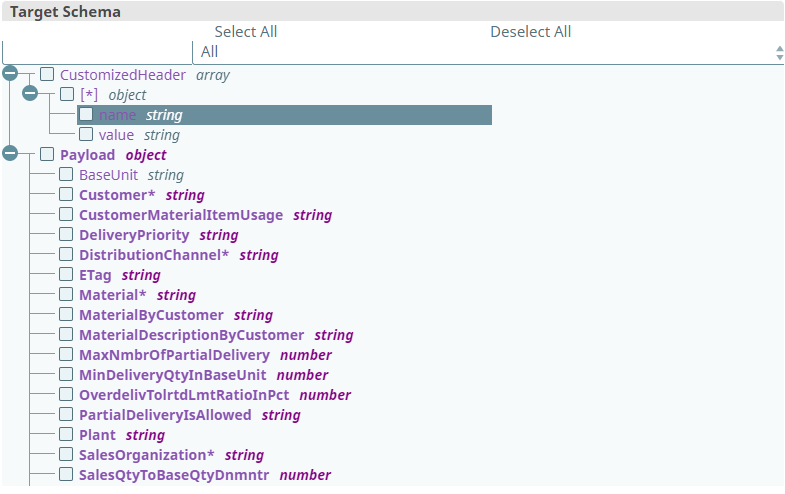
The input schema for SAP S/4HANA Update Snap is divided into two parts, CustomizedHeader, KeyParameter and Payload as shown below.
The CustomizedHeader and KeyParameter schema can help you to define the customized headers and key parameters to the UI using the expression function. You can also manually enter the customized header names with values or select key parameter names from the suggestion dropdown list and select/enter the key parameter values on the UI Customized header or Key parameters fieldset. If you provide only the customized header or key parameters' names and values using schema, but do not link to the UI using the expression, the names or values you have entered are not be delivered to the API.
The Payload schema can help you to define the input payload for the API call via Update Snap. It dynamically loads and represents all the parameters that you need for the data object updating. If you have Mapper Snap or a Snap that can display the entire input schema, always use the Payload schema to define your input payload. Otherwise, in your input JSON object, always include "Payload" text as a key in the parent of your input.
Schema Settings
| Field/Field set | Type | Description |
|---|---|---|
| CustomizedHeader | Array | Add the customized HTTP request header to implement specific HTTP requests. |
| name | String | Specify the field name of the customized HTTP request header. Example: If-Match |
| value | String | Specify the field value of the customized HTTP request header. Example: W/"'82F636DC08F14D22260CE67E505C231D0D2ACD95'" |
| Payload | Object | Specify the input data parameters for the selected entities. |
Usage of Customized Header
For this Snap Pack, setting customized HTTP headers is allowed. SAP S/4HANA Cloud contains a large number of API objects and entities. It is also possible to create customized API objects and entities in SAP S/4 HANA. For some entities, specific HTTP headers might be required. Example: If-Match and Etag. In the current release, only a few commonly used HTTP headers are predefined in the Snap. You can however add any custom or specific HTTP headers to fulfill your requirement. The following headers are already defined in Snap: Content-type, Cache-Control, Authorization, Accept, X-CSRF-Token, and Cookie.

Troubleshooting
| Field/Field set | Type | Description |
|---|---|---|
| There is an empty value in the Field name field for the Key parameter. | The Field name field must not be empty for the Key parameter. | Enter a valid Field name for the Key parameter. |
| There is an empty field in the Field name/value field for the Customized header. | The Field name/value field must not be empty for the Customized header. | Enter a valid Field name/value for the Customized header. |
| API object does not exist. | Allowed API object format is <API ID>(Description). | Locate and select an API Object from the dropdown list. |
| Entity does not exist. | The entered Entity is not found in the SAP S/4HANA Cloud. | Locate and select the Entity from the dropdown list. |