


Infor Data Fabric Compass
Overview
Infor Data Fabric Compass Snap enables integration with the Infor Data Fabric Compass Query
Service. It provides a unified interface for submitting Compass queries and retrieving the
resulting datasets within a single Snap execution. Designed to simplify data extraction
workflows, the Snap handles query submission, execution monitoring, and result retrieval
without requiring multiple Snaps or additional pipeline logic. This makes it ideal for
building efficient, low-maintenance integrations with the Infor Data Fabric ecosystem.
- This is a Write-type Snap.
 Works in Ultra Tasks
Features
- End-to-end query execution: Submit a query and retrieve the results in one step. The Snap automatically processes the query request, waits for execution to complete, and returns the resulting dataset in a structured document format.
- Configurable query parameters: Define the Compass query and execution parameters directly within the Snap, allowing flexible control of request behavior and data retrieval options.
- Built-in execution monitoring: The Snap handles the full lifecycle of a Compass query—submitting, polling, and fetching results—removing the need for manual orchestration across multiple Snaps.
- Optimized for large datasets: Supports streaming and paginated retrieval mechanisms to efficiently handle large query result sets while maintaining pipeline performance.
- Reduced coding and maintenance: By consolidating query submission and data retrieval into a single Snap, integration complexity is minimized, reducing development effort and long-term maintenance.
- Consistent integration experience: Designed in line with existing SnapLogic patterns for Infor integrations, ensuring a familiar configuration experience if you are already using other Infor Snaps.
Prerequisites
- A valid Infor M3 account.
Limitations and known issues
None.
Snap views
| Type | Description | Examples of upstream and downstream Snaps |
|---|---|---|
| Input | This Snap supports one document input view. | Any Document Snap |
| Output | This Snap supports a maximum of one document output view. | Any Document Snap |
| Learn more about Error handling. | ||
Snap settings
Legend:
- Expression icon (
 ): Allows using
JavaScript syntax to access SnapLogic Expressions to set field values dynamically (if
enabled). If disabled, you can provide a static value. Learn more.
): Allows using
JavaScript syntax to access SnapLogic Expressions to set field values dynamically (if
enabled). If disabled, you can provide a static value. Learn more. - SnapGPT (
 ): Generates SnapLogic Expressions
based on natural language using SnapGPT. Learn
more.
): Generates SnapLogic Expressions
based on natural language using SnapGPT. Learn
more. - Suggestion icon (
 ): Populates a
list of values dynamically based on your Snap configuration. You can select only one
attribute at a time using the icon. Type into the field if it supports a comma-separated
list of values.
): Populates a
list of values dynamically based on your Snap configuration. You can select only one
attribute at a time using the icon. Type into the field if it supports a comma-separated
list of values. - Upload
 : Uploads files. Learn more.
| Field/Field set | Type | Description |
|---|---|---|
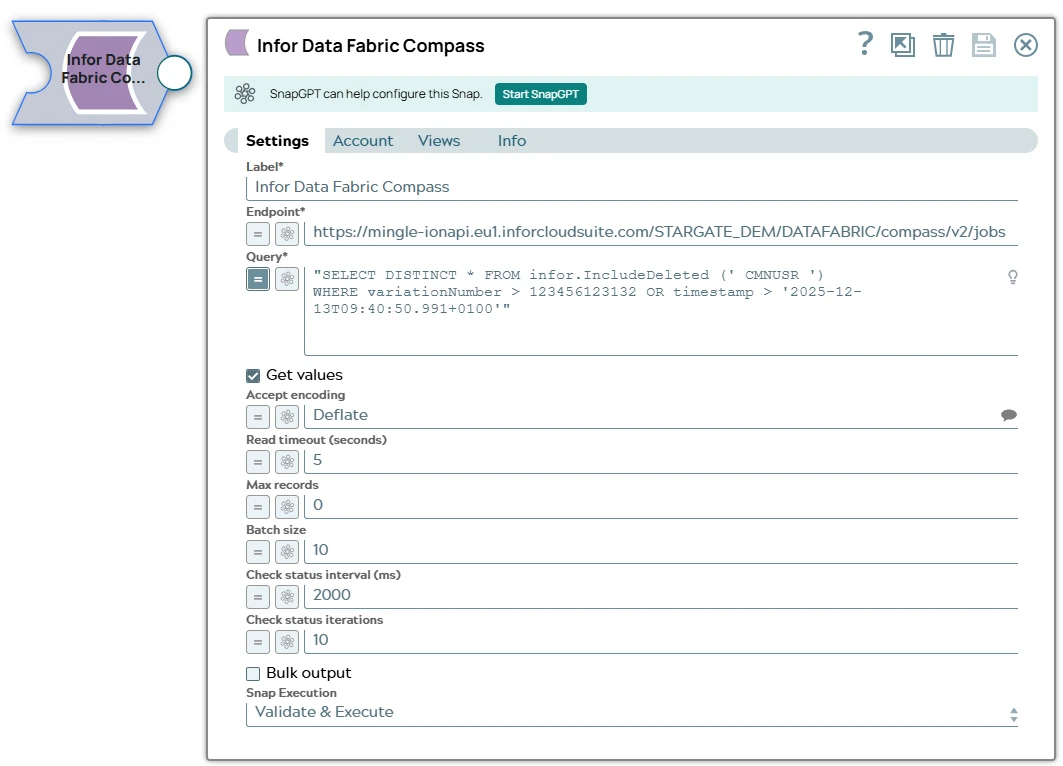
| Label* | String | Specify a unique name for the Snap. Modify this to be more appropriate, especially if there are more than one of the same Snap in the pipeline. |
| Endpoint | String/Expression | Required.Specify the service endpoint URL of the Infor
Data Fabric Compass Query Service. Default value: N/A Example: |
| Query | String/Expression | Required.Specify a SQL statement that you want Compass to
execute against the Infor Data Lake. The query must reference the Data Lake objects or Compass views that you want to read and include any filters, joins, or ordering that you need. The Snap sends this SQL text directly to the Compass API, which returns the resulting dataset. Default value: N/A Example: |
| Get values | Checkbox | Select this checkbox to retrieve the full result set of the executed query. When
you deselect this checkbox, the Snap outputs only the submission response, which
includes the query ID, result location, and current query status. Default status: Selected |
| Accept encoding | String/Expression | Specify the Accept encoding to use when retrieving the values. Default value: Deflate Example: Deflate |
| Read timeout (seconds) | Integer/Expression | Specify the long-polling timeout period. The value can range from 0 through 25
seconds. A value of 0 indicates that long-polling is not used. Default value: 0 Example: 20 |
| Max records | Integer/Expression | Specify the maximum number of records to retrieve. Set 0 to return all
records. Default value: 0 Example: 100 |
| Batch size | Integer/Expression | Specify the batch size that determines the paging size for data retrieval. A
value of 0 retrieves all data at once. Default value: 0 Example: 50 |
| Check status interval (ms) | Integer/Expression | Specify the check-status interval, which defines the delay between consecutive
checks to determine whether the query has finished. Default value: 5000 Example: 2000 |
| Check status iterations | Integer/Expression | Specify the maximum number of iterations used to check whether the query has
completed. Default value: 10 Maximum value 25 Example: 5 |
| Bulk output | Checkbox | Select this checkbox to retrieve the full result set of the executed query in
bulk, based on the specified batch size. When you deselect this checkbox, the Snap
outputs documents one at a time. Default status: Deselected |
| Snap execution | Dropdown list | Choose one of the three modes in which the Snap executes. Available options
are:
|