


Salesforce Publisher
Overview
The Salesforce Publisher Snap publishes Salesforce Platform Event records to a given event custom Salesforce object.
Salesforce Platform Events are part of Salesforce's enterprise messaging platform and help deliver secure and scalable custom notifications within Salesforce or from external sources.
In Bulk API mode, the Snap publishes multiple platform event records in batches. In REST API mode, the Snap publishes only one platform event record per each request for each input document.
- This is a Write-type Snap.
 Works in Ultra Tasks
Supported Accounts
Limitations
- In Salesforce 44.0, when an input document contains extra fields which are not part of the list of fields defined in a given Platform Event object, the error handling of Salesforce in REST API and Bulk API is different. REST API throws the error: "No such column ...". However, Bulk API ignores all extra fields and successfully publishes records as long as the mandatory fields are present.
- This Snap performs batch processing, that is, a batch of input documents are processed for each HTTP request sent to Salesforce.
- Values of all the expression-enabled fields must remain constant during the Snap execution or validation. Hence, all expression fields can support Pipeline parameters only when they are expression-enabled. The input data parameters are not supported for expression fields, for example,
$serviceVersion.
Snap views
| Type | Description | Examples of upstream and downstream Snaps |
|---|---|---|
| Input |
This Snap has exactly one document input view. A stream of documents whose data schema is the same as the schema that is defined in the selected Platform Event custom Salesforce object. Each document contains one Salesforce Platform Event record. The Snap supports the input schema suggest functionality that shows the input schema in the Target path of the Mapper Snap if the Mapper Snap is connected to the input view. |
|
| Output |
This Snap has at most one document output view. A stream of documents that contain the |
|
| Learn more about Error handling. | ||
Snap settings
- Expression icon (
 ): Allows using
pipeline parameters to set field values dynamically (if enabled). SnapLogic Expressions
are not supported. If disabled, you can provide a static value.
): Allows using
pipeline parameters to set field values dynamically (if enabled). SnapLogic Expressions
are not supported. If disabled, you can provide a static value. - SnapGPT (
 ): Generates SnapLogic Expressions
based on natural language using SnapGPT. Learn
more.
): Generates SnapLogic Expressions
based on natural language using SnapGPT. Learn
more. - Suggestion icon (
 ): Populates a
list of values dynamically based on your Snap configuration. You can select only one
attribute at a time using the icon. Type into the field if it supports a comma-separated
list of values.
): Populates a
list of values dynamically based on your Snap configuration. You can select only one
attribute at a time using the icon. Type into the field if it supports a comma-separated
list of values. - Upload
 : Uploads files. Learn more.
| Field/Field set | Description |
|---|---|
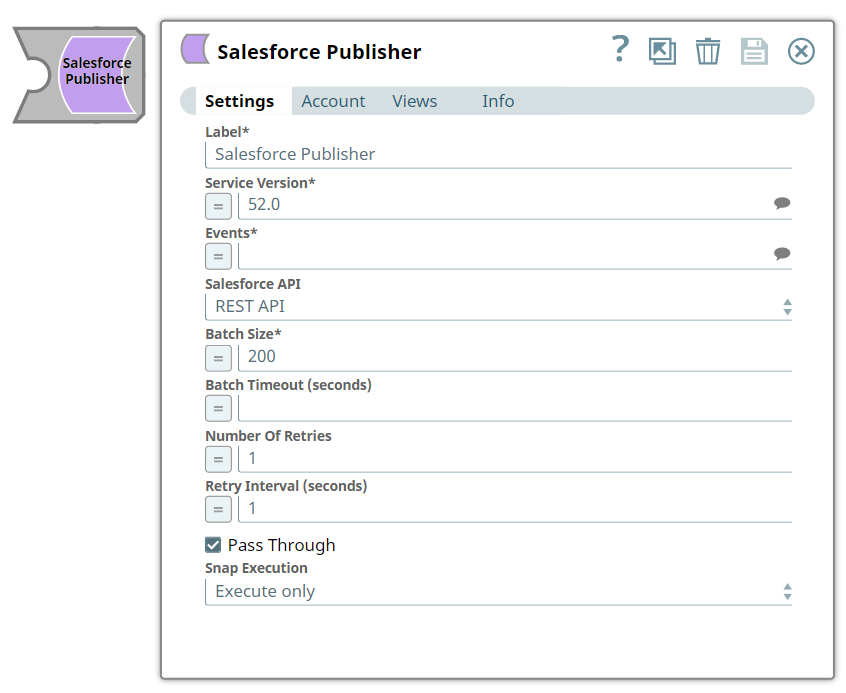
Label
String |
Required. Specify the name for the Snap. You can modify this to be more specific, especially if you have more than one of the same Snap in your Pipeline.
Default value: Salesforce Publisher Example: Salesforce Publisher |
Service Version
String |
Required. Specify the version number of the Salesforce service that you want to connect to.
Note: Salesforce platform event is supported in version 44.0 or later.
Default value: 44.0 Example: 44.0 |
Events
String |
Required. Specify the name of the Salesforce platform event custom object. You can select the name from the suggested list in the drop-down menu. The supported Salesforce Events are:
Note: There are two underscore characters in "__e".
Default value: N/A Example: Printer_Event__e |
Salesforce API
Dropdown list |
Select the Salesforce API mode. The available options are:
Note: In REST API mode, the Snap publishes one record at a time and returns the results in the output. REST API is simpler and faster if the number of records to be published is small.
Default value: REST API Example: Bulk API |
Batch size
Integer |
Specify the batch size in records.
Note:
Default value: 200 Example: 700 |
Batch timeout (seconds)
Integer |
Specify the batch timeout in seconds. The Snap sends a batch write request to SFDC when the number of input documents in the buffer reaches the given Batch size. However, sometimes, input documents may not arrive for a long time. In such cases, a Batch timeout value helps send a batch write request in a specified time interval even if the number of input documents in the buffer is less than the buffer size.
If you set Batch timeout to 0, the Snap waits until the number of input documents in the buffer reaches the Batch size. Default value: N/A Example: 60 |
Number of retries
Integer |
Specify the maximum number of retry attempts in case of a network failure.
Note:
This Snap retries all retryable HTTP status codes, including 401, 403, and 5XX, and connection-related errors. Ensure that the local drive has sufficient free disk space to store the temporary local file. Default value: 1 Example: 3 |
Retry interval (seconds)
Integer |
Specify the minimum number of seconds for which the Snap must wait before attempting recovery from a network failure.
Default value: 1 Example: 3 |
Pass through
Checkbox |
Select this checkbox to pass the input document through to the output view under the key original. If you deselect this checkbox, the input document is not passed and there is no original key in the output document.
Default value: Selected |
Snap execution
Dropdown list |
Choose one of the three modes in
which the Snap executes. Available options are:
|