


Amazon Bedrock MKB Agentic Retrieve
Overview
You can use this Snap to perform agentic retrieval against a single Amazon Bedrock Managed Knowledge Base (MKB). Instead of a single similarity search, a foundation model decomposes the query into sub-queries, iteratively retrieves relevant chunks across the knowledge base, and—when enabled—generates a natural-language answer with citations.
This Snap is the Managed Knowledge Base equivalent of retrieve-and-generate. Because the
RetrieveAndGenerate API is not supported for MANAGED
knowledge bases, the Snap uses the AgenticRetrieveStream API, which supports
both retrieval and answer generation in one call.
Use this Snap for complex, multi-step questions where retrieval accuracy matters more than latency; it is slower and more expensive than a single-pass search because it invokes a foundation model to plan and reason over the retrieval. For simple, low-latency similarity lookups, use the Amazon Bedrock MKB Retrieve Snap instead.
MANAGED. If the specified knowledge base is not
MANAGED, the Snap fails with an error that names the actual type and directs
you to use the Agent Retrieve and Generate Snap, which supports
VECTOR knowledge bases.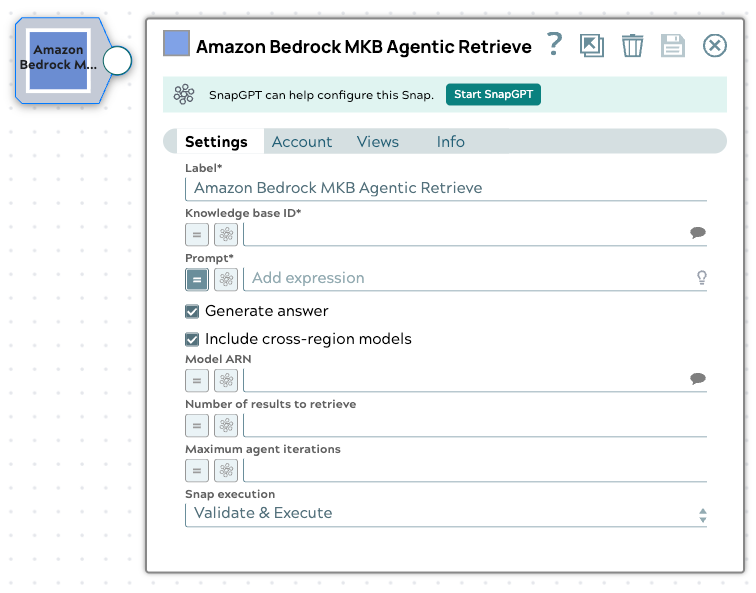
- This is a Transform-type Snap.
 Does not support Ultra Tasks
Prerequisites
- Amazon Bedrock Account
- An Amazon Bedrock Managed Knowledge Base. See Create a knowledge base in the Amazon Bedrock documentation.
Snap views
| Type | Description | Examples of upstream and downstream Snaps |
|---|---|---|
| Input | This Snap supports a maximum of one document or binary input view. The input is optional: if the Prompt field contains a literal value, the Snap can run with no input document. If you select the Binary input view, the incoming stream content (read as UTF-8 text) is used as the prompt, and the Prompt field is not used. | |
| Output | This Snap has exactly one document output view. The output document contains the generated answer and citations (when generation is enabled) and the retrieved results. | Mapper |
| Learn more about Error handling. | ||
Snap settings
- Expression icon (
 ): Allows using
JavaScript syntax to access SnapLogic Expressions to set field values dynamically (if
enabled). If disabled, you can provide a static value. Learn more.
): Allows using
JavaScript syntax to access SnapLogic Expressions to set field values dynamically (if
enabled). If disabled, you can provide a static value. Learn more. - SnapGPT (
 ): Generates SnapLogic Expressions
based on natural language using SnapGPT. Learn
more.
): Generates SnapLogic Expressions
based on natural language using SnapGPT. Learn
more. - Suggestion icon (
 ): Populates a
list of values dynamically based on your Snap configuration. You can select only one
attribute at a time using the icon. Type into the field if it supports a comma-separated
list of values.
): Populates a
list of values dynamically based on your Snap configuration. You can select only one
attribute at a time using the icon. Type into the field if it supports a comma-separated
list of values. - Upload
 : Uploads files. Learn more.
| Field/Field set | Type | Description |
|---|---|---|
| Label*
|
String |
Specify a unique name for the Snap. Modify this to be more appropriate, especially if more than one of the same Snaps is in the pipeline. Default value: Amazon Bedrock MKB Agentic Retrieve Example: Answer support questions |
| Knowledge base ID | String/Expression/ Suggestion |
Required. Specify the unique identifier of the Managed Knowledge Base to query. The Snap suggests available knowledge bases from the configured account. The suggested value uses the following format: KNOWLEDGE_BASE_ID:KNOWLEDGE_BASE_NAME Only the portion before the colon is used as the knowledge base ID. Default value: N/A Example: ABCD1234:support-docs-kb |
| Prompt | String/Expression |
Required. Specify the natural-language question or prompt to
send to the agentic retriever. This field must contain a literal value or
expression when no binary input is provided.
Note: If you select the
Binary input view, the incoming stream content (read as
UTF-8 text) is used as the prompt, and this field is ignored. Default value: N/A Example: What is the SLA for a P1 incident, and how does it compare to P2? |
| Generate answer | Checkbox |
When selected, the Snap generates a natural-language answer with citations. When deselected, the Snap returns retrieved results only (agentic, multi-step retrieval without answer generation). Default status: Selected |
| Include cross-region models | Checkbox |
When selected, cross-region inference profile models are included in the Model ARN suggestion list. This field is hidden or disabled when Model ARN is set through an expression. Default status: Selected |
| Model ARN | String/Expression/ Suggestion |
Specify the ARN of the foundation model used for query decomposition and answer generation. If you leave this field blank, the managed knowledge base automatically selects the optimal model. The Snap suggests the account's available retrieve-and-generate models (foundation models, plus cross-region models when included). Default value: N/A Example: arn:aws:bedrock:us-east-1::foundation-model/anthropic.claude-3-sonnet-20240229-v1:0 |
| Number of results to retrieve | Integer/Expression |
Specify the number of source chunks to retrieve per sub-query. Minimum value: 1 Maximum value 100 Default value: N/A Example: 5 |
| Maximum agent iterations | Integer/Expression |
Specify the maximum number of reasoning and retrieval iterations the agentic retriever may perform. Leave this field blank to use the service default. If specified, the value must be at least 1. Default value: N/A Example: 3 |
| Snap execution
|
Dropdown list |
Choose one of the three modes in
which the Snap executes. Available options are:
Default value: Validate & Execute Example: Execute only |
Troubleshooting
The Knowledge base ID or prompt is blank at execution time.
A required value is missing when the Snap runs.
Provide a value for the Knowledge base ID and for the Prompt (or supply the prompt through a binary input stream).
The knowledge base is not of type
MANAGED.
The specified knowledge base is a VECTOR knowledge
base rather than a MANAGED one.
Use the Agent Retrieve and Generate
Snap for VECTOR knowledge bases, or specify a MANAGED
knowledge base for this Snap.