


JMS Account
Overview
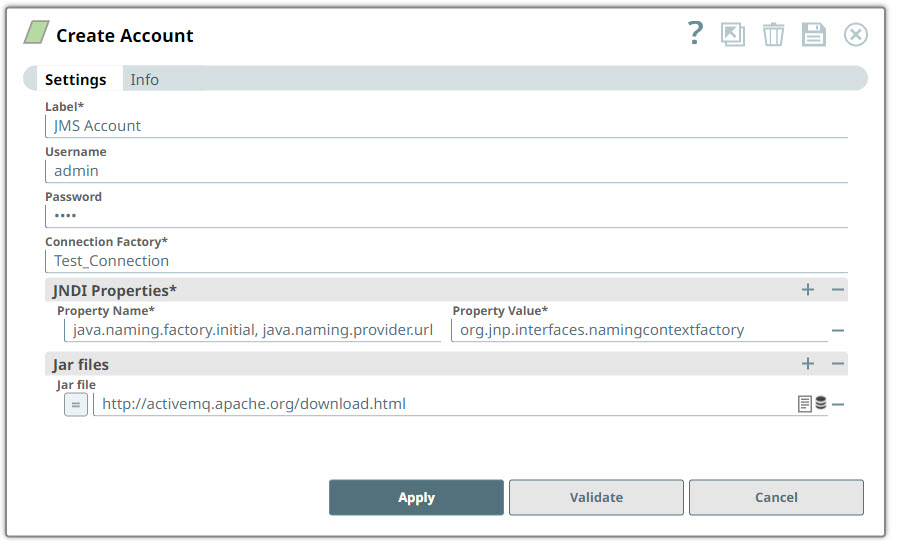
You can use this account type to connect JMS Snaps with data sources that use the JMS account.
Prerequisites
- A valid JAR file.
Account settings
| Field/Field set | Description |
|---|---|
Label*
String |
Specify a unique label for the account. Default value: N/A Example: JMS Account |
Username
String |
Optional. Specify a username necessary to create the connection to the JMS provider. Default value: N/A Example: [email protected] |
Password
String |
Specify the password associated with the JMS username. Default value: N/A Example: NAo93@$$! |
Connection Factory
String |
Specify the JNDI name for the JMS connection factory. Default value: N/A Example: Test_Connection |
| JNDI Properties* |
Use this field set to configure additional JNDI properties for the JMS account. This field set contains the following fields: |
| Property Name | Enter the name of the JNDI property.
Example: java.naming.factory.initial, java.naming.provider.url |
| Property Value | Enter the value of the JNDI property.
Example: org.jnp.interfaces.namingcontextfactory Note: HTTPS protocol is not supported for this field.
|
| Jar files |
Optional. Use this field set to add Jar files.
|
Troubleshooting
| Error | Reason | Resolution |
|---|---|---|
COULD_NOT_CREATE_SESSION |
The account settings are missing or invalid. | Verify that the account settings are correct and valid. |
NO_JAR |
At least one jar must be defined | Define at least one jar file to use the JMS Snaps, such as activemq-all.jar. |
JMS_ERROR |
The JMS account might not be configured properly. | Verify that the JMS provider is available and that the account is properly configured. |
ERROR_LOAD_FROM_CACHE |
Error while loading connections from the cache. | Try again, if the problem persists and then raise a defect. |