


Google Directory Google Service Account
Overview
You can use this account type to connect the Google Directory Snaps with data sources that use the Google Service Account.
C125v1gta) in the
Filter attributes settings in the Google Directory Read Snap. The
filter attributes are optional when using other accounts. This step is mandatory when using
the Google Directory Read Snap configured with the Google Service Account because, by
default, it is not associated with any customer. Learn more about
finding the customer ID in the Google Workspace.Alternatively, you can follow these steps to obtain the Customer ID:
- Sign in using your administrator account in Google Workspace.
- Navigate to your Admin Console.
- Click Account > Account Settings.
- Check for Customer ID.
Prerequisites
- Valid JSON key. Learn how to create a JSON key.
Limitations
- When you read a Group Resource using the userkey as a filter key under the
Filter attributes settings in the
Google Directory Read Snap, a
404error displays because the get API for the Google Resource supports only the groupkey as the filter key. Learn more.
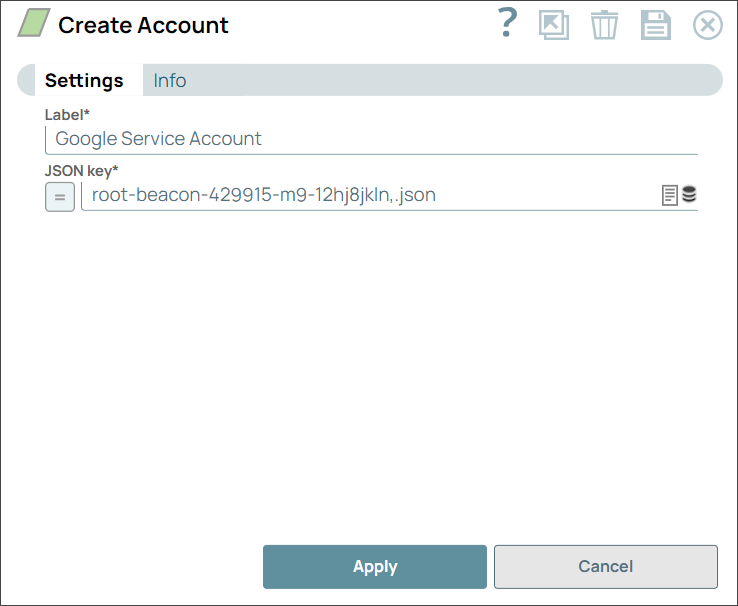
Account settings
| Field/Field set | Description |
|---|---|
Label
String* |
Specify a unique name for the Snap. Modify this to
be more appropriate, especially if there are more than one of the same Snap in the
pipeline.
Default value: Google Service Account Example: Google Directory - Service Account |
JSON key
String/Expression* |
Specify the JSON key created for the service
account. Learn
how to create a JSON key.
Default value: N/A Example: root-beacon-429915-m9-12hj8jkln.json |
Troubleshooting
| Error | Cause | Resolution |
|---|---|---|
| Security Exception occurred while accessing the Google Directory API | Unable to make a call and access the Google Directory API. | Provide the correct credentials and retry. |
| Failure: IO error occurred
|
The Google Service Account is not associated with any customer. | Provide the customerID because the Google Service Account is not associated with any customer. Ensure that the scope is correctly defined for the action or resource being executed. |
| Failure: IO error occurred
|
The Google Service Account is not associated with any customer or domain. | Provide customer or domain information because the Google Service Account is not associated with any customer or domain. |