


Power BI Read
Overview
The Power BI Read Snap reads data resources from a specified workspace.
- This is a Read-type Snap.
 Works in Ultra Tasks
Snap views
| Type | Description | Examples of upstream and downstream Snaps |
|---|---|---|
| Input |
This Snap has at most one document input view. Expected input: A document containing details of the workspace/entity to read. |
|
| Output |
This Snap has exactly one document output view. Expected output: A document containing details of the entities. |
|
| Learn more about Error handling. | ||
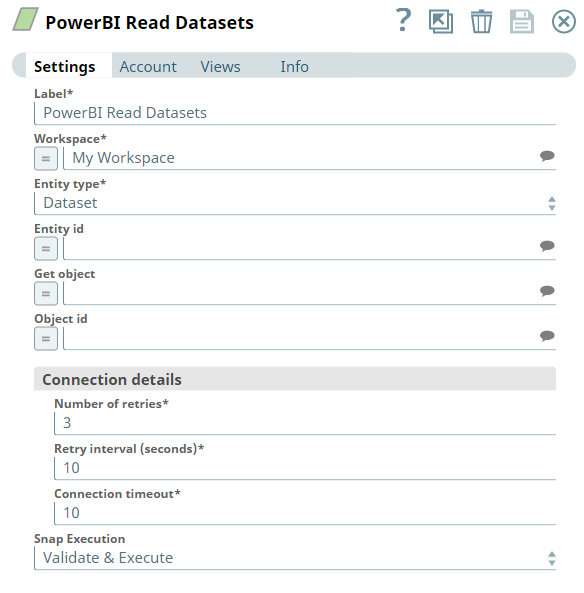
Snap settings
| Field/Field set | Description |
|---|---|
|
Label String
|
Specify a unique name for the Snap. Modify this to
be more appropriate, especially if there are more than one of the same Snap in the
pipeline.
Default value: Power BI Read Example: Read Employee Record |
|
Workspace String
|
Required. Enter the workspace from which to read the resource. Alternatively, click the Suggest icon to fetch a list of workspaces associated with the Power BI account and select the workspace.
Default value: N/A Example: Employee Records |
|
Entity type String
|
Required. Select the entity type to read.
Available options are:
Default value: Dashboard Example: Report |
|
Entity id String
|
Enter the ID of the entity to retrieve. Alternatively, click the Suggest icon to fetch the IDs of all entities of the specified entity type available in the workspace.
Leave this field blank to retrieve all entities of the specified entity type in the workspace. Default value: N/A Example: SalesMarketingDataset (XXXXXXXXXXXXX) |
|
Get object String
|
Select the read operation to perform upon the specified entity/entity type. The available read operations vary based on your configuration of the Entity type field.
This field is mandatory when configuring the Object id field. Available options based on entity types are:
Default value: N/A Example: Get Datasources |
|
Object id String
|
Enter the ID of the object to retrieve. Alternatively, click the Suggest icon to fetch the IDs of all entities of the specified entity type available in the workspace.
Leave this field blank to retrieve all entities of the specified entity type in the workspace. Default value: N/A Example: Number of Projects (1a2345d6-7890-123a-b45f-678a9fe01234) |
| Connection details | Use this field set to configure the network connection parameters.
This field set contains the following fields:
|
|
Connection timeout Integer
|
Required. Specify the connection timeout duration in seconds.
Default value: 10 Example: 30 |
|
Number of retries Integer
|
Required. Specify the maximum number of re-connections if the connection fails or is timed-out.
Default value: 3 Example: 4 |
|
Retry interval (seconds) Integer
|
Required. Specify the interval in seconds between reconnections.
Default value: 10 Example: 30 |
|
Snap execution Dropdown list
|
Choose one of the three modes in
which the Snap executes. Available options are:
Default value: Execute only |
Troubleshooting
| Error | Cause | Resolution |
|---|---|---|
| HTTP Response Exception:400 | Invalid OAuth endpoint/token URL. | Verify the values of the OAuth2 endpoint or token URLs in the account settings. |
| HTTP Response Exception:401 | Invalid refresh token or access token. | Verify the values of the refresh or access tokens in the account settings. |
| HTTP Response Exception:409 | Conflict | Verify the network and Snap settings. |
| Invalid input. | Your input in the Get object field is invalid. | Verify whether you have entered it correctly. Alternatively, select it from the drop-down list to avoid any human errors. |
| Property value is missing. | Your input for 'Workspace'/'Entity id' is missing. | Required fields cannot be blank. Verify whether you have configured all required fields correctly. |