


ASB Acknowledge
Overview
The ASB Acknowledge Snap acknowledges messages from Azure Service Bus (ASB).
You can use this Snap only if the Consumer is set to SYNCHRONOUS mode and if you select PIPELINE CONTROL for Message acknowledge mode. For more information on the Processing and Acknowledge mode, see ASB Consumer.
- This is a Read-type Snap.
 Works in Ultra Tasks
Snap views
| Type | Description | Examples of upstream and downstream Snaps |
|---|---|---|
| Input |
This Snap has exactly one document input view. Expected input: Metadata from an upstream ASB Consumer Snap. |
|
| Output |
This Snap has at most one document output view. Expected output: Messages that have been processed and acknowledged. |
|
| Learn more about Error handling. | ||
Snap settings
- Expression icon (
 ): Allows using
pipeline parameters to set field values dynamically (if enabled). SnapLogic Expressions
are not supported. If disabled, you can provide a static value.
): Allows using
pipeline parameters to set field values dynamically (if enabled). SnapLogic Expressions
are not supported. If disabled, you can provide a static value. - SnapGPT (
 ): Generates SnapLogic Expressions
based on natural language using SnapGPT. Learn
more.
): Generates SnapLogic Expressions
based on natural language using SnapGPT. Learn
more. - Suggestion icon (
 ): Populates a
list of values dynamically based on your Snap configuration. You can select only one
attribute at a time using the icon. Type into the field if it supports a comma-separated
list of values.
): Populates a
list of values dynamically based on your Snap configuration. You can select only one
attribute at a time using the icon. Type into the field if it supports a comma-separated
list of values. - Upload
 : Uploads files. Learn more.
| Field/Field set | Description |
|---|---|
Label
String |
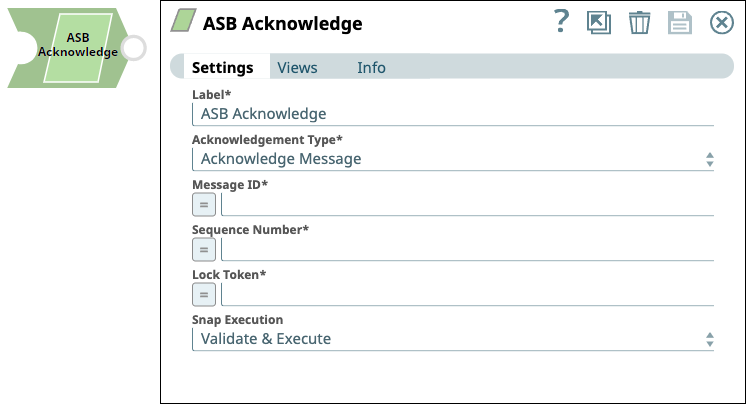
Required. Specify a unique name for the Snap. Modify this to be more appropriate, especially if more than one of the same Snaps is in the pipeline. Default value: ASB Acknowledge |
Acknowledgement Type*
Dropdown list |
Select an option to determine the action on the received messages. The available options are:
Default value: Acknowledge Message Example: Defer Message |
Message ID*
String/Expression |
Specify the ID of the message to be acknowledged. Default value: N/A Example: 345 |
Sequence Number*
String/Expression |
Specify the order, relative to other messages, in which the message will be acknowledged. Default value: N/A Example: 2 |
Lock Token*
String/Expression |
Specify the lock token of the message to be acknowledged. Note: Lock token is the lock on the message to access a particular message that is unique for each message. The lock token is bound with a specific time duration called message lock duration in the Azure portal. This token is available for a specific time duration only for each message. After the duration lapses, the token is exhausted or the message cannot be acknowledged and is abandoned automatically.
Default value: N/A Example: 852 |
Snap execution
Dropdown list |
Choose one of the three modes in
which the Snap executes. Available options are:
|