


SuccessFactors Create
Overview
The SuccessFactors Create Snap creates data objects in the SuccessFactors Data Center.
For more information about SuccessFactors APIs, see SuccessFactors Documentation.
- This is a Write-type Snap.
 Works in Ultra Tasks
Supported Accounts
Prerequisites
- A valid SuccessFactors host server.
- A valid account with the roles required to perform the Create operation on the selected entity.
Snap views
| Type | Description | Examples of upstream and downstream Snaps |
|---|---|---|
| Input |
This Snap has exactly one document input view. A document containing data that must be created and written into the SuccessFactors Data Center for the selected entity. |
|
| Output |
This Snap has at most one document output view. A document containing the new data created in the SuccessFactors Data Center for the selected entity. |
|
| Learn more about Error handling. | ||
Snap settings
| Field/Field set | Description |
|---|---|
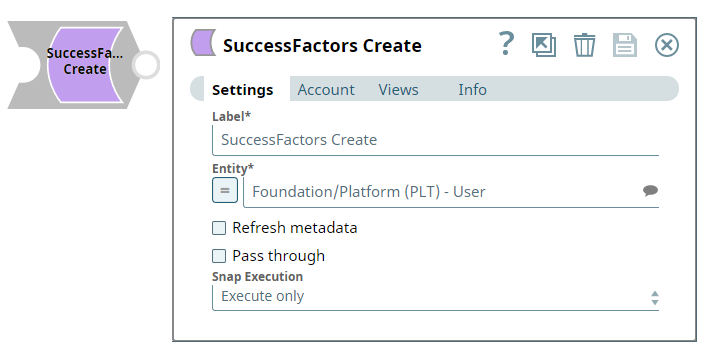
| Label
|
Specify a unique name for the Snap. Modify this to be more appropriate, especially if more than one of the same Snaps is in the pipeline. Default value: SuccessFactors Create |
| Entity
|
Required. Lets you define an entity (business object) of the API. You can either choose an entity from the suggestion drop-down or type an entity manually. The values in the suggestion drop-down are displayed dynamically based on the user's account.
The entity is shown as Default value: N/A Example: Foundation/Platform (PLT) – User or User |
| Refresh metadata
|
If selected, the Snap refreshes the cache and shows the refreshed metadata results including any entities/parameters that were added or deleted. This is useful in cases where changes are made to the dataset outside of SnapLogic, such as when a dataset has been created or deleted.
Note: After the first run and after the metadata has been refreshed, please deselect this checkbox.
Default value: Deselected |
| Pass through
|
If selected, lets the data from an incoming document "pass through" and merge into the new document being written to the output. The input document is passed through to the output view under the key 'original'.
Default value: Selected |
| Snap execution
| Choose one of the three modes in
which the Snap executes. Available options are:
|
For more information about the OData based API, see OData Version 4.0 Documentation.
Troubleshooting
| Error | Cause | Resolution |
|---|---|---|
| The input entity does not exist. | An invalid entity has been entered. | Click the suggestion drop-down in the Entity field and select the entity. |