


Reltio Account (Deprecated)
Overview
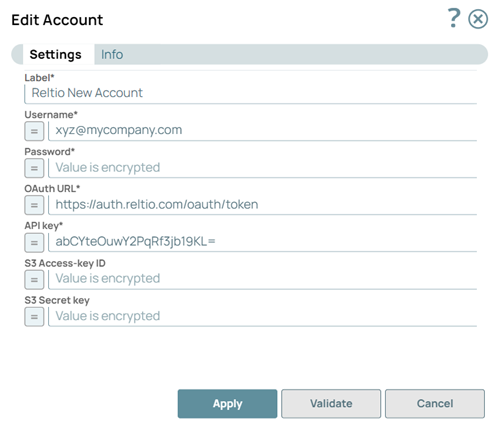
The Reltio Account uses basic authentication (username and password) to connect Reltio Snaps to your Reltio tenant.
Important: Reltio deprecated basic authentication (username and password) for API
access in October 2024. Migrate to the Reltio OAuth2
Account, which authenticates using client credentials.
Account settings
Legend:
- Expression icon (
 ): Allows using
JavaScript syntax to access SnapLogic Expressions to set field values dynamically (if
enabled). If disabled, you can provide a static value. Learn more.
): Allows using
JavaScript syntax to access SnapLogic Expressions to set field values dynamically (if
enabled). If disabled, you can provide a static value. Learn more. - SnapGPT (
 ): Generates SnapLogic Expressions
based on natural language using SnapGPT. Learn
more.
): Generates SnapLogic Expressions
based on natural language using SnapGPT. Learn
more. - Suggestion icon (
 ): Populates a
list of values dynamically based on your Snap configuration. You can select only one
attribute at a time using the icon. Type into the field if it supports a comma-separated
list of values.
): Populates a
list of values dynamically based on your Snap configuration. You can select only one
attribute at a time using the icon. Type into the field if it supports a comma-separated
list of values. - Upload
 : Uploads files. Learn more.
| Field/Field set | Description |
|---|---|
Label*
String |
Specify the name for the account. Modify the
account name if there is more than one account of the same account type in your
project.
Default value: N/A Example: Reltio Account |
Username*
String/Expression |
Specify the username or email address associated
with your Reltio account.
Default value: N/A Example: [email protected] |
Password*
String/Expression |
Specify the password associated with your Reltio
account.
Default value: N/A Example: <Encrypted> |
OAuth URL*
String/Expression |
Specify the URL of Reltio's authorization server
where the token request will be sent.
Default value: https://auth.reltio.com/oauth/token Example: https://auth.reltio.com/oauth/token |
API key*
String/Expression |
Specify the API key associated with your Reltio
account.
Default value: N/A Example: abCYteOuwY2PqRf3jb19KL= |
S3 Access-key ID
String/Expression |
Specify the S3 Access key ID as a part of AWS
authentication.
Note:
Default value: None Example: AKIAIOSFODNN7EXAMPLE |
S3 Secret key
String/Expression |
Specify the S3 Secret key as a part of AWS
authentication.
Note:
Default value: None Example: wJalrXUtnFEMI/K7MDENG/bPxRfiCYEXAMPLEKEY |
Note: Click Validate
after entering the required details to ensure that all fields have been filled accurately.
Click Apply to save the settings.