


Salesforce Subscriber
Overview
The Salesforce Subscriber Snap enables subscribing to the CometD channels of the Salesforce Platform to read Custom Platform events and Change Data Capture (CDC) events for standard and custom Salesforce objects.
The Snap also enables subscribing to custom channels where Salesforce's enterprise users broadcast real-time updates on their Salesforce objects.
Refer to the Salesforce Platform Event Allocations and Subscribe to change events documents before configuring this Snap.
- This is a Read-type Snap.
 Works in Ultra Tasks
Supported Salesforce Events
- Custom Platform events: User-defined read/write events. These events end with
__e. - CDC events: Read-only events created when the Salesforce objects (standard or custom) change. These events end with
ChangeEventor__ChangeEvent. - Custom channels: Streams of select event messages, of either platform event type or CDC event type. These topics end with
__chn.
__e, __ChangeEvent, and __chn.Supported Accounts
Prerequisites
- Ensure that Change Data Capture is enabled for the target entities. Log in to your Salesforce instance and navigate to Setup > App Setup > Develop > Change Data Capture.
- Ensure that Field Tracking is enabled for the selected entities.
- Account must have valid access permissions.
Limitations
- For a Salesforce (Platform Events) Subscriber Snap, retry attempts are not logged, and currently, retries are attempted only for authentication errors.
- Salesforce imposes a limit on the number of subscriptions. See Change Data Capture Allocations for details.
- Supports only Platform and CDC events.
Behavior changes
- From the 4.30 release onwards, the Snap stops and reports the error immediately when it encounters the
daily limit exceedederror. Earlier, the Snap reported an error and stopped only at the next resubscribe attempt when it encountered thedaily limit exceedederror.
Snap views
| Type | Description | Examples of upstream and downstream Snaps |
|---|---|---|
| Input |
This Snap has at most one document input view. The input contains data to be listened on a Salesforce object. |
|
| Output |
This Snap has exactly one document output view. A document with Map data that contains the individual records subscribed on the given Salesforce object and/or |
|
| Learn more about Error handling. | ||
Snap settings
- Expression icon (
 ): Allows using
pipeline parameters to set field values dynamically (if enabled). SnapLogic Expressions
are not supported. If disabled, you can provide a static value.
): Allows using
pipeline parameters to set field values dynamically (if enabled). SnapLogic Expressions
are not supported. If disabled, you can provide a static value. - SnapGPT (
 ): Generates SnapLogic Expressions
based on natural language using SnapGPT. Learn
more.
): Generates SnapLogic Expressions
based on natural language using SnapGPT. Learn
more. - Suggestion icon (
 ): Populates a
list of values dynamically based on your Snap configuration. You can select only one
attribute at a time using the icon. Type into the field if it supports a comma-separated
list of values.
): Populates a
list of values dynamically based on your Snap configuration. You can select only one
attribute at a time using the icon. Type into the field if it supports a comma-separated
list of values. - Upload
 : Uploads files. Learn more.
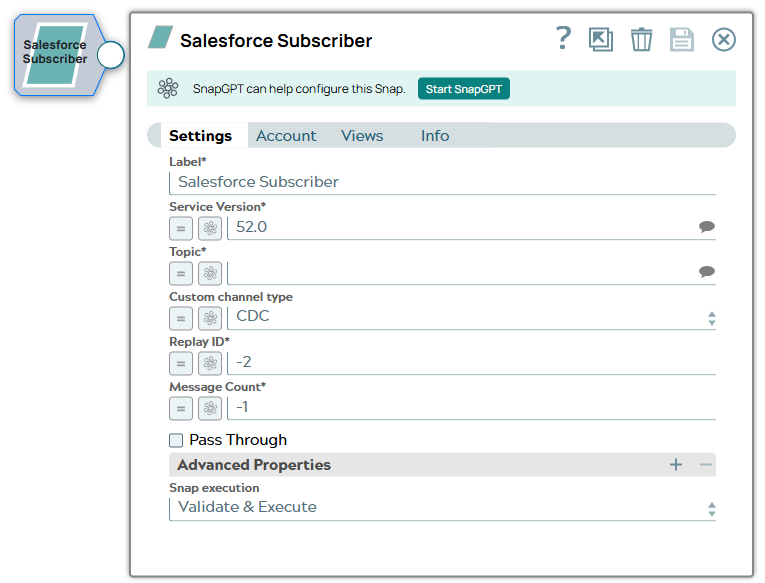
| Field/Field set | Description |
|---|---|
Label
String |
Required. Specify the name for the Snap. You can modify this to be more specific, especially if you have more than one of the same Snap in your pipeline. Default value: Salesforce Subscriber Example: Salesforce Subscriber |
Service Version
String/Expression |
Required. Specify the version number of the Salesforce service that you want to connect to. Note: Salesforce platform event is supported in version 44.0 or later.
Default value: 52.0 Example: 52.0 |
Topic
String/Expression |
Required. Specify the topic (Salesforce Platform event, CDC event, or custom channel) to subscribe to. This is a suggestible field that lists the Platform Events and CDC events available to you. You can select the name from the suggested list. The supported Salesforce events are:
Custom channel names are case-sensitive. Default value: N/A Example: Printer_Event__e, AccountChangeEvent |
Custom channel type
Dropdown list |
Choose a custom channel type - Event (for events) or CDC (for data) if the chosen topic is a custom channel that ends with Custom channel type values are case-sensitive. Default value: CDC Example: Event |
Replay ID
Integer/Expression |
Required. Specify the position of an event in the event stream. The Snap supports the following IDs:
If you stop a Pipeline execution, the Replay ID is lost and the Snap restarts from the position you input here. Note: The Snap automatically sets the Replay ID value to -2 when:
Default value: -2 Example: 20 |
Message Count
Integer/Expression |
Required. Specify the number of messages required to read and complete the Pipeline execution. Note: If the value is set to -1, the Snap waits indefinitely and reads messages whenever available until you manually stop the pipeline execution.
Default value: -1 Example: 2 |
Pass Through
Checkbox |
Select this checkbox to pass the input document to the output view under the key If you deselect this checkbox, the input document will not be passed and there is no Default value: Deselected |
| Advanced Properties | Use this fieldset to configure Http Long Polling. |
Properties
String |
Specify the property or select from the suggestion list. Default value: N/A Example: maxNetworkDelay, maxMessageSize |
Values
String |
Specify the value for the property. Default value: N/A Example: 50000 |
Snap execution
Dropdown list |
Choose one of the three modes in
which the Snap executes. Available options are:
|
Troubleshooting
| Error | Cause | Resolution |
|---|---|---|
| 403::Handshake denied; 401::Request requires authentication | Client is not authorized to access the server due to either a domain mismatch or authentication failure. | Configure the Enhanced Domain in the Instance URL property to ensure authentication for successful access to the server. |
| Unable to subscribe to topic <channel name>. Reason: 400::The channel specified is not valid | The Topic value does not exactly match the full name of the custom channel. | Check the spelling of the provided channel, including the matching case, and ensure it ends with __chn. |
| Unable to subscribe to topic <channel name>. Reason: 400::The channel specified is not valid | Incorrect Custom channel type is selected. | Select the appropriate channel type from the list - CDC for custom channels of type 'data' and Event for custom channels of type 'event.' |